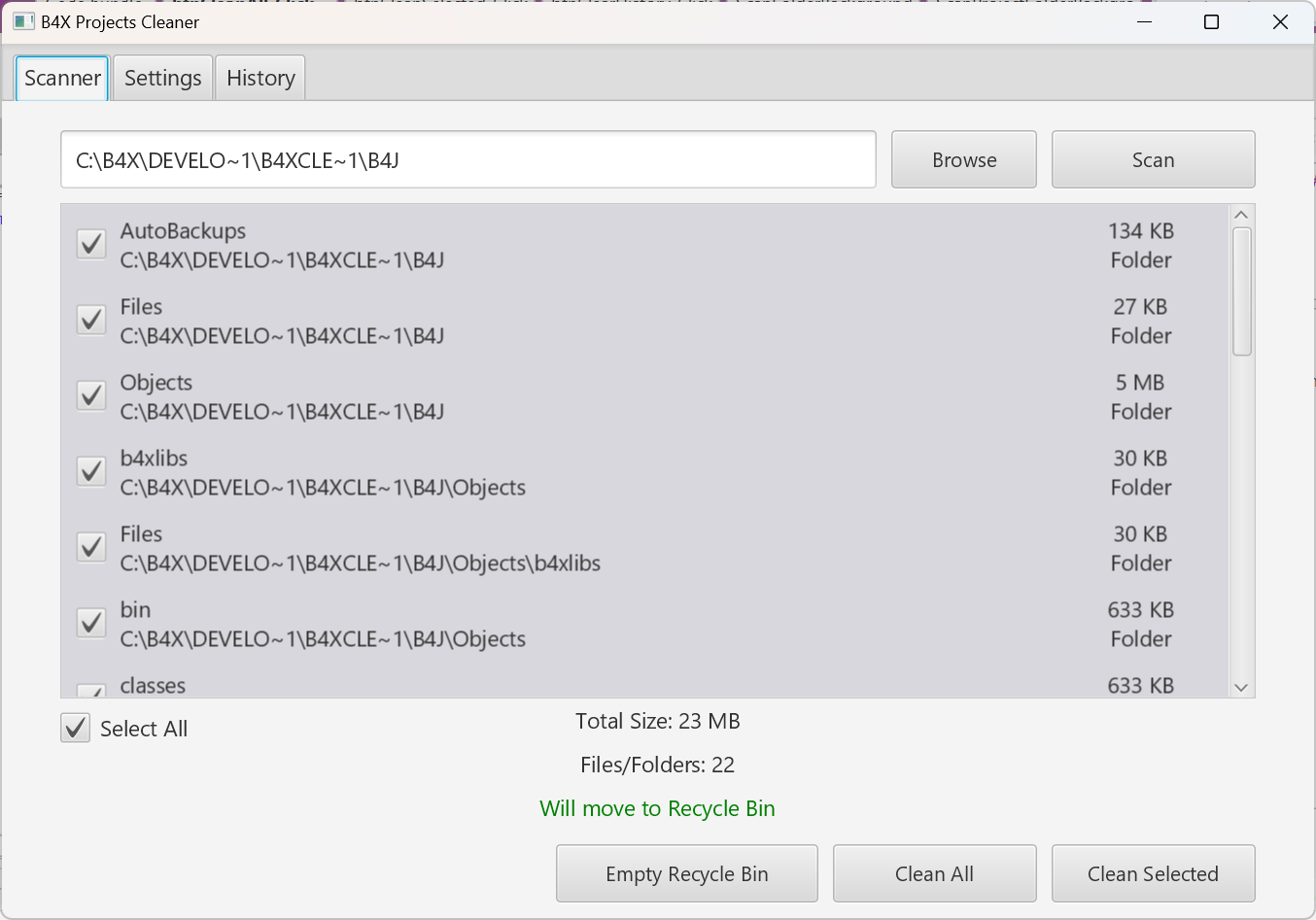
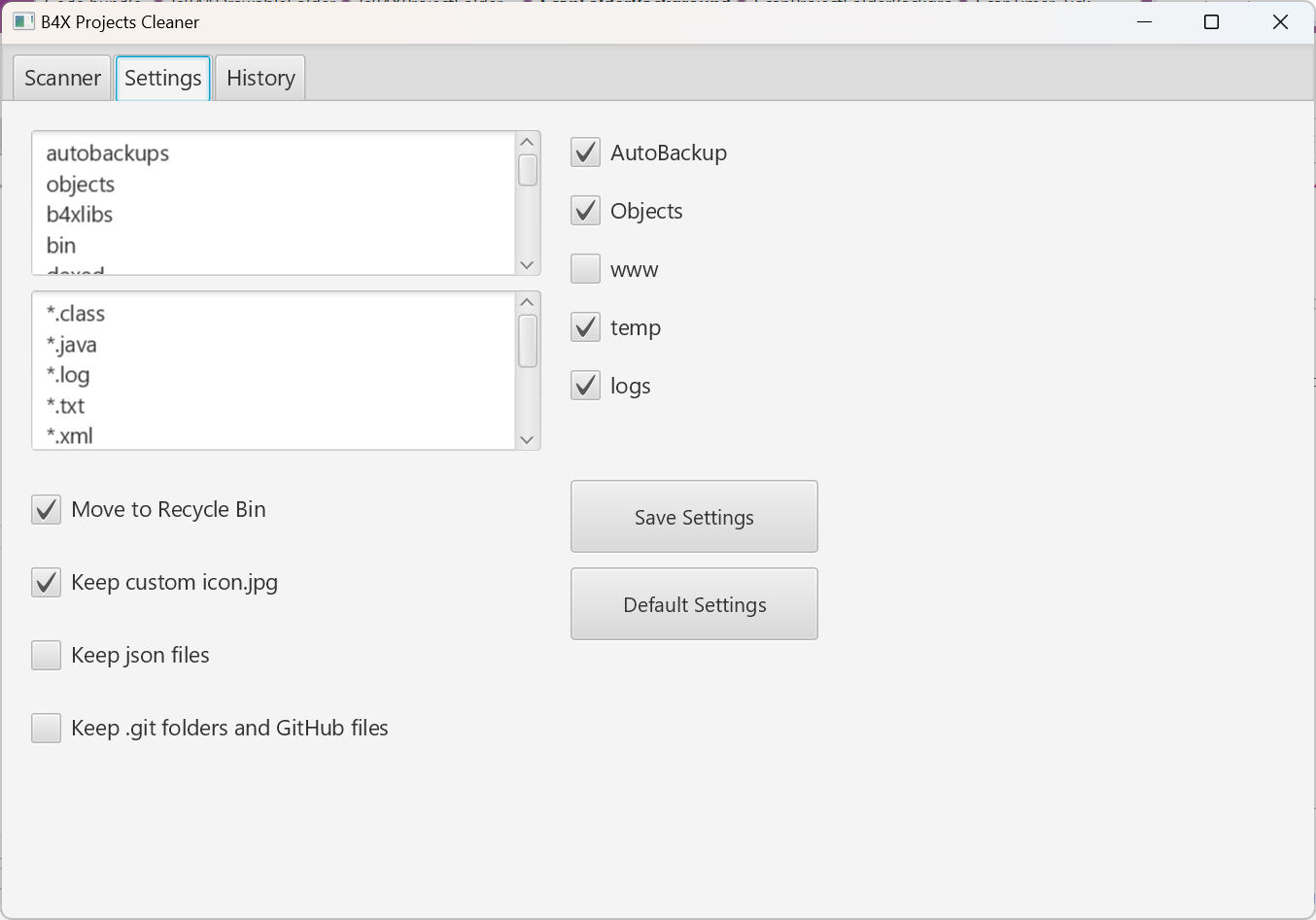
Share My Creation B4X Project Cleaner (Alpha)

B4X Projects Cleaner
Description:
Delete files and Objects folder (created during Debug compilation) by bulk before backup/transfer to another device to save diskspace.
Initial operation is already working but need to fine tune and do more testings.
This tool may save you 10GBs and more.

NOTE:
This project is in early development stage.
Please use this project with caution.
Ensure to make backups of your project folders!
I am not responsible if you accidentally deleted your important projects.

GitHub: https://github.com/pyhoon/B4X-Project-Cleaner

P/S: This is a continual from this discussion

1768245941713-png.169343
1768221868328-png.169330
 

Attachments

  • B4XCleaner.zip
    18.1 KB · Views: 22
Last edited:

Magma

Expert
Licensed User
Longtime User
B4X Projects Cleaner
Description:
Delete files and Objects folder (created during Debug compilation) by bulk before backup/transfer to another device to save diskspace.
Initial operation is already working but need to fine tune and do more testings.
This tool may save you 10GBs and more.

NOTE:
This project is in early development stage.
Please use this project with caution.
Ensure to make backups of your project folders!
I am not responsible if you accidentally deleted your important projects.

GitHub: https://github.com/pyhoon/B4X-Project-Cleaner

P/S: This is a continual from this discussion
Ok, two things...

First, the "general idea" is excellent... could be an excellent tool cleanining Temps for Windows PCs targetting c:\windows\temp, c:\programdata\temp, c:\users\user\appdata\local\temp /roaming\temp ... windows update temp files and may be internet files after asking

Second, "it is too" risky for a Developer using tools like that... cleaning projects automatically (just my thought)


From the other hand is another "super-excellent" project by aeric
 

aeric

Expert
Licensed User
Longtime User
Ok, two things...

First, the "general idea" is excellent... could be an excellent tool cleanining Temps for Windows PCs targetting c:\windows\temp, c:\programdata\temp, c:\users\user\appdata\local\temp /roaming\temp ... windows update temp files and may be internet files after asking

Second, "it is too" risky for a Developer using tools like that... cleaning projects automatically (just my thought)


From the other hand is another "super-excellent" project by aeric
My idea is not to delete Windows system temp folders.

This idea came out when I was having my laptop keyboard spoilt last 2 weeks. I can't work.
I plan to backup my B4X projects and transfer to another backup laptop temporarily so I can continue to work.
I organized my B4X projects in C:\B4X\Development but the total file size is very big.

Transferring the unused files inside Objects folder seems stupid to me.

I have use the tool (WinDirStat) recommended by Erel
I tried to delete the Objects folder one by one.
I wish I am expert in Python scripting to automate such a boring task.

I feel frustrated by the time wasted in my life.
As a programmer, I think I should take a hard route only once and for all.

Yes, I can follow the lazy way. Do nothing. Just copy and paste the entire Development folder to my external harddisk using USB3 cable.
I know I have experienced before when the files copy operation failed in 95% completion and I don't want to take a risk.
I can blame Windows 11 or the USB cable, but there is no use.
I need to repeat the step again. Either delete all the copied files and copy again or just ignore the files that I didn't manage to copy.
I have to figure out which sub-folders are already copied, which are not. But how?
I don't know how many people have the same experience.

I have many projects having multiple copies of the same files. e.g bootstrap asset files inside www folder of web api server templates.
I feel stupid to see the same redundant files being copied again and again.

Deja vu? This has happened before and will happen again in the future.

I think the results of this tool will be very satisfying if first I see originally 50GB of project folders has now shrinked to like 5GB only.
 

aeric

Expert
Licensed User
Longtime User
Second, "it is too" risky for a Developer using tools like that... cleaning projects automatically (just my thought)
That's why I have stated to use it on own risk and very clear of what you are doing.
I emphasize a stress test is needed to be done when developing this tool.

When using this tool, a user can select smaller batch of folders to do the operation and proceed to another batch when completed.

For example,
1. Select first 5 folders from C:\B4X\Projects and duplicate them to a temporary folder such as C:\B4X\CleanBatch.
2. Apply the cleaning to the folder CleanBatch.
3. Verify the files and subfolders in CleanBatch after the operation.
Tip: Use WinDirStat for a treeview explorer to easily check the files.
4. If everything is fine, move the subfolders in CleanBatch to external harddisk.
5. (Optional) Delete the 5 folders in Projects folder.
6. Rinse and Repeat until all folders are cleaned.

If you are feeling comfortable or confident with 5 folders, you can take higher risk to select 10 folders.
 
Last edited:

Magma

Expert
Licensed User
Longtime User
My idea is not to delete Windows system temp folders.

This idea came out when I was having my laptop keyboard spoilt last 2 weeks. I can't work.
I plan to backup my B4X projects and transfer to another backup laptop temporarily so I can continue to work.
I organized my B4X projects in C:\B4X\Development but the total file size is very big.

Transferring the unused files inside Objects folder seems stupid to me.

I have use the tool (WinDirStat) recommended by Erel
I tried to delete the Objects folder one by one.
I wish I am expert in Python scripting to automate such a boring task.

I feel frustrated by the time wasted in my life.
As a programmer, I think I should take a hard route only once and for all.

Yes, I can follow the lazy way. Do nothing. Just copy and paste the entire Development folder to my external harddisk using USB3 cable.
I know I have experienced before when the files copy operation failed in 95% completion and I don't want to take a risk.
I can blame Windows 11 or the USB cable, but there is no use.
I need to repeat the step again. Either delete all the copied files and copy again or just ignore the files that I didn't manage to copy.
I have to figure out which sub-folders are already copied, which are not. But how?
I don't know how many people have the same experience.

I have many projects having multiple copies of the same files. e.g bootstrap asset files inside www folder of web api server templates.
I feel stupid to see the same redundant files being copied again and again.

Deja vu? This has happened before and will happen again in the future.

I think the results of this tool will be very satisfying if first I see originally 50GB of project folders has now shrinked to like 5GB only.
I understand the reason of the Tool... but put yourself at a different Developer position... that will have to use (or not) the tool... probably will not... only if he had the code...

The reason told for "Temp Windows Files" is because is a general thing... that not targetting devs folders...

I am talking just for the success of the utility / nothing more...

From the other hand as i said is a super-tool

how about using templates with prefs of user... ?
This is not making exclusive only for B4X Projects but for "anything" - that user want to automatically clean / perhaps also temp files... will be a General Cleaner With Templates...
For example i want to keep also ini files, sqlite and logs that may be named in different folders in objects everytime...
 

aeric

Expert
Licensed User
Longtime User
I understand the reason of the Tool... but put yourself at a different Developer position... that will have to use (or not) the tool... probably will not... only if he had the code...

The reason told for "Temp Windows Files" is because is a general thing... that not targetting devs folders...

I am talking just for the success of the utility / nothing more...

From the other hand as i said is a super-tool

how about using templates with prefs of user... ?
This is not making exclusive only for B4X Projects but for "anything" - that user want to automatically clean / perhaps also temp files... will be a General Cleaner With Templates...
For example i want to keep also ini files, sqlite and logs that may be named in different folders in objects everytime...
Yes, you can modify a project to suit to your needs.
I just create a tool for my use case.

Edit: I think there is a software called CCleaner in the market already to clean up Temp folders or just use Windows Disk Cleanup tool.
1768290450764.png


Personally I won't touch Windows system files even it is the temp folder.
Windows 11 is quite fragile nowadays.
Recently, my Windows taskbar icons freezed and all iconized Windows cannot be maximized again.
I can't confirm what happened but I suspected memory leak or conflict between IDE, VS Code, SQLite DB Browser or Chrome browser.
I tried to restart Windows Explorer in Task Manager and the OS goes hairwire.
Luckily I get back the Windows from start up rescue.
 
Last edited:

aeric

Expert
Licensed User
Longtime User
I can say B4A and B4i objects folders are not really dangerous like B4J which saves www, and other files especially when you are doing web projects.

For B4A, B4i, mostly compiled APK,IPA, zip and Dex files
Ya.
For B4A, I also prefer to keep my custom icon.png

For all platforms, at one time, I decided not to keep all AutoBackup zip files but maybe at another time, I want to keep them all.
 

Magma

Expert
Licensed User
Longtime User
Ya.
For B4A, I also prefer to keep my custom icon.png

For all platforms, at one time, I decided not to keep all AutoBackup zip files but maybe at another time, I want to keep them all.
autobackup saved me.... 100 times !
 

aeric

Expert
Licensed User
Longtime User
autobackup saved me.... 100 times !
Yes but when I try out example projects or answering questions by the members, the Autobackup folder builds up and taking up space too.
I wished I have separated my own main projects folder from the examples but I didn't manage to get out from this habit. 🥲
 

aeric

Expert
Licensed User
Longtime User
Another bad habit is keeping some important files such as old layouts, asset files, config files, innosetup, text files inside AutoBackup folder.
Worse, I have another Autobackup and Objects folders inside Autobackup folder. 😆
 
Top