I don't know if it's a bug or I'm using it the wrong way.
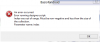
As soon as I use ActivitySize in my Designer Scripts and push Run Script (F5) to check it on device, I get "Error running Designer Script. Index was out of range." I'm on B4A 2.3.
P.S. I don't get any errors when running the actual app loading that layout. That only happens when I connect to B4A Designer and try to preview the layout.
As a side note - in my emulators I don't get Back button if the screen width is smaller than 601, so I have to use the Escape key on my keyboard to close out of any app. In B4A Designer the key is blocked and just pops Theme options. There is no way out of B4A if you want to go back to another app running on the same emulator. (May be there is, but I couldn't find it)
As soon as I use ActivitySize in my Designer Scripts and push Run Script (F5) to check it on device, I get "Error running Designer Script. Index was out of range." I'm on B4A 2.3.
B4X:
'this is the part that creates the error
If ActivitySize > 6 Then
   'do something
End If
P.S. I don't get any errors when running the actual app loading that layout. That only happens when I connect to B4A Designer and try to preview the layout.
As a side note - in my emulators I don't get Back button if the screen width is smaller than 601, so I have to use the Escape key on my keyboard to close out of any app. In B4A Designer the key is blocked and just pops Theme options. There is no way out of B4A if you want to go back to another app running on the same emulator. (May be there is, but I couldn't find it)