Android Question How to launch app in work profile?

plager

Member
Hello community,
simple question:
how can I launch an app installed in work profile from my app installed in normal profile?

A bit larger explanation:
I have an revolut app installed in work profile. I want to launch it from within my app, which is installed in normal profile.
How can I do that?

Background:
It works somehow. I use a Square Home Launcher. When I created a shortcut for revolut, in json file it is like that:
{"T":0,"c":"com.revolut.revolut\/com.revolut.ui.login.pin.LoginActivity:10"}
not sure about T, but:
- com.revolut.revolut is a package of revolut app.
- com.revolut.ui.login.pin.LoginActivity is an activity which is launched at startup of a revolut app. There is no Main activity, or something like that
- double dot 10 ( :10 ) means it is installed in work profile (normal profile has ID:1. This is not mentioned if app is launched from normal (user) profile)

So, how can i launch this app (installed in work profile)?
Many thanks.
P.
(Using Samsung Flip 7 FE, A16, if it helps)
 

plager

Member
Hi Erel,
thank you for the answer.
Output of that piece of code is:
(Intent) Not initialized

I already tried this:
B4X:
Dim intent1 As Intent
Dim pm As PackageManager

intent1 = pm.GetApplicationIntent(app_package)

Log(intent1)
Log(intent1.IsInitialized)

If intent1.IsInitialized Then
    StartActivity(intent1)
    Return "OK"
Else
    Return "Intent is not initialized: " & app_package
End If
It was intent not initialized.

I added a relevant permissions into manifest:
B4X:
AddPermission("android.permission.INTERACT_ACROSS_PROFILES")
AddPermission("android.permission.QUERY_ALL_PACKAGES")
AddPermission("android.permission.INTERACT_ACROSS_USERS")

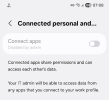
A also tried this to get a permission window. I got it, but checkbox is disabled.

B4X:
Sub GetWorkProfilePermissions As Boolean
    Dim JO As JavaObject
    Dim manager As JavaObject
    Dim canInteract As Boolean

    JO.InitializeContext
    manager = JO.RunMethodJO("getSystemService", Array("crossprofileapps"))

    canInteract = manager.RunMethod("canInteractAcrossProfiles", Null)
    If canInteract = False Then
        If manager.RunMethod("canRequestInteractAcrossProfiles", Null) Then
            ' Create the system settings intent to ask for permission
            Dim settingsIntent As Intent
            Dim JOIntent As JavaObject = manager.RunMethod("createRequestInteractAcrossProfilesIntent", Null)
            settingsIntent = JOIntent
            StartActivity(settingsIntent)
            ' After user grants permission, your app receives a broadcast; you may need to wait.
            Return False
        Else
            Log("Cannot request cross‑profile permission.")

            Return False
        End If
    End If

End Sub

That default message on that screenshot about IT admin it not right, as I am the admin and work profile is created by me, via Shelter.
 

Attachments

  • settings.png
    settings.png
    59.6 KB · Views: 55
Upvote 0

Peter Simpson

Expert
Licensed User
Longtime User
Probably 100% incorrect, but try this.

Code:
Dim i As Intent
    i.Initialize(i.ACTION_MAIN, "")
    i.SetComponent("com.revolut.revolut/com.revolut.ui.login.pin.LoginActivity")
StartActivity(i)

Probably will not work though...
 
Upvote 0

plager

Member
@Peter Simpson
No, I tried that. It throws this error:
android.content.ActivityNotFoundException: Unable to find explicit activity class {com.revolut.revolut/com.revolut.ui.login.pin.LoginActivity}; have you declared this activity in your AndroidManifest.xml, or does your intent not match its declared <intent-filter>?

Not sure, if because it is in work profile, or activity being not Main.
 
Last edited:
Upvote 0

Jmu5667

Well-Known Member
Licensed User
Longtime User
You cannot launch an app inside a Work Profile from an app in the Personal Profile unless the OS grants your app INTERACT_ACROSS_PROFILES, and on non‑enterprise devices (including Shelter‑created profiles), that permission is always denied. This is why every method in the thread fails — not because of B4A, not because of the intent, but because Android blocks it at the framework level. - (co-pilot)
 
Upvote 0

plager

Member
"... and on non‑enterprise devices (including Shelter‑created profiles), that permission is always denied."
I have to disagree. When I create a shortcut (on home screen, my launcher is Square Home) to an app installed in work profile, it works (mentioned in the first post). So it is NOT always denied. Besides, I included a relevant permissions to my app's manifest - see my post (third post)
btw, copilot sucks. I tried it a few times, and it is worst of any llm chatbots around (my opinion, no offense, please)
 
Upvote 0

plager

Member
Getting deeper into it.

This procedure can correctly get all profiles IDs:
B4X:
Sub GetProfiles
    Dim JO As JavaObject
    JO.InitializeContext

    ' 1. Check how many profiles exist
    Dim userManager As JavaObject = JO.RunMethodJO("getSystemService", Array("user"))
    Dim profiles As List = userManager.RunMethod("getUserProfiles", Null)   ' List<UserHandle>
    If profiles.Size < 2 Then
        Log("No second profile found.")
        Return
    End If

    ' 2. Get current user handle using UserHandle.myUserId()
    Dim currentUserId As Int
    Dim JOUserHandle As JavaObject
    JOUserHandle.InitializeStatic("android.os.UserHandle")
    currentUserId = JOUserHandle.RunMethod("myUserId", Null)
    Log("Current User ID: '" & currentUserId & "'")

    ' 3. List all found profiles
    For i = 0 To profiles.Size - 1
        Dim profile As JavaObject = profiles.Get(i)
        Dim profileId As Int = profile.RunMethod("getIdentifier", Null)
        Log("Found this profile ID: '" & profileId & "'")
    Next

End Sub

App has these permissions:
B4X:
AddPermission("android.permission.INTERACT_ACROSS_PROFILES")
AddPermission("android.permission.QUERY_ALL_PACKAGES")
AddPermission("android.permission.INTERACT_ACROSS_USERS")
AddPermission("android.permission.INTERACT_ACROSS_USERS_FULL")

However, I still don't know how to start an app in work profile. I even built a simple app with receiver and service, with same permissions, and installed it in work profile.
I tried to start it as an intent, as an activity, as a receiver, as a service. No luck at all. Receiver never hits, neither a service started form receiver. App in work profile just won't start. App from normal profile just don't see an app in work profile in any circumstances.
Struggling with this for about three days since. Anybody around to help with any clue?
 
Upvote 0
Top