B4J Question Library issue, B4J

margret

Well-Known Member
Licensed User
Longtime User
I have the code listed below. I am using B4J 1.06 and wrote this small sample to try my database library. It crashes at the mdb.Initialize(Me). This library uses no UI elements. I thought that the B4A libraries should work if they did not use UI elements. Any help would be great.

B4X:
Sub Process_Globals
     Privatefx As JFX
     PrivateMainForm As Form
     Privateclose As Button
     Privatemdb As DataBase
End Sub
 
Sub AppStart (Form1 AsForm, Args() AsString)
     mdb.Initialize(Me)
     MainForm = Form1
     MainForm.RootPane.LoadLayout("layout1")
     MainForm.Show
     If File.Exists(File.DirApp, "test.dat") = False Then
          createDB
     EndIf
End Sub
 
Sub close_MouseClicked (EventData AsMouseEvent)
     Log("Closing & Saving Data...")
     mdb.PutField("name", "Margret")
     mdb.PutField("phone", "999-8989")
     mdb.AddRecord
     'ExitApplication
End Sub
 
Sub createDB
     mdb.CreateDataBase(0, "test.dat", File.DirApp , ArrayAsString("name", "phone"))
End Sub
 
Last edited:

margret

Well-Known Member
Licensed User
Longtime User
Ok, found the issues. Had to re-write the library. I don't know if there are solutions for this but it would really help if there were. Some commands that I have found missing and needed are listed below. There may be a Library I don't know about that replaces these. If so, I would love to see a link. I am just starting out with B4J as of yesterday.

InputList
DoEvents
ProgressDialogShow
ProgressDialogHide
MsgBox
ToastMessageShow
DialogResponse
 
Upvote 0

agraham

Expert
Licensed User
Longtime User
Ok, our posts seemed to have crossed.

Msgbox and DialogResponse equivalents are in my jMsboxes library :
http://www.b4x.com/android/forum/threads/msgbox-library.34700/

Toast message :
http://www.b4x.com/android/forum/threads/toastmessageshow-library.36086/

DoEvents
Not available. You would have to do stuff in a Timer or on a Thread depending upon what you need.

ProgressDialogShow and ProgressDialogHide
There's a ProgressIndicator in the jFX library but I haven't used it myself.

InputList
I don't think there is an equivalent - but I'm not really up to speed on B4J UI stuff.
 
Upvote 0

margret

Well-Known Member
Licensed User
Longtime User
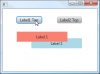
Thanks for this information. I will use them! I just hit another issue you might know the answer to. I have two buttons, one on top of the other. In code I wish to bring one or the other to the front. I do not see any option like .BringToFront. I see Enable, etc. but no bringtofront option. Am I over looking it.
 
Upvote 0

dilettante

Active Member
Licensed User
Longtime User
Or maybe...

B4X:
Sub Process_Globals
    Private fx As JFX
    Private MainForm As Form
    Private lbl1 As Label
    Private lbl2 As Label
    Private btnLabel1Top As Button
    Private btnLabel2Top As Button
End Sub
 
Sub AppStart (Form1 As Form, Args() As String)
    MainForm = Form1
    MainForm.RootPane.LoadLayout("Layout1")
    MainForm.Show
End Sub
 
Sub btnLabel1Top_Action
    Dim jo As JavaObject = lbl1
    jo.RunMethod("toFront", Null)
End Sub
 
Sub btnLabel2Top_Action
    Dim jo As JavaObject = lbl2
    jo.RunMethod("toFront", Null)
End Sub

Ok, I see you were not after Z-Order control after all.
 

Attachments

  • sshot.png
    sshot.png
    9.5 KB · Views: 375
Upvote 0

Theera

Expert
Licensed User
Longtime User
Hi Margret,
I'm glad to see your post in B4J forum,I look forward for your StringFunction library version B4J. It's useful for me. Thank you in advance.
 
Upvote 0

margret

Well-Known Member
Licensed User
Longtime User
Upvote 0
Top