
Android Question SOLVED Firebase issue for nougat 7 huawey phone. Google framework was disabled.

tigrot

Well-Known Member
Licensed User
Longtime User
Hi everybody
I have an app which polls another smartphone via firebase messaging. If poll is made via wi_fi it's ok. If android 7 is on 4g the app doesn't work. If it's on wi--fi and the counterpart on 4g it's ok.
Anybody knows the reason?
 

tigrot

Well-Known Member
Licensed User
Longtime User
I have stored the key on a db. I use phone # to access it then use to contact the counterpart. The app worked for 10 months in beta on Google store and was tested on all possible Os's on wi-fi and 4g 3g.
 
Last edited:
Upvote 0

tigrot

Well-Known Member
Licensed User
Longtime User
Not exactly. I have two roles in this App: server and client. They are present at the same time. The client asks the server its position and it answers with coordinates.
What I see is that the server receives the poll request and answers, but the client doesn't receive the answer. I use the passed key to answer. This happens only if the Android 7 side is on G4/G3. If it's on Wi-Fi everything is ok.
I have read somewhere that A7 is sometimes faulty with Firebase Messaging Key.
 
Upvote 0

KMatle

Expert
Licensed User
Longtime User
Yep, Android 7. Will try a restart. Usually the service is re-started if necessary. Do you get any messages when SENDING a message to the device? (e.g. "not registered"). Are you REALLY sure that the app/your device has the correct settings in the Huawei energy saving menu? Will upload a small demo project with you can try with (B4A/B4J).
 
Upvote 0

KMatle

Expert
Licensed User
Longtime User
I did a test with the app's attached. All working fine even after a restart (without any "start at boot" option or others).

1. Edit the B4A app (just copy the google-services.json file to the folder) and start it (check that the energy setting "stop app when screen is turned off" is set to OFF. As it seems Huawei has learned from that because on my new one it is set to OFF, on my P8 it was automatically set to ON for unknown apps. Even WhatsApp was stopped and the Google calendar did not update until Huawei brought an update).

2. Copy the device's token (see the log) to the B4J app and enter your server key (see the FCM console of your app)

Take a look at error messages. Of course it's a simple example which doesn't store the token to a database. Just for a quick test.
 

Attachments

  • B4J_App.zip
    2.8 KB · Views: 232
  • B4A_App.zip
    30.6 KB · Views: 252
Upvote 0

DonManfred

Expert
Licensed User
Longtime User
just copy the google-services.json file to the folder
Sidenote:
AND change the packagename to the app defined in the json file you downloaded from Firebase.

Or not?
 
Upvote 0

tigrot

Well-Known Member
Licensed User
Longtime User
I have a sort of timeout when receiving from server. As a poll scheme i send a request and wait for delivery for a two minutes or so. In the meanwhile i send a poll every 30". I don't care for multiple answers because they are real time coordinates.
 
Upvote 0

tigrot

Well-Known Member
Licensed User
Longtime User
Seems:this is not the solution to me: read the next post for my real solution

It's a known issue for Honor 6X
Here is solution:
This is for EMUI 5 (Android 7).

Solution: (credits to @Mammuth1)
https://forum.xda-developers.com/sho...&postcount=112

The final solution for Honor 6x BLN-AL40 (Android 7.0 EMUI 5.0):
1. Clean start: reinstall stock ROM over eRecovery
2. Install Google Installer (same here)
3. Install GMS Core
4. Restart
smile.gif
 
Last edited:
Upvote 0

tigrot

Well-Known Member
Licensed User
Longtime User
Google framework was disabled for mobile network. I spent 1 hour in chat to explain an agent what is Google Firebase and i were defeated by her :(. No way to explain. Then i started to search for a logical setting about this issue.
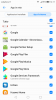
I include the setting for this use.
Happy week-end
Mauro.
 

Attachments

  • Screenshot_20180106-141724.png
    Screenshot_20180106-141724.png
    178.1 KB · Views: 321
Upvote 0
Top