
Text Box Text not aligning correctly

bishmedia

Member
Licensed User
Longtime User
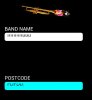
Text aligns fine on my Nexus but on the samsung s3 its cut off at the top as p[er picture below.

What am i doing wrong??

B4X:
   txtContactName.Initialize("txtContactName")
   txtContactName.TextSize = 20
   txtContactName.TextColor = Colors.Black
   txtContactName.Gravity = Gravity.LEFT + Gravity.BOTTOM
   txtContactName.Text = ""
   txtContactName.Background=cd
   Activity.AddView(txtContactName, 5%x, 20%y, 85%x, 5%y)
 

Attachments

  • Screenshot_2013-04-15-18-09-34.jpg
    Screenshot_2013-04-15-18-09-34.jpg
    27.1 KB · Views: 254

NJDude

Expert
Licensed User
Longtime User
You are using percentage for the height, on a small screen the proportional size might be too small to accommodate that big font size, you might need to put a fixed size in DIP.

Also, this is the right way to use multiple gravities:
B4X:
txtContactName.Gravity = Bit.Or(Gravity.LEFT, Gravity.BOTTOM)
 
Last edited:
Upvote 0
Top