welu1805 Active Member Licensed User Longtime User Nov 8, 2016 #1 Hi all, I installed B4A 6.31 and can't find the combobox with the recent search key words in the Find / Replace Dialog. Am I to stupid? Lutz
Hi all, I installed B4A 6.31 and can't find the combobox with the recent search key words in the Find / Replace Dialog. Am I to stupid? Lutz
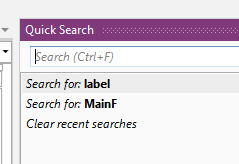
Erel B4X founder Staff member Licensed User Longtime User Nov 8, 2016 #2 It is available here: Items are added in two cases: - Select text in the code editor and click on Ctrl + F - Search for a term and click on enter (or on any other item). The recent searches list appears when the search field is empty. Upvote 0
It is available here: Items are added in two cases: - Select text in the code editor and click on Ctrl + F - Search for a term and click on enter (or on any other item). The recent searches list appears when the search field is empty.
eurojam Well-Known Member Licensed User Longtime User Nov 8, 2016 #3 If you search with quicksearch (CRTL F) you have the list below the search item.... Upvote 0
welu1805 Active Member Licensed User Longtime User Nov 9, 2016 #4 Thankx. I never used Quick Search ... Upvote 0