Add panel in dependence on parents size

jinxaw

Member
Licensed User
Longtime User
Hey everybody,

Maybe i'm doing something wrong but if i add a panel to a panel which is added to an activity (see code below) the the width of the "proddetailpnl" on a full HD tablet is still ~1920.

B4X:
Dim miniinfopnl As Panel
miniinfopnl.Initialize("miniinfopnl")
Activity.AddView(miniinfopnl, 10%x, 5%y, 20%x, 60%y)
proddetail.Initialize("proddetail")
miniinfopnl.AddView(proddetail, 0, 0, 100%x, 90%y)

Maybe someone can explain to me what i am doing wrong.:BangHead:

Best regards,
Daniel
 

Erel

B4X founder
Staff member
Licensed User
Longtime User
%x / %y in the code are always related to the activity size.

You should change your code to:
B4X:
miniinfopnl.AddView(proddetail, 0, 0, miniinfopnl.Width, 90 / 100 * miniinfopnl.Height)

It would be simpler if you use a layout file. In that case you can load the layout file to the panel and %x / %y in the designer script will be related to the panel.
 
Upvote 0

jinxaw

Member
Licensed User
Longtime User
I've done some testing.
Now i'm even more confused...

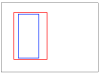
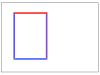
The black box is the tablet display. The red box is miniinfopnl and the blue box is proddetail. Both are panels.

In image 1 the red box is added as following:
B4X:
Activity.AddView(miniinfopnl, 9%x, 4%y, 31%x, 71%y)
miniinfopnl.AddView(proddetail, 5%x, 1%y, 20%x, 98%y)

In image 2:
B4X:
Activity.AddView(miniinfopnl, 9%x, 4%y, 31%x, 71%y)
miniinfopnl.AddView(proddetail, 1%x, 1%y, 30%x, 98%y)

So in conclusion the LEFT attribute is bound to miniinfopnl but the WIDTH attribute is not. It's calculated based on the display width.

Am i wrong? Am i missing something??
PS: The HEIGHT in my images is not representative...

Best regards,
Daniel
 

Attachments

  • ex1.png
    ex1.png
    5.7 KB · Views: 275
  • ex2.png
    ex2.png
    6.3 KB · Views: 286
Upvote 0

jinxaw

Member
Licensed User
Longtime User
Can someone explain it to me, please?
Pretty please! :sign0163:

Someone..., Anyone..., Bueller, Bueller?
 
Upvote 0

devlei

Active Member
Licensed User
Longtime User
As Erel suggested in post #2, use a layout file.

Alternatively, I have found the 'Designer Scripts' to be the best way to sort such issues out, because you can immediately check via the UI cloud what it will look like on a variety of devices. You then set all views relative to others, which makes things much easier. See the Designer Scripts tutorial here: http://www.b4x.com/forum/basic4andr...2522-designer-scripts-autoscale-tutorial.html

Dave
 
Upvote 0

jinxaw

Member
Licensed User
Longtime User
I get, that i should do it that way.

I'm just really curious why B4A behaves that way. It would make perfect sense for me if i add a view or whatever to a panel and the percent values are relative to the parent.

Best regards,
Daniel
 
Upvote 0
Top