B4A Class AdsHelper Extension for Traditional B4A apps & more

I wanted to share an update I made to the AdsHelper class and example.

Added:
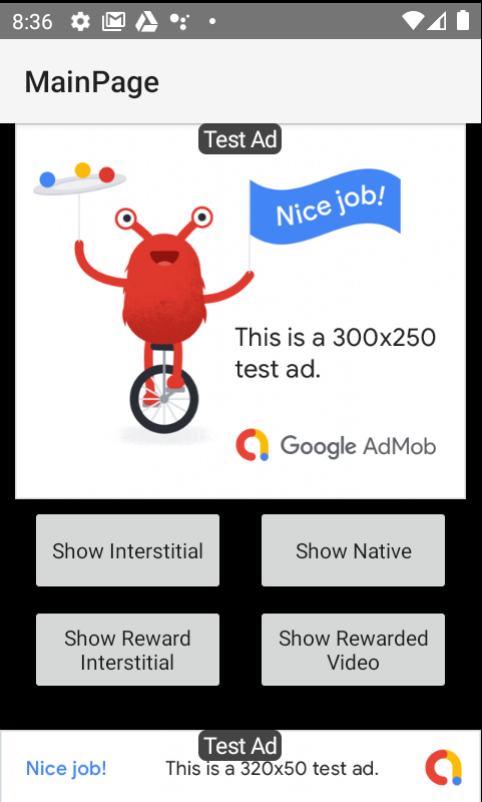
  • support for rewarded video ads
  • events for rewarded video
  • events for rewarded interstitial
  • events for open ads
  • added parameter for open ads for setting the background delay before allowing the ad to show
  • incorporated native ad example and moved the code into a separate class
  • example of a fixed size banner ad (300x250)
  • support for traditional B4A apps

Modified:
  • code reorganized to make it more readable and easier to follow
1624136473910.png
 

Attachments

  • ActivityAdExample.zip
    19.4 KB · Views: 1,071
  • B4XPagesMobileAds.zip
    18.8 KB · Views: 1,018

Sofian

Member
Hi, I try example ads. for activity ads its working fine, and for B4xpage ads its not show any ads.
error log :
error log:
Failed to load RewardedInterstitialAd: {
  "Code": 3,
    "Message": "No ad config.",
     "Domain": "com.google.android.gms.ads",
     "Cause": "null",
    "Response Info": {
    "Response ID": "null",
    "Mediation Adapter Class Name": "",
    "Adapter Responses": []
    }
}
all the same error code: 3 with other ads
 

Sofian

Member
Hi, I try example ads. for activity ads its working fine, and for B4xpage ads its not show any ads.
error log :
error log:
Failed to load RewardedInterstitialAd: {
  "Code": 3,
    "Message": "No ad config.",
     "Domain": "com.google.android.gms.ads",
     "Cause": "null",
    "Response Info": {
    "Response ID": "null",
    "Mediation Adapter Class Name": "",
    "Adapter Responses": []
    }
}
all the same error code: 3 with other ads
I thinks after update B4A.exe to 11.80(64bit) , befote is 11.50 (32bit)
already copy resources_06_21.zip files and commandlinetools-win-6609375_latest.zip and exctract it . My other apps stop showing ads after this with same error
 

Filippo

Expert
Licensed User
Longtime User
Hi,

when executing the procedure "getConsentType" always comes this crash-message.
Is this an bug or is this normal?

B4X:
'Returns one of the following values: NON_PERSONALIZED, PERSONALIZED, UNKNOWN
Public Sub GetConsentType As String
    Dim statuses As Map = CreateMap(1: "NON_PERSONALIZED", 2: "PERSONALIZED", 0: "UNKNOWN")
    Dim status As Int = ConsentInformation.RunMethod("getConsentType", Null)
    Return statuses.GetDefault(status, "UNKNOWN")
End Sub

Crash message:
Error occurred on line: 68 (AdsHelper)
java.lang.RuntimeException: Method: getConsentType not found in: com.google.android.gms.internal.consent_sdk.zzk
 

DOM85

Active Member
Licensed User
Longtime User
I wanted to share an update I made to the AdsHelper class and example.

Added:
  • support for rewarded video ads
  • events for rewarded video
  • events for rewarded interstitial
  • events for open ads
  • added parameter for open ads for setting the background delay before allowing the ad to show
  • incorporated native ad example and moved the code into a separate class
  • example of a fixed size banner ad (300x250)
  • support for traditional B4A apps

Modified:
  • code reorganized to make it more readable and easier to follow
View attachment 115211
Hello,
I know that this post is very old, but i feel it very useful.
However your exemple seems to run only when i click first on "Show Native" button.
Otherwise the app finish without any message.
I tried to simplify it, to understand what happens.
I suppressed "Show Intestitial" and "Show Rewarded Video" buttons.
So, the only buttons remaining are "Show Reward Interstitial", and "Show "Native".

In addition, i have put "StartActivity(NativeActivity)" in sub Activity Create.
With these small modifications, the app run first "Show "Native".
Then, when the ad has finishedand stay waiting, i can manually click on the back key (left arrow at the bottom of the smartphone Android), and atthistime the "Show Reward interstitial" button works fine.

So my question is :
why is it necessary to click on the "Show Native" button to obtain the possibility to use "
If nedded, i can post the app modified as described.

In addition, if this problem cannot be solved, how could i cancel the wait of the "Show Native" when its ad is finished ?

Thank you.

I wanted to share an update I made to the AdsHelper class and example.

Added:
  • support for rewarded video ads
  • events for rewarded video
  • events for rewarded interstitial
  • events for open ads
  • added parameter for open ads for setting the background delay before allowing the ad to show
  • incorporated native ad example and moved the code into a separate class
  • example of a fixed size banner ad (300x250)
  • support for traditional B4A apps

Modified:
  • code reorganized to make it more readable and easier to follow
View attachment 115211
 

asales

Expert
Licensed User
Longtime User
Otherwise the app finish without any message.
When you don't see any message, check the unfiltered logs.
You'll see the original example show this error message in the unfiltered logs:
java.lang.RuntimeException: Field: APP_OPEN_AD_ORIENTATION_PORTRAIT not found in: com.google.android.gms.ads.appopen.AppOpenAd

I tried to simplify it, to understand what happens.
I suppressed "Show Intestitial" and "Show Rewarded Video" buttons.
So, the only buttons remaining are "Show Reward Interstitial", and "Show "Native".
The only problem in the example is the Open Ad.
Find all references to "OpenAd" in the main module and disable it.

In addition, i have put "StartActivity(NativeActivity)" in sub Activity Create.
With these small modifications, the app run first "Show "Native".
Then, when the ad has finishedand stay waiting, i can manually click on the back key (left arrow at the bottom of the smartphone Android), and atthistime the "Show Reward interstitial" button works fine.

So my question is :
why is it necessary to click on the "Show Native" button to obtain the possibility to use "
If nedded, i can post the app modified as described.

In addition, if this problem cannot be solved, how could i cancel the wait of the "Show Native" when its ad is finished ?

Thank you.
Change this line in manifest:
CreateResourceFromFile (Macro, FirebaseAdMob2.FirebaseAds)
And put the SDK target = 35

With then OpenAd disable and this changes in the example, all the others ads (banners, interstitial, native and reward) works fine.

I updated then Activity example in attach, but I recommend that you uses the B4xpages example.
Check out the images showing the example running.

1770920381614.png
1770920395771.png
1770920409515.png
1770920419137.png
 

Attachments

  • AdExample.zip
    19.8 KB · Views: 29
Last edited:

DOM85

Active Member
Licensed User
Longtime User
When you don't see any message, check the unfiltered logs.
You'll see the original example show this error message in the unfiltered logs:
java.lang.RuntimeException: Field: APP_OPEN_AD_ORIENTATION_PORTRAIT not found in: com.google.android.gms.ads.appopen.AppOpenAd


The only problem in the example is the Open Ad.
Find all references to "OpenAd" in the main module and disable it.


Change this line in manifest:
CreateResourceFromFile (Macro, FirebaseAdMob2.FirebaseAds)
And put the SDK target = 35

With then OpenAd disable and this changes in the example, all the others ads (banners, interstitial, native and reward) works fine.

I updated then Activity example in attach, but I recommend that you uses the B4xpages example.
Check out the images showing the example running.

View attachment 169912 View attachment 169913 View attachment 169914 View attachment 169915
I apologize for the delay in replying, and especially for thanking you.
Indeed, I applied the changes you suggested to the previous version, and everything is perfect. I also tried the updated version you provided. It works very well and helped me a lot in understanding how to insert the advertisement. I agree with you that it would be much better to use the example in B4XPages.
However, my main application is written in standard B4A; it's quite large, and it would be rather complicated for me to convert it.
But thank you so much for your help!
 
Top