

Hi there
When we get a new phone, or new car, or whatever, we seldom read the user manual. We usually go through them when that particular device/car has a problem, and realize aha, it was so simple. Big mistake.
When I started building BVAD, I had to prepare myself mentally that I need to understand how VueJS work, and then how Vuetify work. I spent time googling the internet, finding free online courses so that I could understand what this beast was all about. The truth is VueJS, is very easy, however making it work with BANano is not easy. The other truth is, Vuetify, is easy too, its so massive too.
Thing is, I needed to study it and understand is structure, how it works and how all of this fits with B4x Abstract Designer etc and still make this work with BANano and then the code part.
I'm going to be extremely blunt.
1. The Vuetify website has a lot of documentation about Vuetify, of which is the basis of BVAD3. BVAD3 is based on the Vuetify API, which basically is just HTML attributes and tags, one seldom applies any styling. Vuetify does most of it for you.
2. The New Awesome Kitchen sink is just a reproduction of what is on the Vuetify Website with a few additions here and there.
For example, these are the buttons done via the abstract designer in the Kitchen Sink.

These are not different to what is on this Vuetify Web Page. Done by just setting properties just like they did on that website.
To explain, take a look at this icon.

As per Vuetify WebSite
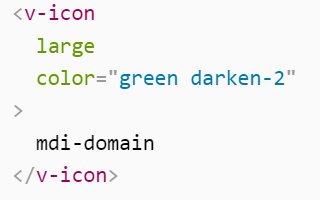
In BVAD3, drop a VIcon on the abstract designer and set its properties like this.
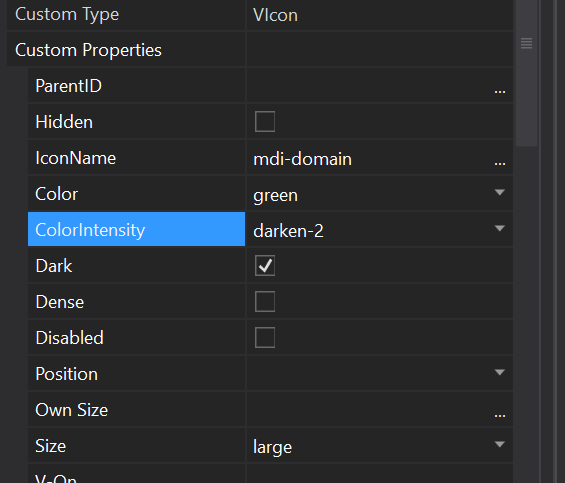
3. In all the templates I have seen, even expensive Pro templates from the Vuetify Store, 80% of their content, even documentation they have is, exactly word-for-word / code for code with what is on the Vuetify website. I mean a complete 100% copy and paste.
4. This led me to one conclusion and one conclusion only. I will never be successfully master BVAD3 without going through the Vuetify Website and understanding how each component works, how to apply different colors etc and then some VueJS.
5. Books will be written, vlogs will be done, new components will be written, anything can be done, but, but, all of it will be based on what is written on the Vuetify Website, when it comes to designing your app. Everything is there, with a person adding their own creativity and flavour.
6. One of the best teachers I founds, is The Net Ninja and whilst he pastes code from the Vuetify website as is, to create his app, listening to him explain concepts helped a lot. This copying and pasting also took place on this 30 minutes To Do WebApp by Danny here.
In closing, if you are interested in understanding the whole BVAD3 (Vuetify+VueJS) thing, empower yourself with knowledge.
1. Spend time to skim the Vuetify Website and see what is going on. This will help you understand that when you see a BVAD3 component, how it was done.
2. With everything that you will find on any learning platform, book, vlog, it will be mostly just a rehashing of what is on the Vuetify website.
3. Make the Vuetify Website your best friend to understand how stuff is designed.
4. Learning VueJS, will help you understand why on the property bag, we start our property text with : or even use {{ }}, why we have .SetData / .GetData, VModel, VIf, VShow etc etc
5. You can completely (if you feel being in an adventure), spend time skimming the BVAD3 library source code, here and there. Its open source and MIT. Go to a custom component of interest, find out what was done to make it work etc.
An eBook will be coming in the near future about BVAD3, for now please be patient. I also need to teach myself how to create awesome Video Learning Material. I really suck at it.
BTW: SD has started an awesome thread here taking about anything BVAD3, check it out now.
May the force be with you.
When we get a new phone, or new car, or whatever, we seldom read the user manual. We usually go through them when that particular device/car has a problem, and realize aha, it was so simple. Big mistake.
When I started building BVAD, I had to prepare myself mentally that I need to understand how VueJS work, and then how Vuetify work. I spent time googling the internet, finding free online courses so that I could understand what this beast was all about. The truth is VueJS, is very easy, however making it work with BANano is not easy. The other truth is, Vuetify, is easy too, its so massive too.
Thing is, I needed to study it and understand is structure, how it works and how all of this fits with B4x Abstract Designer etc and still make this work with BANano and then the code part.
I'm going to be extremely blunt.
1. The Vuetify website has a lot of documentation about Vuetify, of which is the basis of BVAD3. BVAD3 is based on the Vuetify API, which basically is just HTML attributes and tags, one seldom applies any styling. Vuetify does most of it for you.
2. The New Awesome Kitchen sink is just a reproduction of what is on the Vuetify Website with a few additions here and there.
For example, these are the buttons done via the abstract designer in the Kitchen Sink.
These are not different to what is on this Vuetify Web Page. Done by just setting properties just like they did on that website.
To explain, take a look at this icon.
As per Vuetify WebSite
In BVAD3, drop a VIcon on the abstract designer and set its properties like this.
3. In all the templates I have seen, even expensive Pro templates from the Vuetify Store, 80% of their content, even documentation they have is, exactly word-for-word / code for code with what is on the Vuetify website. I mean a complete 100% copy and paste.
4. This led me to one conclusion and one conclusion only. I will never be successfully master BVAD3 without going through the Vuetify Website and understanding how each component works, how to apply different colors etc and then some VueJS.
5. Books will be written, vlogs will be done, new components will be written, anything can be done, but, but, all of it will be based on what is written on the Vuetify Website, when it comes to designing your app. Everything is there, with a person adding their own creativity and flavour.
6. One of the best teachers I founds, is The Net Ninja and whilst he pastes code from the Vuetify website as is, to create his app, listening to him explain concepts helped a lot. This copying and pasting also took place on this 30 minutes To Do WebApp by Danny here.
In closing, if you are interested in understanding the whole BVAD3 (Vuetify+VueJS) thing, empower yourself with knowledge.
1. Spend time to skim the Vuetify Website and see what is going on. This will help you understand that when you see a BVAD3 component, how it was done.
2. With everything that you will find on any learning platform, book, vlog, it will be mostly just a rehashing of what is on the Vuetify website.
3. Make the Vuetify Website your best friend to understand how stuff is designed.
4. Learning VueJS, will help you understand why on the property bag, we start our property text with : or even use {{ }}, why we have .SetData / .GetData, VModel, VIf, VShow etc etc
5. You can completely (if you feel being in an adventure), spend time skimming the BVAD3 library source code, here and there. Its open source and MIT. Go to a custom component of interest, find out what was done to make it work etc.
An eBook will be coming in the near future about BVAD3, for now please be patient. I also need to teach myself how to create awesome Video Learning Material. I really suck at it.
BTW: SD has started an awesome thread here taking about anything BVAD3, check it out now.
[BANano] [VuetifyAD3] Small solutions to development hitches
May the force be with you.
Last edited: