Android Question BXDialogs problems

GiovanniPolese

Well-Known Member
Licensed User
Longtime User
Hi to everybody here
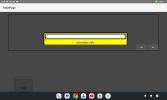
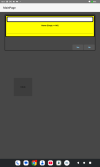
I have several doubts about using B4xDialogs. I have difficulties to manage the appearance of a simple dialog, while orientation changes. I attach two screenshots. "1" is for portait and "2" for landscape. I am working on a 2000x1200 tablet. As you see, while the portrait dialog is acceptable, the landscape is not. Clearly I am missing something very basic, but after doing various trials, I think not to be able to fix it. The project is attached, as long as the two screenshots.
Thanks for any hint.101
 

Attachments

  • 1.png
    1.png
    16.9 KB · Views: 184
  • 2.png
    2.png
    17.1 KB · Views: 188
  • TestDialog.zip
    11.5 KB · Views: 113

GiovanniPolese

Well-Known Member
Licensed User
Longtime User
Basically I would like that the xui container panel, were dimensioned on the panel that I did with the designer, but the two seem to have no relationship ..
 
Upvote 0

GiovanniPolese

Well-Known Member
Licensed User
Longtime User
Of course. The project should contain it... didn't you see it? Or I sent something wrong ..
BTW the size proposed by the designer is enough far from actual tablet resolution, but it it seems to have not importance... at least .. it seems .. but what can I do, not having the correct size available? I choosed just one of the proposed sizes ..
 
Upvote 0

stevel05

Expert
Licensed User
Longtime User
OK, now I see it. I don't have a device handy to test it on, does it load the layout "Test" even though it's called "test" in the files folder?
 
Upvote 0

GiovanniPolese

Well-Known Member
Licensed User
Longtime User
Don't use an anchor for the panel in the designer.
Adjust the size of the panel in the test layout (width 314, height 160)
Move the button in the MainPage layout to the top left so you can click on it in landscape mode.
Test the app.
My will was exactly to use anchors... as a matter of fact I want the dialog horizontally centered. Anyway, the main question is to know which relation exists between the container panel and the panel that I did with the designer. What I observe is that the container cannot be done in a way that it contains "exactly" the designed panel. Therefore the "Yes" and "No" buttons appear in a position related to the container and not to the panel defined in the designer. Maye not clear, but trying me example on a tablet should clarify the problem.
 
Upvote 0
Top