My tablet device is broken and my tiny cell phone lacks a non-proportional font like "Courier New", and the screen is so small that the buttons in my application overrun the width of the screen. I could use one of the ADB emulators I have set up, but I think I would rather use my Bluestacks as my emulator. But I can't connect to Bluestacks from the b4A IDE. I start B4A-Bridge, v2.68 and it tells me my IP is: 10.0.2.15. I go into the b4A IDE and click on "Tools - B4A Bridge - Connect" and I see the 10.0.2.15 IP listed and enabled. But when I try to compile my program using F5, it tells me "No device found" and to "Please use B4A-Bridge to connect to a device or start an emulator." What am I doing wrong? Why can't b4A "see" Bluestacks, or communicate with it? Thank you.
UPDATE: I did the following: 1) In "Tools", select "Restart ADB server".
2) Started B4A-Bridge in Bluestacks.
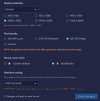
3) In Bluestacks Settings - Advanced", I turned on "Android Debug Bridge (ADB)".
4) in b4A "Tools - B4A Bridge - Connect", I set a new IP address as 127.0.0.1", as Bluestacks instructed in Step 3).
5) I compiled my program, both in Debug mode and Production mode and it opens in Bluestacks.
UPDATE: I did the following: 1) In "Tools", select "Restart ADB server".
2) Started B4A-Bridge in Bluestacks.
3) In Bluestacks Settings - Advanced", I turned on "Android Debug Bridge (ADB)".
4) in b4A "Tools - B4A Bridge - Connect", I set a new IP address as 127.0.0.1", as Bluestacks instructed in Step 3).
5) I compiled my program, both in Debug mode and Production mode and it opens in Bluestacks.
Last edited: