Editbox stopped scrolling in Android 4.03?

ondesic

Active Member
Licensed User
Longtime User
I have the exact same app running on android 2.3.3 and 4.03.
I have a small editbox that is filled with a lot of text (enough so ou have to scroll it to see all the text). I disable the edit box and then scroll through the text with my finger.

On the 2.3.3 the edit box scrolls through the text perfect. On my 4.03 device, it won't scroll at all.
 

ondesic

Active Member
Licensed User
Longtime User
Sorry, I guess I put too much faith in my explanations.

The EditText control can scroll in 2.3.3, even if disabled. Enable and disable the EditText control and try to scroll the text inside. 4.03 doesn't do it for me.

B4X:
Sub Globals
   Dim txt As EditText
   Dim tbn As ToggleButton
End Sub

Sub Activity_Create(FirstTime As Boolean)
   tbn.Initialize("tbn")
   tbn.TextOff = "OFF"
   tbn.TextOn = "ON"
   
   txt.Initialize("txt")
   txt.Text="This is a test to see if scrolling works inside a disabled EditBox. In 2.3.3 this scrolled fine even though it was disabled."
   txt.Gravity=Gravity.TOP
   txt.ForceDoneButton=True
   txt.Enabled=False
   
   Activity.AddView(tbn,0,0,100,100)
   Activity.AddView(txt,0,150,300,300)
End Sub

Sub tbn_CheckedChange(Checked As Boolean)
   If txt.Enabled Then 
      txt.Enabled=False
   Else
      txt.Enabled=True
   End If
End Sub
 
Upvote 0

Roger Garstang

Well-Known Member
Licensed User
Longtime User
The EditText control can scroll in 2.3.3, even if disabled.

Reread what I wrote. The part in bold above was a bug in Pre-4.x Android. You never should have been able to scroll or edit a disabled control, but there was a flaw in the Focus code that allowed it. They fixed it in Android 4.x hence why you can't scroll. The methods I mentioned above were actually used to fix the bug in Android versions before 4.x to properly disable them so they didn't scroll. To get the flawed behavior back for Android above version 4 you can try to use them the opposite way and make it allowed again...but it isn't the standard behavior.

Now if you can't scroll with it Enabled then we have a problem that could be a bug, because that should work.
 
Upvote 0

ondesic

Active Member
Licensed User
Longtime User
Interesting. Though I have never been able to type text when the edittext was disabled, only scrolling. That was nice because you could read the text like a label.

I look this up and see if I can get it to work the "wrong" way.

Thanks
 
Upvote 0

Roger Garstang

Well-Known Member
Licensed User
Longtime User
The Focus bug was only partial and you usually need to use both of the methods and set both to true or both to false otherwise it only seems to change halfway. With Touch or Keyboard you could scroll (Pre 4.x), but to Edit a disabled you had to do a requestFocus or if it was set focus by changing Tabs or something that wasn't by touch you could edit it. I do agree that they fixed it too much though and should have left the scrolling since other OS do this (I usually use a disabled Textbox without a border in Windows if it is something a user may need to Copy/Paste like the File Properties dialog in Explorer does)
 
Upvote 0

ondesic

Active Member
Licensed User
Longtime User
I add this code to the above, but it still won't scroll. Any suggestions?

B4X:
Sub tbn_CheckedChange(Checked As Boolean)
   If txt.Enabled Then 
      txt.Enabled=False
      r.Target = txt
      r.RunMethod2("setFocusable", "True", "java.lang.boolean")                
      r.RunMethod2("setFocusableInTouchMode", "True", "java.lang.boolean")
   Else
      txt.Enabled=True
      r.Target = txt
      r.RunMethod2("setFocusable", "True", "java.lang.boolean")                
      r.RunMethod2("setFocusableInTouchMode", "True", "java.lang.boolean")
   End If
End Sub
 
Upvote 0

Roger Garstang

Well-Known Member
Licensed User
Longtime User
Never tried going the other way...I guess they really fixed it good. Would just blocking changing the text work in the TextChanged Event then you can Enable it? You could just set the text of the Edit View to OldText if OldText <> NewText.

May need IME library to kill the keyboard. Sometimes setting InputType to 0 may do it too.
 
Last edited:
Upvote 0

ondesic

Active Member
Licensed User
Longtime User
The problem occurs when I try to make it editable again. I use the following code in the tobblebutton:

B4X:
Sub tbn_CheckedChange(Checked As Boolean)
   If Checked==False Then 
      'txt.Enabled=False
      txt.InputType=txt.INPUT_TYPE_NONE
   Else
      'txt.Enabled=True
      txt.InputType = txt.INPUT_TYPE_TEXT
   End If
End Sub

setting

B4X:
txt.InputType = txt.INPUT_TYPE_TEXT

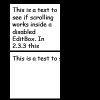
changes the whole nature of the editbox. It is no longer wrapped AND the padding gets screwed up? :(
 
Upvote 0

ondesic

Active Member
Licensed User
Longtime User
The top image is before I set the edittext to "txt.InputType = txt.INPUT_TYPE_TEXT"

The bottom is right after I set to "txt.InputType = txt.INPUT_TYPE_TEXT"
This seems screwy.
 

Attachments

  • test.png
    test.png
    3.4 KB · Views: 317
Upvote 0

ondesic

Active Member
Licensed User
Longtime User
From the picture above, any ideas as to why it is doing this?

The default InputType of the EditText is 131073. INPUT_TYPE_TEXT=1 and INPUT_TYPE_NONE = 0.
Also when change the inputtype to 0, it changes the padding again and the text format changes to the bottom picture.
 
Last edited:
Upvote 0

ondesic

Active Member
Licensed User
Longtime User
Ok, deep in the reaches of the forum, I found that if you change the inputtype, it automatically goes to singleline. Therefore you have to:

myEditText.SingleLine = false

Hope this helps someone ;-)
 
Upvote 0

Roger Garstang

Well-Known Member
Licensed User
Longtime User
Yes, just saw this today and would say the same thing...I didn't realize that is what you meant when you were talking about wrapping and padding before I left work. On one of my devices changing the password status even adjusts Typeface too and it returns a smaller width for a password field (Sounds fine since the dots are smaller than regular text), but on another device it does nothing. Android is weird on what changes. At least the 4.x+ versions appear to be getting better.
 
Upvote 0

Roger Garstang

Well-Known Member
Licensed User
Longtime User
From the picture above, any ideas as to why it is doing this?

The default InputType of the EditText is 131073. INPUT_TYPE_TEXT=1 and INPUT_TYPE_NONE = 0.
Also when change the inputtype to 0, it changes the padding again and the text format changes to the bottom picture.

131072 is TYPE_TEXT_FLAG_MULTI_LINE. It ORed with the TYPE_CLASS_TEXT of 1 is your 131073. B4A has the basic Input Types...I wish it had more myself, but I made my own flags in my View Manager class. Even in my class though I still set the SingleLine value and the InputType to Multiline since I don't know if internally B4A does something more with SingleLine. You could try reverting to 131073 instead of INPUT_TYPE_TEXT to save a step. Might be interesting to see if SingleLine changes too or if it does its own thing.
 
Upvote 0
Top