Having problems with TableView Column Width Settings.
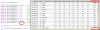
In the First Image TV1.png the last column is set at 80.1 and the Columns fit in snugly up against the Vertical ScrollBar. It can be set to 79.0 and fits in and leaves a big margin from the ScrollBar.
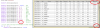
In the second Image TV2.png the Last Column width is changed to 80.0 which is LESS than the width used for TV1.png yet the last Column Width blows out well past the Vertical ScrollBar.
The First Column for Date also misbehaves when the Width is changed from 80.0 to 79.0 as it reduces the Column to JUST fit the text into it. Reducing much more than 1 pixel.
Seems like Widths with zero ending do not calculate correctly?
Labels are used in the TableView except for first column which is invisible.
Only noticed this happening since the last update of B4J.
Code used for setting up the TableView:
Code Used to fill the TableView:
In the First Image TV1.png the last column is set at 80.1 and the Columns fit in snugly up against the Vertical ScrollBar. It can be set to 79.0 and fits in and leaves a big margin from the ScrollBar.
In the second Image TV2.png the Last Column width is changed to 80.0 which is LESS than the width used for TV1.png yet the last Column Width blows out well past the Vertical ScrollBar.
The First Column for Date also misbehaves when the Width is changed from 80.0 to 79.0 as it reduces the Column to JUST fit the text into it. Reducing much more than 1 pixel.
Seems like Widths with zero ending do not calculate correctly?
Labels are used in the TableView except for first column which is invisible.
Only noticed this happening since the last update of B4J.
Code used for setting up the TableView:
B4X:
Private Sub SetupTableView
    Dim RList As List

    RList.Initialize
    RList.Add("SId")
    RList.Add("Date")
    RList.Add("No")
    RList.Add("Name")
    RList.Add("Odds")
    RList.Add("Base")
    RList.Add("Recoup")
    RList.Add("Bet")
    RList.Add("Div")
    RList.Add("Win")
    RList.Add("Loss")
    RList.Add("Tot. Loss")
    RList.Add("Balance")

    EndBetTV.SetColumns(RList)

    EndBetTV.SetColumnVisible(0, False) ' SId
    EndBetTV.SetColumnWidth(1, 80.0)    ' Date
    EndBetTV.SetColumnWidth(2, 30.0)    ' No
    EndBetTV.SetColumnWidth(3, 135.0)    ' Name
    EndBetTV.SetColumnWidth(4, 50.0)    ' Odds
    EndBetTV.SetColumnWidth(5, 50.0)    ' Base
    EndBetTV.SetColumnWidth(6, 60.0)    ' Recoup
    EndBetTV.SetColumnWidth(7, 50.0)    ' Bet
    EndBetTV.SetColumnWidth(8, 50.0)    ' Div
    EndBetTV.SetColumnWidth(9, 55.0)    ' Win
    EndBetTV.SetColumnWidth(10, 55.0)    ' Loss
    EndBetTV.SetColumnWidth(11, 70.1)    ' TotLoss
    EndBetTV.SetColumnWidth(12, 80.0)    ' Balance

    ' do not want sorting as RowIndex is used throught the calcs
    For i= 1 To 12
        EndBetTV.SetColumnSortable(i, False)
    Next

    RList.Clear
End Sub
Code Used to fill the TableView:
B4X:
Public Sub LoadEndBetsTable(SQL As SQL, Query As String, StringArgs() As String, Limit As Int, _
    TableView1 As TableView)

    TableView1.Items.Clear

    Dim cur As ResultSet
    If StringArgs = Null Then
        Dim StringArgs(0) As String
    End If
    cur = SQL.ExecQuery2(Query, StringArgs)

    Do While cur.NextRow
        Dim values(cur.ColumnCount) As Object
        For col = 0 To cur.ColumnCount - 1
            Select col
                Case 0
                    values(col) = cur.GetString2(col)
                Case 1, 3
                    Dim lbl As Label
                    lbl.Initialize("")
                    lbl.PrefWidth = TableView1.GetColumnWidth(col)
                    lbl.Style = "-fx-font-family: Tahoma; -fx-font-size: 14px;"        ' Left-align
                    lbl.Text = cur.GetString2(col)
                    values(col) = lbl
                Case 2, 4, 5, 6, 8, 9, 10, 11, 12
                    Dim lbl As Label
                    lbl.Initialize("")
                    lbl.PrefWidth = TableView1.GetColumnWidth(col)
                    lbl.Style = "-fx-font-family: Tahoma; -fx-font-size: 14px; -fx-alignment: CENTER;"    ' Center
                    lbl.Text = cur.GetString2(col)
                    values(col) = lbl
                Case 7
                    Dim lbl As Label
                    lbl.Initialize("")
                    lbl.PrefWidth = TableView1.GetColumnWidth(col)
                    lbl.Style = "-fx-font-family: Tahoma; -fx-font-size: 14px; -fx-font-weight: bold; -fx-alignment: CENTER;"    ' Center
                    lbl.Text = cur.GetString2(col)
                    values(col) = lbl
            End Select
        Next
        TableView1.Items.Add(values)
        If Limit > 0 AND TableView1.Items.Size >= Limit Then Exit
    Loop
    cur.Close
End Sub