B4J Library HMITiles

HMITiles - an Open-Source HMI Tile Library for Industrial Dashboards


Overview
HMITiles
is an open-source HMI (Human Machine Interface) tile library written in B4X, following widely accepted industrial HMI principles.

It provides reusable, professional-grade HMI tiles for:
  • Industrial dashboards
  • SCADA (Supervisory Control and Data Acquisition) front-ends
  • Machine and process HMIs
The focus of this library is clarity, consistency, and disciplined HMI design — not visual effects or UI decoration.


Design Goals
  • Based on widely accepted industrial HMI principles
  • Alarm-first color discipline
  • Clear and consistent state handling
  • Touch-friendly layouts
  • No animations or visual noise
  • Minimal configuration required
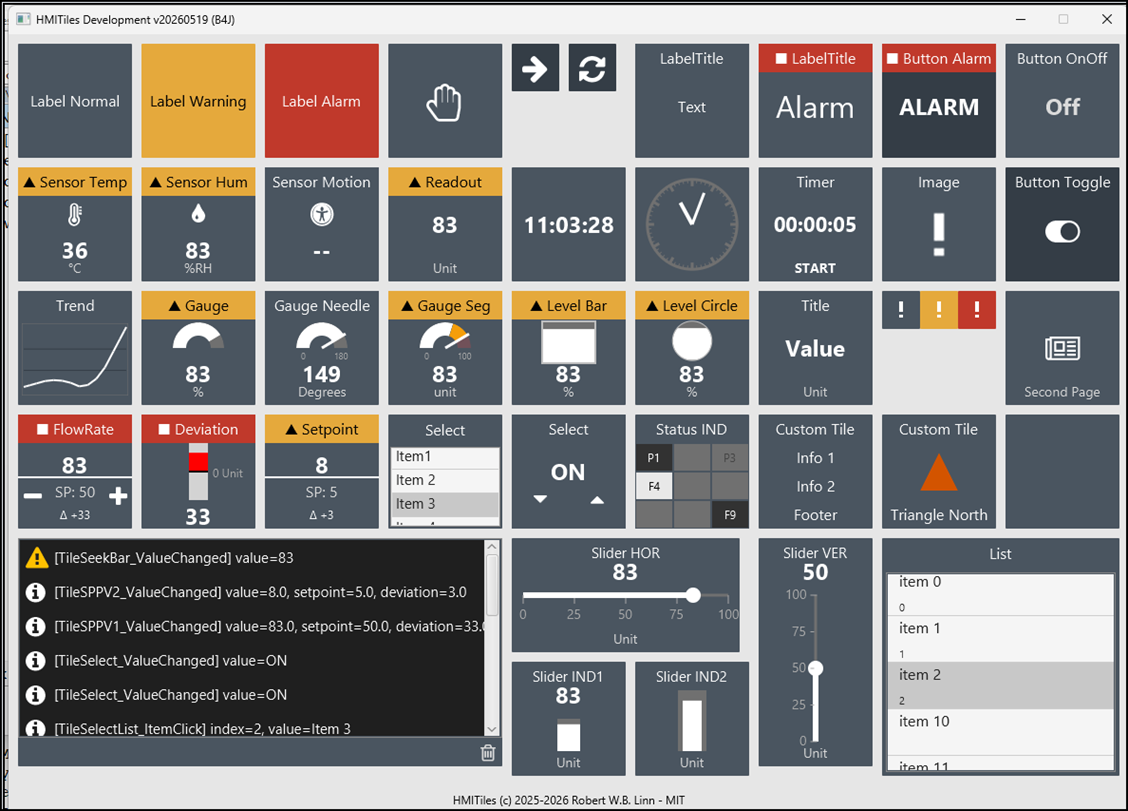
Implemented tiles
  • Buttons (including ON/OFF logic)
  • Numeric and text readouts
  • Sensor tiles
  • Clocks and time displays
  • Event and message viewers
  • Sliders and setpoints
  • Image tiles
  • RGB indicators
  • Layout and helper components
All tiles share an unified styling and state model.


1767198599103.png


Files
HMITiles-NNN.zip archive contains the library and sample projects.


Install
From the zip archive, copy the file HMITiles.b4xlib to the B4J additional libraries folder.
For some of the examples addition libraries are required. See folder Libs.


Examples
The folder examples has several examples organised by B4A & B4J.
To mention
  • B4A & B4J Overview - All HMI tiles at a glance. The slider changes selected tiles.
  • B4J-WaterTankSimulator - Simulate live data with HMI setpoint & trend tiles.
  • B4J-ArduinoLED - Control onboard Arduino LED via serial line (sending/receiving single byte), Arduino firmware B4R.
  • B4A-ESP32BLEED - Control ESP32 connected LED via BLE (UART), ESP32 firmware B4R.
  • B4A Ble - Several Ble client & scanner examples (using the new BleCentral.b4xlib).
  • HomeKit32 - Real example controlling the HomeKit32.
The Libs folder contains additional B4A & B4R libraries required for some of the examples.


Basic Example

HMITiles are standard B4X CustomViews and can be placed in the Designer.
Example: simple ON / OFF HMITile
B4X:
Sub Class_Globals
    Private HMITileButtonOnOff As HMITileButton
    ...

Private Sub B4XPage_Created (Root1 As B4XView)
    ...
    ' OnOff Button
    HMITileButtonOnOff.State = False
    ...

Private Sub HMITileButtonOnOff_Click
    HMITileButtonOnOff.SetState(HMITileButtonOnOff.State)
    HMITileButtonOnOff.StateText = IIf(HMITileButtonOnOff.State, "ON", "OFF")
    Log($"[HMITileButtonOnOff] state=${HMITileButtonOnOff.State}"$)
End Sub


To-Do
  • Additional GetStarted examples.
  • FarmKit32 - Control the FarmKit32. Similar to HomeKit32 but then using the Keyestudio Smart Farm Kit KS0567 (docs.keyestudio.com/projects/KS0567/en/latest/wiki/index.html).


License
MIT - see LICENSE.
 

Attachments

  • HMITiles-150.zip
    354.8 KB · Views: 8
Last edited:

rwblinn

Well-Known Member
Licensed User
Longtime User
Update v1.3.0 2025-12-26 (see Post #1)
- NEW: HMITiles - Trend, SPPV, Gauge.
- NEW: Internal customviews - HMISeekbar, HMIPlusMinusNumeric.
- NEW: Example Water Tank Simulator, Arduino LED (control LED connected to an Arduino UNO via serial line).
- UPD: HMITiles various minor updates.
- UPD: HMITileUtils - Color scheme revised to neutral blue-green scale.
- UPD: Example Overview.

B4J Examples Water Tank Simulator and Arduino LED.
1767180413558.png
 
Last edited:

rwblinn

Well-Known Member
Licensed User
Longtime User
Update v1.4.0 2025-12-31 (see Post #1)

- NEW: HMITiles - SeekBar (replaces Slider), Select, SelectList, Shapes (HLine,VLine,Corners).
- NEW: B4A Example Apps - Overview, ESP32BLELED (control ESP32 LED via BLE, ESP32 firmare B4R).
- NEW: B4J Example HomeKit32.
- UPD: Customviews - All HMITiles reworked, tested with B4A - exception: HMITileRGB (B4J only).
- UPD: B4J Examples - Overview (see Post #1), Water Tank Simulator, ArduinoLED (see Post #2).
- DEL: Internal customviews - HMISeekbar, HMIPlusMinusNumeric.

1767198789105.png


1767180238873.png


1767199530852.png
 

Attachments

  • 1767180211774.png
    1767180211774.png
    127.2 KB · Views: 41
Last edited:

rwblinn

Well-Known Member
Licensed User
Longtime User
Update v1.5.0 2026-01-09 (see Post #1)

- NEW: HMITileLabel - API SetFontAwesome large or default size, SetFontNormal.
- NEW: HMITileEventViewer - API RowHeight to override defaults for compact/normal mode.
- NEW: HMITileSeekBar - API ShowValue to hide the value.
- NEW: B4A examples (using the B4A library BleCentral.b4xlib) - BleScanner, GVH5075Scanner, RuuviTagScanner, Bricks BuWizz2, Lego HUB No.4.
- NEW: B4J examples - Get Started HMITileButton, HMITileLabel.
- UPD: HMITiles custom views public API aligned.
- UPD: All examples, HMITiles bug fixes.

1767958227912.png


Note
The BleCentral.b4xlib is a is a lightweight, generic BLE GATT manager and scanner for B4A, providing reliable BLE connections and notification handling.
Not published yet on the B4A additional libraries forum - still some work to do.
 
Top