B4J Question How to close page completely

Nitin Joshi

Active Member
Licensed User
Longtime User
There are 2 pages in project "Main Page" and "Run Page". From Main Page, I show "Run Page". When i come back to Main Page, i want Run Page to get close completely. How can i achieve this?

 
Solution
When the MainPage button is pressed, does Run Page close itself?
B4X:
B4XPages.ClosePage(Me)

When you get back to MainPage, Run Page should invisible.
If you want to change to content of Run Page next time you show it., use:
B4X:
Private Sub B4XPage_Appear
  
End Sub

Sorry @aeric I send my response at same time.

Nitin Joshi

Active Member
Licensed User
Longtime User
How do you come back to MainPage?
When I am on RunPage, i can see option to click MainPage.
What do you mean by "close completely"?

Means when i come back to MainPage, RunPage is still open. I want that page to close completely or destroy because when again i open RunPage, buttons on RunPage are new because every time i create button dynamically. some times 12, some times 30 etc....

Please see below screenshot.
1740323159553.png


I hope, i could convey my request.
 
Upvote 0

aeric

Expert
Licensed User
Longtime User
You want to clear all the views and reload the layout again?

RunPage:
B4X:
Sub Class_Globals
    Private Root As B4XView 'ignore
    Private xui As XUI 'ignore
End Sub

Public Sub Initialize As Object
    Return Me
End Sub

Private Sub B4XPage_Created (Root1 As B4XView)
    Root = Root1
End Sub

Private Sub B4XPage_Appear
    Root.LoadLayout("RunPage")
    B4XPages.SetTitle(Me, "Run Page")
End Sub

Private Sub BtnClose_Click
    Root.RemoveAllViews
    B4XPages.ClosePage(Me)
    B4XPages.ShowPage("MainPage")
End Sub
 

Attachments

  • Example.zip
    17.4 KB · Views: 88
Upvote 0

William Lancee

Well-Known Member
Licensed User
Longtime User
When the MainPage button is pressed, does Run Page close itself?
B4X:
B4XPages.ClosePage(Me)

When you get back to MainPage, Run Page should invisible.
If you want to change to content of Run Page next time you show it., use:
B4X:
Private Sub B4XPage_Appear
  
End Sub

Sorry @aeric I send my response at same time.
 
Upvote 0
Solution

Nitin Joshi

Active Member
Licensed User
Longtime User
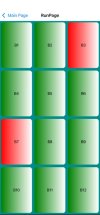
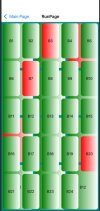
Thanks @aeric and @William Lancee , highly appreciate. I will look into both suggestion. However, please allow me to share more with you to elaborate bit better. I am adding 3 pictures. One is Main Page and 2 pictures from Run Page.

Please see picture "Second Time Run Page 24 buttons"...you will see 24 buttons are there however at back side showing earlier 12 buttons.

I hope, you got my point. Can i close or destroy runpage before MainPage appears? or is there any better solution?
 

Attachments

  • First Time Run Page 12 buttons.jpg
    First Time Run Page 12 buttons.jpg
    35.3 KB · Views: 128
  • Main Page.jpg
    Main Page.jpg
    12.2 KB · Views: 120
  • Second Time Run Page 24 buttons.jpg
    Second Time Run Page 24 buttons.jpg
    46.4 KB · Views: 121
Upvote 0

William Lancee

Well-Known Member
Licensed User
Longtime User
Can i close or destroy runpage before MainPage appears? Yes
The important B4XPage_Appear sub is in Run Page not in Mainpage
 
Upvote 0

aeric

Expert
Licensed User
Longtime User
Thanks @aeric and @William Lancee , highly appreciate. I will look into both suggestion. However, please allow me to share more with you to elaborate bit better. I am adding 3 pictures. One is Main Page and 2 pictures from Run Page.

Please see picture "Second Time Run Page 24 buttons"...you will see 24 buttons are there however at back side showing earlier 12 buttons.

I hope, you got my point. Can i close or destroy runpage before MainPage appears? or is there any better solution?
Check my example first.

By the way, are you creating for B4i? This is B4J forum.
 
Upvote 0

aeric

Expert
Licensed User
Longtime User
Can i close or destroy runpage before MainPage appears? or is there any better solution?
I seldom use B4XPage_Appear and B4XPage_Disappear.
Maybe you can also use B4XPage_Disappear.

B4X:
Private Sub B4XPage_Disappear
    Root.RemoveAllViews
End Sub

Private Sub BtnClose_Click
    'Root.RemoveAllViews
    B4XPages.ClosePage(Me)
    B4XPages.ShowPage("MainPage")
End Sub


  • B4XPage_Disappear - Called whenever a visible page disappear.
 
Upvote 0

Nitin Joshi

Active Member
Licensed User
Longtime User
I checked the example.

Private Sub BtnClose_Click Root.RemoveAllViews B4XPages.ClosePage(Me) B4XPages.ShowPage("MainPage") End Sub
It wont work for me because in RunPage, there is no BtnClose button to close the page.

If i add code in MainPage to close the RunPage then error occurs when first time ShowPage("RunPage") is executed.

Main Page Code...
Main Page Code:
'This is the code from B4XMainPage
Private Sub B4XPage_Appear()
    B4XPages.ClosePage("RunPage")
End Sub
 
Upvote 0

William Lancee

Well-Known Member
Licensed User
Longtime User
The important B4XPage_Appear sub is in RunPage NOT in Mainpage.
That's the place where you redesign the RunPage.
You don't have to close anything, it is also automatic.

The sequence is Mainpage -> RunPage > Mainpage -> RunPage (when RunPage "Appears" BUT before you see it remake/reload your layout.)
 
Upvote 0
Top