B4J Question How to display image by WebSocket

derez

Expert
Licensed User
Longtime User
In the cctv server I have in the index file this text which takes care of calling the GetIimages handler and put a new image in the html page:
B4X:
<script type="text/javascript">
function get_images(){
$.ajax({
url: "/GetImages",
success: function(result)
{
$("#images").html(result);},
});
}
$(document).ready(function(){
get_images();
setInterval(function(){get_images();}, 300);
});

Is it possible to add the image functionality to this index of a homecontrol app, which use a websocket :
B4X:
:
<!DOCTYPE html>
<html xmlns="http://www.w3.org/1999/xhtml">
<head>
<title>EREZ home control</title>
<script src="https://ajax.googleapis.com/ajax/libs/jquery/2.1.0/jquery.min.js"></script>
<link rel="stylesheet"type="text/css" href="index.css" />
<script src="/b4j_ws.js"></script>
</head>
<body>
<h1><img src='kimel.jpg'/ width=100 height=100> EREZ home control<br/> </h1> <p id="plog"></p>
<div id="maindiv">
<br>Switch1 :
<input Type="radio" name="sw1" checked="True"> OFF <input Type="radio"id="sw1on" name="sw1" > ON <br>
<br>Switch2 :
<input Type="radio" name="sw2" checked="True"> OFF <input Type="radio"id="sw2on" name="sw2" > ON <br>
<br>Switch3 :
<input Type="radio" name="sw3" checked="True"> OFF <input Type="radio"id="sw3on" name="sw3" > ON <br>
<br>Switch4 :
<input Type="radio" name="sw4" checked="True"> OFF <input Type="radio"id="sw4on" name="sw4" > ON <br><br>
<buttonid="submit">Submit</button><br>
<p id="result"></p><br/>
</div>
<script>
//connect to the web socket when the pageis ready.
$( document ).ready(function() {
b4j_connect("/ws");});
</script>
</body>
 

derez

Expert
Licensed User
Longtime User
B4X:
<!DOCTYPE html>
<html xmlns="http://www.w3.org/1999/xhtml">
<head>
<title>EREZ home control</title>
    <script src="https://ajax.googleapis.com/ajax/libs/jquery/2.1.0/jquery.min.js"></script>
    <link rel="stylesheet" type="text/css" href="index.css" />
    <script src="/b4j_ws.js"></script>
</head>
<body>
    <h1><img src='kimel.jpg'/ width=100 height=100> EREZ home control<br/> </h1>
    <p id="plog"></p>
    <div id="maindiv">
        <br>Switch 1 :
        <input Type="radio" name="sw1" checked="True"> OFF <input Type="radio" id="sw1on" name="sw1" > ON <br>
         <br>Switch 2 :
        <input Type="radio" name="sw2" checked="True"> OFF <input Type="radio" id="sw2on" name="sw2" > ON <br>
         <br>Switch 3 :
        <input Type="radio" name="sw3" checked="True"> OFF <input Type="radio" id="sw3on" name="sw3" > ON <br>
         <br>Switch 4 :
        <input Type="radio" name="sw4" checked="True"> OFF <input Type="radio" id="sw4on" name="sw4" > ON <br><br>
        <button id="submit">Submit</button><br>
        <p id="result"></p><br/>
     </div>
  
<div id="images"></div>
    <script type="text/javascript">
    function get_images(){
        $.ajax({
           url: "/GetImages",
           success: function(result)
           {
               $("#images").html(result);
           },        
         });
    }
    $(document).ready(function(){
        get_images();
        setInterval(function(){get_images();}, 1000);
    });

    <script>
    //connect to the web socket when the page is ready.
    $( document ).ready(function() {
       b4j_connect("/ws");
    });
    </script>
</body>

It does not work. Neither handler is called (Control or GetImages).
I tried to all the document ready in one place - no.
 
Upvote 0

Erel

B4X founder
Staff member
Licensed User
Longtime User
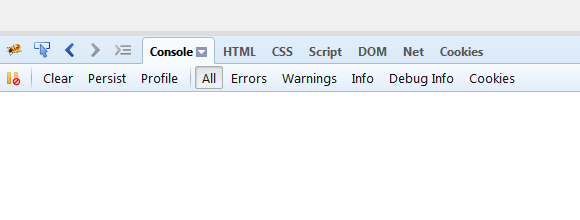
Have you checked the browser developer console for any errors?

SS-2015-12-28_09.45.34.png
 
Upvote 0

Daestrum

Expert
Licensed User
Longtime User
I would try putting your get_images() function in <head>..<head>

then change the
B4X:
 $( document ).ready(function() {
 b4j_connect("/ws");
 });
to
B4X:
$( document ).ready(function() {
 b4j_connect("/ws");
 get_images();
 setInterval(function(){get_images();}, 1000); 
});
not sure how it handles two document ready functions ( as you had in your code), I would guess it ignores one and uses the last one it finds.
 
Upvote 0

derez

Expert
Licensed User
Longtime User
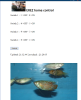
Thanks Daestrum but I was working with the console and could change the index file and see the results in real time, I got the following to work nicely with the pictures bellow the buttons and test:
B4X:
<!DOCTYPE html>
<html xmlns="http://www.w3.org/1999/xhtml">
<head>
<title>EREZ home control</title>
    <script src="https://ajax.googleapis.com/ajax/libs/jquery/2.1.0/jquery.min.js"></script>
    <link rel="stylesheet" type="text/css" href="index.css" />
    <script src="/b4j_ws.js"></script>
</head>
<body>
    <h1><img src='kimel.jpg'/ width=100 height=100> EREZ home control<br/> </h1>
    <p id="plog"></p>
    <div id="maindiv">
        <br>Switch 1 :
        <input Type="radio" name="sw1" checked="True"> OFF <input Type="radio" id="sw1on" name="sw1" > ON <br>
         <br>Switch 2 :
        <input Type="radio" name="sw2" checked="True"> OFF <input Type="radio" id="sw2on" name="sw2" > ON <br>
         <br>Switch 3 :
        <input Type="radio" name="sw3" checked="True"> OFF <input Type="radio" id="sw3on" name="sw3" > ON <br>
         <br>Switch 4 :
        <input Type="radio" name="sw4" checked="True"> OFF <input Type="radio" id="sw4on" name="sw4" > ON <br><br>
                <button id="submit">Submit</button><br>
        <p id="result"></p><br/>
           <div id="images"></div>
</div>
  
    <script type="text/javascript">
    function get_images(){
        $.ajax({
           url: "/GetImages",
           success: function(result)
           {
               $("#images").html(result);
           },        
         });
    }
    $(document).ready(function(){
        get_images();
        setInterval(function(){get_images();}, 1000);
    });

//    <script>
    //connect to the web socket when the page is ready.
    $( document ).ready(function() {
       b4j_connect("/ws");
    });
    </script>
</body>
 

Attachments

  • homecontrol.png
    homecontrol.png
    189.2 KB · Views: 284
Upvote 0
Top