
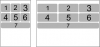
Hi, I would like some help or pointers in laying out this format. I have 7 buttons which I would like to arrange in the following way so they can work on normal phones/tablets etc.
I tried this but it doesn't work:
I am able to do it with one on top of another, ladder style, but it is not the best looking way to do it, so I want some code help with doing it 3 on top and 3 on bottom + 1 below everything (number 7). Thanks in advance. Cheers!
I tried this but it doesn't work:
B4X:
Btn1.SetTopAndBottom(5, 25%y)
Btn1.SetLeftAndRight(5, 30%x)
Btn2.SetLeftAndRight(Btn1.Right,30%x)
Btn2.SetTopAndBottom(5, 25%y)
Btn3.SetLeftAndRight(Btn2.Right,5)
Btn3.SetTopAndBottom(5, 25%y)

Btn4.SetLeftAndRight(5,30%x)
Btn4.SetTopAndBottom(Btn1.Bottom, 25%y)

Btn_Stat.Top(Btn4.Bottom)
Btn_Stat.Width=100%xAttachments
Last edited:


