iOS Question NFC tags reading

Tomas Petrus

Active Member
Licensed User
Longtime User
I have already succesfully tested reading of tag ID on Android using this https://www.b4x.com/android/forum/threads/nfc-reading-and-writing.64451/
In example there is also b4i Project but it doesnt work.

So after some research I found this https://www.b4x.com/android/forum/threads/nfc-reading-ndef-tags.84784/#content

Tried example, followed all instructions but even devices cards and chips that I have previously tested with nfc taginfo on iOS and proven to be working with iOS is not working with this example. i click scan and try to read chip or card but no reaction. also nothing in logs.

Any advice ?
 

b4x-de

Active Member
Licensed User
Longtime User
My app is based on the example provided by the link you shared and it works well. So there might be a problem hidden in your specific configuration. Please give us some more information so we can help you: Are you reading Ndef? What is your B4i-Version? What is the iOS-Version your are trying to read from? Does the bottom card with the scanner appear?
 
Upvote 0

Tomas Petrus

Active Member
Licensed User
Longtime User
Bottom panel appears.
b4. 10.0 64bit
I am trying to read chips and cards that I can read on android using https://www.b4x.com/android/forum/threads/nfc-reading-and-writing.64451/
and that respond when I try them read with nfc taginfo on iOS. min version on example is 11. it didnt work so I changed it to 16 doesnt work either I am testing on on iOS 18.6.2 Now i have pending update to iOS 26... should it help ?
 
Upvote 0

Tomas Petrus

Active Member
Licensed User
Longtime User
tags are mifare desfire or tag temper and others.

I can read most of them by nfc taginfo on iPhone
I see there their UID.
I also see no ndef records

So to understand it to be able to read UID its not iOS limitation it is limitation of this library ?
Or am I doing something wrong ?

What are posibilities to solve the issue ?
 
Upvote 0

b4x-de

Active Member
Licensed User
Longtime User
The question is somewhat tricky because MIFARE DESFire tags are not preconfigured like classic NFC Forum tags (NDEF Type 1/2/3/4). A DESFire chip is a full-fledged smart card controller that can only store an NDEF structure if a suitable application (AID) and file structure for NDEF is created on the chip.

However, you can create an NDEF file structure if it is missing. This is described here in section 6.5:


Incidentally, ChatGPT is surprisingly knowledgeable about this.
 
Upvote 0

Tomas Petrus

Active Member
Licensed User
Longtime User
I am not sure if I understand
One device is city travel card - I am not sure if I can write or create anything inside it.
Other devices are classic fresh bought identification chips with which I am now experimenting.
When the app - lib doesnt recognize the device how can I access it and write or create anything ?.

Or did you mean to create in somehow magicaly on the app level ?

I really just need to read UID of chip/card and then pair it in our system with client data and use it for later identification.
 
Upvote 0

b4x-de

Active Member
Licensed User
Longtime User
You can only read NFC tags with NDEF file structure. I do not know where this limit comes from (OS or library).

A MIFARE DESFire chip is an NFC tag – but not a simple NFC tag.
It is a smartcard-class secure microcontroller that can behave like an NFC tag only if you configure it to do so (for example as an NFC Forum Type-4 Tag).

Follow the link to the documentation I provided above.

ChatGPT explains in Detail:

WHY A MIFARE DESFire CHIP IS NOT A “SIMPLE” NFC TAG

A conventional NFC tag (like NTAG213, Ultralight, or Topaz) is extremely simple:

• fixed memory
• no operating system
• no applications
• no real security (maybe a password, nothing more)
• always presents itself as an NFC Forum Tag (NDEF ready)

These chips are basically “wireless EEPROMs”.

WHAT MIFARE DESFire REALLY IS

A MIFARE DESFire EV1/EV2/EV3 is completely different:

1. It is a full smartcard microcontroller, very similar to a contactless payment card.
It runs an operating system, not just memory.


2. It supports multiple applications (AIDs), just like a JavaCard.


3. Inside each application, you can create multiple files (standard data files, value files, record files).
→ This is a complete, structured file system.


4. It supports strong security mechanisms:
– 3DES, 3K3DES, AES
– mutual authentication
– secure messaging (ENC/CMAC)
– configurable access rights for every file
– transaction support (commit/rollback)


5. It communicates using ISO/IEC 14443-4 (ISO-DEP), not the simple 14443-3 tag protocols.
→ This is the same protocol family used by passports and credit cards.


6. It does not automatically present NFC Forum structures.
You must create the NFC Forum application and the NDEF files yourself.


WHY IT IS NOT “NDEF READY” OUT OF THE BOX

Simple NFC tags are designed for consumer use – tap and read a URL.
DESFire is designed for secure systems, such as:

• public transport
• university ID cards
• access control
• payment systems
• e-ticketing
• secure credential storage

Because these systems require controlled memory layout and security, NXP does not enable NDEF by default.
You must define:

• the NFC Forum application (AID = A0000003)
• the Capability Container file
• the NDEF file
• the access rights

Only after this configuration will a phone recognise it as a “normal NFC tag”.
 
Upvote 0

b4x-de

Active Member
Licensed User
Longtime User
Please do not delegate the simple task of asking ChatGPT to forum members.

Here is another answer that ChatGPT could have give to you as well:

Short answer:
No, you cannot reliably read the unique ID (UID) of a MIFARE DESFire tag on iOS.

And here is the precise, formal explanation:


---

iOS does not expose the NFC tag UID for security and privacy reasons.
Apple intentionally blocks UID access except in a few very narrow cases.

For MIFARE DESFire, this means:

• The UID is completely hidden.
• iOS will never return it through Core NFC.
• Even with ISO-DEP (ISO 14443-4) sessions, you cannot retrieve the UID.

The only exception Apple makes is for NFC Forum Type-2 tags (NTAG, Ultralight C).
And even there, the UID is only partially exposed.

Because DESFire operates as an ISO-DEP smartcard, iOS treats it like a secure credential and blocks UID access entirely.


---

WHY APPLE BLOCKS UID ACCESS

Apple does this for privacy and anti-tracking reasons:

• A tag UID is globally unique and cannot be changed.
• If apps could read UIDs, they could track users across locations.
• Therefore, iOS requires that apps read only application data, not the hardware identity.

DESFire chips, being secure microcontrollers, fall under the “protected” category.


---

WHAT YOU CAN READ ON IOS FROM A DESFIRE TAG

iOS can:

• Open an ISO-DEP session
• Exchange APDUs with the DESFire application
• Read NDEF if the tag is formatted as a Type-4 Tag
• Access custom files if your app implements the full DESFire protocol
(and you have the keys)

But you will never get:

• UID
• ATS (Answer To Select, partially hidden)
• any hardware fingerprint


---

WORKAROUND: APPLICATION-LEVEL IDENTIFIER

Because you cannot read the UID, most iOS apps use:

1. an app-generated identifier written into a DESFire file, or


2. the DESFire internal serial number file (not the UID), or


3. a cryptographically signed challenge-response protocol (best practice)


This is the method used in:

• access control systems
• ticketing
• campus cards
• secure e-wallets


---

SUMMARY

DESFire + iOS:

• UID: ❌ Not accessible
• NDEF: ✔ If T4T formatted
• ISO-DEP APDUs: ✔ Fully supported
• Custom DESFire apps: ✔ Yes
• Tracking-sensitive identifiers: ❌ Blocked by Apple
 
Upvote 0

b4x-de

Active Member
Licensed User
Longtime User
To cheer you up: What I learn from this example is that it makes a difference whether you enter Apple's glittering, beautiful world as a customer or as a developer through the service entrance. Then iOS shows its unvarnished and often ugly side.
 
Upvote 0

Tomas Petrus

Active Member
Licensed User
Longtime User
thank you, but AIs are sometimes halucinating and sometimes it collide with reality.. And thats why I am asking somebody better then AI here : )

Already mentioned but here again:

FACTS:
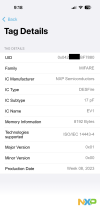
  • application nfc taginfo from AppStore READ UID from MIFARE DESFire EV1
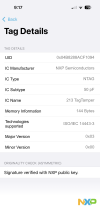
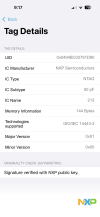
  • application nfc taginfo from AppStore READ UID from NTAG 213 TagTemper
I am not trying to invent the wheel, not counterdict and contemplate about what is teoreticly possible or not.. AI is telling it is not possible, forum is telling me it is not possible. But I CAN VERIFY AND SEE IT WITH MY OWN EYES that it is not true and nfc taginfo is doing it.

So I dont need why is it not possible but how to replicate something working and how to do it using b4i : )
 

Attachments

  • mirafare.png
    mirafare.png
    161.9 KB · Views: 10
  • nftag1.png
    nftag1.png
    202.9 KB · Views: 11
  • nftag2.png
    nftag2.png
    199.3 KB · Views: 11
Upvote 0

f0raster0

Well-Known Member
Licensed User
Longtime User
thank you, but AIs are sometimes halucinating and sometimes it collide with reality.. And thats why I am asking somebody better then AI here : )

Already mentioned but here again:

FACTS:
  • application nfc taginfo from AppStore READ UID from MIFARE DESFire EV1
  • application nfc taginfo from AppStore READ UID from NTAG 213 TagTemper
I am not trying to invent the wheel, not counterdict and contemplate about what is teoreticly possible or not.. AI is telling it is not possible, forum is telling me it is not possible. But I CAN VERIFY AND SEE IT WITH MY OWN EYES that it is not true and nfc taginfo is doing it.

So I dont need why is it not possible but how to replicate something working and how to do it using b4i : )
Back around 2014/2015, I used a library here that could read MIFARE tags. It was eventually deprecated or lost support. I had a working prototype, but when Apple later opened up the iPhone's NFC antenna, initially with limited functionality, I discovered the B4A library no longer worked with MIFARE, and B4i only supported NDEF tags.

Due to these limitations, I moved the project to BLE and stopped using NFC. I never fully determined if it was a B4X library constraint or not; my understanding is that a library (maybe using other software, or a new library wiht B4X) should work as long as the phone's antenna can physically read the MIFARE-tags..

Edit:
From memory, when using the B4X library you can understand(vibration or so) when the phone is reading.. meaning the antenna and capacity to read the MIFARE-tags is there..
 
Last edited:
Upvote 0
Top