
Android Question Problem with Allow Hiding Status Bar

EduardoElias

Active Member
Licensed User
Longtime User
Hi there,

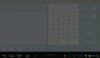
I have experimented a problem with a customer yesterday, that this option Allow Hiding Status Bar was selected and the user could not access the app menu for configuration. Please take a look on the image attached.

4.0.3 Android Tablet.

The menu appears right over the android status bar with these 3 options: "login, configuracoes, sair"

On the picture it can be seen that the menu is mixed with the android bar.

My manifest file is attached.

How to avoid that happen?
 

Attachments

  • Screenshot_2013-08-13-18-19-29.JPG
    Screenshot_2013-08-13-18-19-29.JPG
    23.7 KB · Views: 473
  • AndroidManifest.zip
    895 bytes · Views: 313

EduardoElias

Active Member
Licensed User
Longtime User
There is some androids 4 with the option "Allow Hiding Status Bar" under Display on Settings

The ones I have here do not have this option. However I was not lucky to find an user that have it and decided to turn it on.

That caused my app to be under the Status bar (bottom android bar) and not be possible when select the menu to configure it. I refer to the menu with 3 dots, 4th position from left to right on the bottom.

My question is how to avoid the problem of the menu showing up behind the status bar (please take a look on the picture attached on the first post). The options from the menu is behind the status bar and not reach by touching. It took a full day to find out what the user made to that happen. I don't see that option on my tablets. However I know there are some differences on options from one to other androids.

Thanks you
 
Upvote 0

EduardoElias

Active Member
Licensed User
Longtime User
What I know is that the user turned on this setting before calling my app. He was using it with that on before.

And when needed to configure my app the menu options where under the status bar.

How can i create this safe zone?
 
Upvote 0

EduardoElias

Active Member
Licensed User
Longtime User
I am sorry, I think I was not clear in my question, I am using the PreferenceManager and PreferenceScreen to handle config options (PreferenceActivity 1.01 that comes with b4a 2.71). I am using the following

B4X:
    Activity.AddMenuItem("Login", "login")
    Activity.AddMenuItem("Configuração", "config")
    Activity.AddMenuItem("Sair", "sair")

And I do not know how to control to have this safe zone, since I believe this is handled by android itself.

Please, let me know what I have to do. Or alternatives if there is.

Thank you

Eduardo
 
Upvote 0

EduardoElias

Active Member
Licensed User
Longtime User
Is there a way to detect such option, where the android status bar is hidden? At least I could give a warning to the user to get out of this option. Any of my devices have such option, but I found one that the customer had a lot of trouble until we found a way to disable it.

Eduardo
 
Upvote 0

raaiman

Member
Licensed User
Longtime User
Well it's been along time coming but i managed to solve this issue

first with erel's code

Dim jo As JavaObject = Activity
jo.RunMethod("setSystemUiVisibility", ArrayAsObject(5394))
Activity.Height=730dip '#this is where it will force the activity to cover the missing gap.

hope it helps.
 
Upvote 0
Top