
version: 1.10
This project template can be use for starting a B4X class library project.
The project also contains a B4X folder which contains B4XPages projects and a server project that already linked to the library's class using relative path.
GitHub: https://github.com/pyhoon/B4X-Library-Template
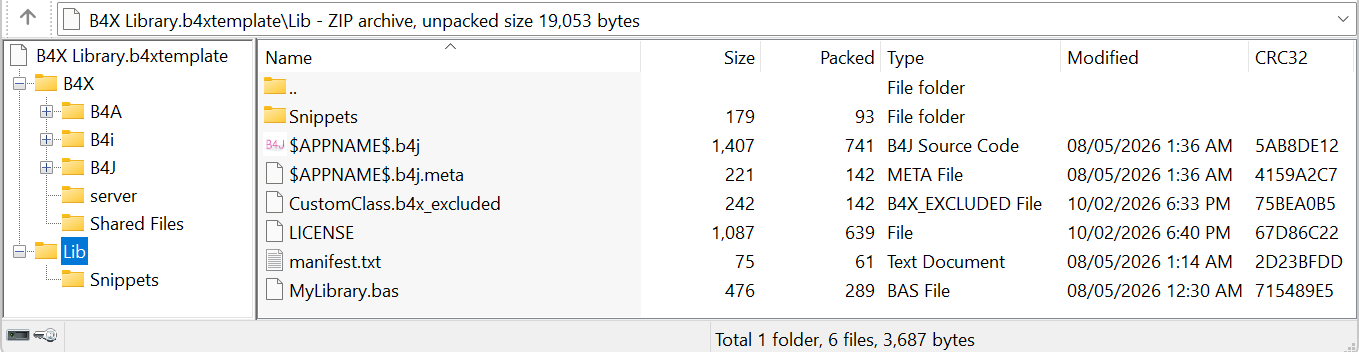
How to use:
 www.b4x.com
This project template can be use for starting a B4X class library project.
The project also contains a B4X folder which contains B4XPages projects and a server project that already linked to the library's class using relative path.
GitHub: https://github.com/pyhoon/B4X-Library-Template
How to use:
- Download attached B4X Library.b4xtemplate and drop it to Additional Libraries/B4J
- Create a project from B4J from menu File -> New -> B4X Library.
- The project in "Lib" folder will be opened.
- Develop your library.
- Remove unused files such as Snippets\sample.txt and CustomClass.b4x_excluded if not applicable.
- Once you are happy with it, test whether it also works for B4XPages UI (B4A, B4i, B4J) and server project inside the "B4X" folder.
- Change the LICENSE file if you like.
- Use #Macro: Title, Update Manifest with manifest-writer.jar to write the manifest.txt file.
- Use #Macro: Title, Create B4X Lib to package your library. The YourLib.b4xlib will be created inside your project folder.
- Use #Macro: Title, Copy to B4X AddLibs to copy the library to the Additional Libraries/B4X folder.
- Share your library with the community.
[B4X] Create B4xLib (only 1 easy click)
Creating a b4xlib is easy. You only need a B4X code (class or code module) with .bas file extension compressed into a file with the file extension .b4xlib. You can add a manifest.txt to show the library version in the IDE. Now, it is even faster and easier with the following steps, just inside...
www.b4x.com
Attachments
Last edited:


