Shared Modules Folder - What's the point?

LWGShane

Well-Known Member
Licensed User
Longtime User
- The Modules Pane doesn't display modules in the Shared Modules folder.
- The "Add Existing Module" button doesn't load the Shared Modules folder when clicked.

I would seriously like to know because configuring a "Shared Modules" folder is pointless.
 

lemonisdead

Well-Known Member
Licensed User
Longtime User
Shared modules folder is one folder you have created to store your existing modules (classes, code modules). In short, what you could use and reuse.
You have to set the path in your IDE to that folder.

Now, when you want to add a reusable module, you choose "Add existing modules" and browse to your Shared modules folder and you choose that module. It will be linked to your project but not moved.

If you do a modification to that module in the Shared modules folder, the modification will be in all the projects where you use that module.
If you do a modification to a shared module from the project you are currently working on, that module will be copied into your current project.

Simple and powerful :)
 

LWGShane

Well-Known Member
Licensed User
Longtime User
Shared modules folder is one folder you have created to store your existing modules (classes, code modules). In short, what you could use and reuse.
You have to set the path in your IDE to that folder.

Now, when you want to add a reusable module, you choose "Add existing module" and browse to your Shared modules folder and you choose that module. It will be linked to your project but not moved.

If you do a modification to that module in the Shared modules folder, the modification will be in all the projects where you use that module.
If you do a modification to a shared module from the project you are currently working on, that module will be copied into your current project.

Simple and powerful :)

Agreed, but I would like to see it actually integrated with the IDE. For example, clicking the "Add Existing Module" button would have the file chooser's default location be the supplied Shared Modules folder. Or, have the option to automatically load Shared Modules into the Modules Pane.
 

sorex

Expert
Licensed User
Longtime User
when you selected a file in the "Add existing module" file dialogue it will go back to that directory the next time you use it.

there used to be (shared) or something next to the class name when it was loaded from the shared folder, although I don't it here or I'm looking at the wrong panel.
 

Erel

B4X founder
Staff member
Licensed User
Longtime User
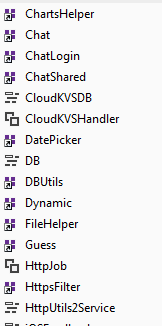
The icon is different for shared modules:

SS-2016-02-28_09.31.25.png
 

LWGShane

Well-Known Member
Licensed User
Longtime User
@Erel - I do see the icons, but I'm talking about having the IDE automatically load or have a button to load modules in the shared modules folder into the modules pane, without having to load each one.
 

Lahksman

Active Member
Licensed User
Longtime User
There is no reason to add all the shared modules automatically. Note that you can select multiple modules at once. You don't need to add each one separately.
Agreed, but it would be nice to have them "selectable", just like the libraries.
 
Top