I have a question about Custom View and how to access views from a layout created in Designer. I know this question might be dumb, but I have searched and read the documentation, and cannot figured it out.
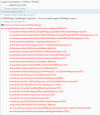
My issue is that, from DesignerCreateView, I can access the view Label1 but later in setGo Label1 is Null, and I get an error when assign new value to it's attributes.
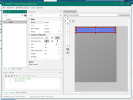
What am I missing? Shouldn't it be possible to access views from pnlGlobal?
My issue is that, from DesignerCreateView, I can access the view Label1 but later in setGo Label1 is Null, and I get an error when assign new value to it's attributes.
What am I missing? Shouldn't it be possible to access views from pnlGlobal?
SharedView:
Sub Class_Globals
    Private mEventName As String 'ignore
    Private mCallBack As Object 'ignore
    Public mBase As B4XView
    Private xui As XUI 'ignore
    Public Tag As Object
    Private Label1 As B4XView
End Sub

Public Sub Initialize (Callback As Object, EventName As String)
    mEventName = EventName
    mCallBack = Callback
End Sub

'Base type must be Object
Public Sub DesignerCreateView (Base As Object, Lbl As Label, Props As Map)
    mBase = Base

    Sleep(0)
    mBase.LoadLayout("pnlGlobal")
    Label1.Text = "Start"
End Sub

Private Sub Base_Resize (Width As Double, Height As Double)

End Sub

Public Sub setGo(newText As String)
    Label1.Text = newText
End Sub
B4XMainPage:
Sub Class_Globals
    Private Root As B4XView
    Private xui As XUI
    Private sh As SharedView
End Sub

Public Sub Initialize
'    B4XPages.GetManager.LogEvents = True

End Sub

'This event will be called once, before the page becomes visible.
Private Sub B4XPage_Created (Root1 As B4XView)
    Root = Root1
    Root.LoadLayout("MainPage")
    sh.Initialize(Root1, "SharedView")
End Sub

'You can see the list of page related events in the B4XPagesManager object. The event name is B4XPage.

Private Sub Button1_Click
    xui.MsgboxAsync("Hello world!", "B4X")
    sh.Go = "Off we go!"
End Sub