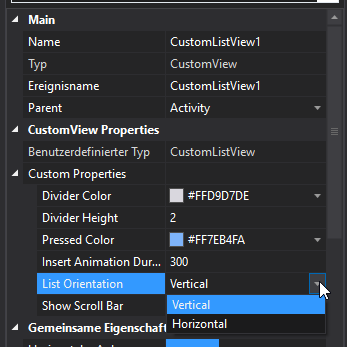
Android Question [SOLVED] Horizontal xCustomListView, How activate scrolling?

Rubsanpe

Active Member
Licensed User
Longtime User
Hello. How to activate the horizontal scroll of the elements? I can see the added elements, but I can not move horizontally in the list to see the elements that are outside the screen. In the designer I have activated the option "Show scroll bar".

Thank you
 

DonManfred

Expert
Licensed User
Longtime User
xclv_082.png
 
Upvote 0

Rubsanpe

Active Member
Licensed User
Longtime User
Thank you, DonManfred. Of course I have selected that option in the designer. I can see the elements distributed horizontally. But I can't make the list of elements scroll horizontally if there are elements outside the screen. I don't see the scroll bar.

Rubén
 
Last edited:
Upvote 0

Rubsanpe

Active Member
Licensed User
Longtime User
Thank you Erel and DonManfred. The CLV was inside an AHPageContainer in my original Activity. In that case the scroll didn't work. By preparing a simpler example just with the CLV in an activity the scroll did work.

So I put the CLV inside a panel and now everything is working well in both cases.

Greetings

Ruben
 
Upvote 0
Top