I had added Firebase Notifications about a year ago to one of my old B4I apps and it worked right away after carefully following the setup and configuration procedures posted by Erel. So I am familiar with doing this. It still works fine.
Well, I tried to set it up again with a new App (using the updated Firebase Push Notifications 2023+ tutorial - https://www.b4x.com/android/forum/threads/b4x-firebase-push-notifications-2023.148715/ ) and this time compiling with B4I 10.0, but I just could not get the App to receive any notifications.
So I decided to try it again from scratch, one-step-at-a-time this time with the posted B4I PushClients sample Application and the B4J-Sending Tool (FCMPush) posted in the above Tutorial. Here are the steps I followed:
* Created a new Non-wildcard App ID
Enabled Push Notifications and created a Production SSL Push Cert
Downloaded the Certificate (aps*.cer)
* Created a provision file with the same App ID as above
* Created the Push Store - firebase_push.p12 ( Tools - Build Server -> Create Push Store -> Firebase Service)
* Created a new project in Google Firebase Console and a new iOS App.
* Uploaded Push Store (.p12 file above) to Firebase console under Settings - CLOUD MESSAGING - Production APN Certificate
* Downloaded GoogleService-Info.plist and copied it to Files\Special folder
* Generated and Downloaded the private sign key (JSON file for FCMPush) Project settings -> Service accounts -> Generate new private sign key
No changes were made to the sample PushClients App code and FCMPush Code other than updating the ProjectId and ServiceAccountFilePath (to JSON file) in the FCMPush Application and setting #MinVersion: 16 in B4I. I'm also using the same topic "general".
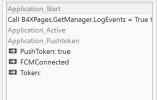
After successfully compiling the B4I App and running it in debug and standalone modes, I still could not receive any test notifications sent by FCMPush. The B4I logs indicate that nothing is received.
Has anyone tried doing this since the major v10.0 update to B4I? I hate to point my finger to any incompatability between v10.0 and Firebase Notifications but I have tried and checked and double checked everything but am at a complete loss on finding the issue? Any thoughts? Thanks!
BTW: I also tried using the new and recommended APN authentication key method but with no success. Also, another worthwhile note - The FCMPush application does send notifications to my old B4I App when I reference the appropriate ProjectId and ServiceAccountFilePath. So it appears that the FCMPush Application is working fine.
Well, I tried to set it up again with a new App (using the updated Firebase Push Notifications 2023+ tutorial - https://www.b4x.com/android/forum/threads/b4x-firebase-push-notifications-2023.148715/ ) and this time compiling with B4I 10.0, but I just could not get the App to receive any notifications.
So I decided to try it again from scratch, one-step-at-a-time this time with the posted B4I PushClients sample Application and the B4J-Sending Tool (FCMPush) posted in the above Tutorial. Here are the steps I followed:
* Created a new Non-wildcard App ID
Enabled Push Notifications and created a Production SSL Push Cert
Downloaded the Certificate (aps*.cer)
* Created a provision file with the same App ID as above
* Created the Push Store - firebase_push.p12 ( Tools - Build Server -> Create Push Store -> Firebase Service)
* Created a new project in Google Firebase Console and a new iOS App.
* Uploaded Push Store (.p12 file above) to Firebase console under Settings - CLOUD MESSAGING - Production APN Certificate
* Downloaded GoogleService-Info.plist and copied it to Files\Special folder
* Generated and Downloaded the private sign key (JSON file for FCMPush) Project settings -> Service accounts -> Generate new private sign key
No changes were made to the sample PushClients App code and FCMPush Code other than updating the ProjectId and ServiceAccountFilePath (to JSON file) in the FCMPush Application and setting #MinVersion: 16 in B4I. I'm also using the same topic "general".
After successfully compiling the B4I App and running it in debug and standalone modes, I still could not receive any test notifications sent by FCMPush. The B4I logs indicate that nothing is received.
Has anyone tried doing this since the major v10.0 update to B4I? I hate to point my finger to any incompatability between v10.0 and Firebase Notifications but I have tried and checked and double checked everything but am at a complete loss on finding the issue? Any thoughts? Thanks!
BTW: I also tried using the new and recommended APN authentication key method but with no success. Also, another worthwhile note - The FCMPush application does send notifications to my old B4I App when I reference the appropriate ProjectId and ServiceAccountFilePath. So it appears that the FCMPush Application is working fine.
Last edited: