
Toggle Buttons

aaronk

Well-Known Member
Licensed User
Longtime User
Toggle Buttons Look Different

Hello,

I have 2 devices running Android.

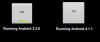
Device 1: Samsung SII 4G (GT-I9210T) - (Running Android 2.3.6)
Device 2: Google Nexus 7 (ME370T) - (Running Android 4.1.1)

I have copied the same app onto the device and noticed the toggle buttons look a whole lot different to each other.

My Samsung device seems to be showing the toggle button the way I want it to but my Google Nexus 7 seems to only show it like if it's a button without the green bar.

I have included a screenshot of both, am I doing something wrong or is it a Android thing..

I want it so that it has the green bar at the bottom of the button.

(if it's a Android thing is there a work around to make it have the green bar at the bottom?)
 

Attachments
  • Android_togglebuttons.png
    Android_togglebuttons.png
    7.4 KB · Views: 596
Last edited:

BarrySumpter

Active Member
Licensed User
Longtime User
You can make you own button with a panle view with a graphic copied from that Android version.
Then it wouldn't matter what Anroid version your app runs on.
They would all look the same.

One of my first bv4 apps was to display the graphics (StateListDrawable) available in the Android OS.
(with considerable help from b4a contributors)
I wanted to design my apps to take advantage of them and use the Android theme.
But I found that while the graphics referral and use remained the same (i.e. mail, calendar)
but the sizes, quality, and content changed between OS versions.


hth
 
Last edited:
Upvote 0

warwound

Expert
Licensed User
Longtime User
Perhaps the Android built in Resource - the StateListDrawable - for the ToggleButton is missing from the Nexus...?

Martin.
 
Upvote 0

chose007

New Member
If anybody else hits this problem, I figured it out. The problem is, that the nine patch images "btn_toggle_off.9.png" and "btn_toggle_on.9.png" (which you can find in the androids-sdk resources for platform "android-16") contains too small resizable areas (only two separate pixels on the left and top side of the nine patch drawable). Nexus 7 uses the "tvdpi" scale bucket which means it (usually) scales down the hdpi resources. And as you can read on the android developer blog concerning the nexus 7 (i can't paste here the url):

Make sure that any stretchable regions are at least 2x2 pixels in size, else they risk disappearing when scaled down.

Well, it's good to know, that the google guys know how it should be, but unfortunately in this case they just probably forgot to fix these nine patches. :)

So the workaround is to copy out the resources for toggle button from android-sdk (specifically btn_toggle.xml, btn_toggle_bg.xml and also btn_toggle_off.9.png and btn_toggle_on.9.png for all the scales needed) and to fix the nine patches - make it a pixel larger on the left, top and the right side and enlarge the stretchable regions. Then you can override the default style for toggle buttons and use these resources instead.

Just to mention - this is only a problem if you target some older sdk or if use don't use the new holo themes, where the toggle button looks differently (and the ninepatches are ok).
 
Upvote 0
Top