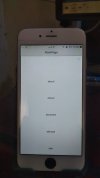
iOS Question Using the PreoptimizedCLV tool, the background appears transparent in b4a But it does not appear in b4i

AlfaizDev

Well-Known Member
Licensed User
Longtime User
Using the PreoptimizedCLV tool, the background appears transparent in b4a
But it does not appear in b4i
How do I make it appear transparent in b4i
As it is in b4a
See pictures in attachments
As well as the project file for modification

 

Attachments

  • 1695019059317.png
    1695019059317.png
    460.9 KB · Views: 289
  • photo_2023-09-18_09-38-44.jpg
    photo_2023-09-18_09-38-44.jpg
    43 KB · Views: 258
  • PCLV_Example.zip
    366.9 KB · Views: 242
Solution
Add this:
B4X:
PCLV.Initialize(Me, "PCLV", CustomListView1)
CustomListView1.AsView.Color = xui.Color_Transparent '<-----

And make sure that the background color in Item layout is transparent.
Tip: you don't need this designer script. Use anchors instead. Simpler and better.

AlfaizDev

Well-Known Member
Licensed User
Longtime User
Thank you

I'm not used to the anchors method yet
But I'll give it a try
 
Upvote 0
Top