

amir hosein
Member
Hello everyone
I am making a program in B4J to show the volume of a Liquid TANK in Graphical shape like a Tank Fuel . (above ground)
Every time I receive the Data I should show it like the following picture :
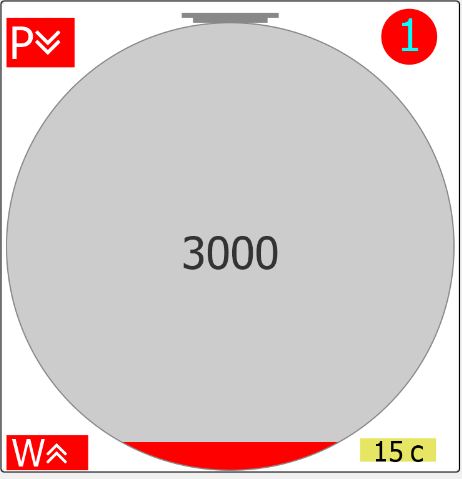
but it doesn't draw full and I should refresh it again after drawing . The drawing always is defective and doesn't show a complete shape of a round Tank .
The first drawing is as follow :
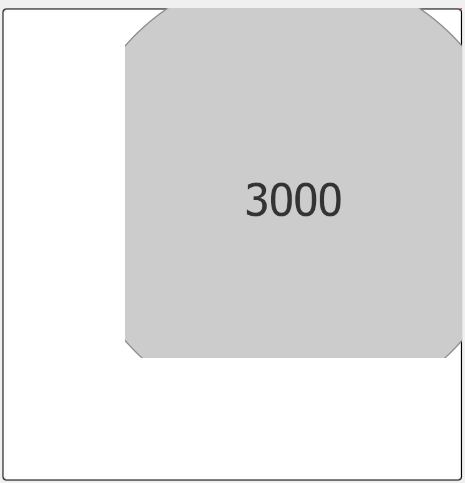
My code for drawing this shape is as follow :
the draw segment :
and the show sub is as follow :
I am drawing on multiple pane (for more than 1 Tank) with a canvas . the code to refresh Tanks is as follow :
Does anyone have any Idea ?
I appreciate your constructive feed back .
Thanks
I am making a program in B4J to show the volume of a Liquid TANK in Graphical shape like a Tank Fuel . (above ground)
Every time I receive the Data I should show it like the following picture :
but it doesn't draw full and I should refresh it again after drawing . The drawing always is defective and doesn't show a complete shape of a round Tank .
The first drawing is as follow :
My code for drawing this shape is as follow :
the draw segment :
Draw Segment:
private Sub drawSegment(cx As Int , cy As Int , r As Short ,xper As Float, color As Int)
    Dim dia As Short = r*2
    Dim rt As Int = r + 1dip 'stroke width
    Dim p As B4XPath
    p.Initialize(cx - rt, cy - rt + ((100-xper)*dia/100) )
    p.LineTo(cx + rt, cy - rt + ((100-xper) *dia/100))
    p.LineTo(cx + rt, cy+rt)
    p.LineTo(cx - rt, cy+rt)
'    Sleep(0)
    cvs.ClipPath(p)
    cvs.DrawCircle(cx, cy, r, color, True, 1dip)
    cvs.RemoveClip
    cvs.DrawCircle(cx, cy, r, xui.Color_Gray, False, 1dip)
    Sleep(0)
End Sub
and the show sub is as follow :
B4X:
Sub show_tank(pan As B4XView , cx As Int , cy As Int , r As Short , percent As Float ,vol As Int, num As Byte ,ft As Byte , pErr As Byte,wErr  As Byte , temp As Float)
    Dim top As B4XRect
    Dim topDoor As B4XRect
    Dim tankNum As B4XRect
    Dim tankERR As B4XRect
    Dim tankErrWat As B4XRect
    Dim tankTemp As B4XRect
    Dim frameRect As B4XRect
    Dim errTextOff As Byte = -10
    Dim font As B4XFont=xui.CreateFontAwesome(r/5)
    Dim errFont As B4XFont= xui.CreateFontAwesome (r/6)
    Dim tempFont As B4XFont = xui.CreateFontAwesome (r/8)
    Dim color As Int
    Dim r_col , g_col, b_col As Short
    Dim captionColor As Int
    Dim textsize As B4XRect
    If percent=0 Then percent=1.0
    If percent>100.0 Then percent=100.0
    top.Initialize(cx-r/6,cy-r-5,cx+r/6,cy-r)
    topDoor.Initialize(cx-(r/5)-3,cy-r-8,cx+(r/5)+3,cy-r-4)
    textsize=cvs.MeasureText(num,font)
'    Sleep(0)
    frameRect.Initialize(cx-r-1 , cy-r-10 , cx+r+1 , cy+r+2)
    tankNum.Initialize(cx+r-textsize.Width*2,cy-r-textsize.Height/2,cx+r,cy-r+textsize.Height)
    textsize=cvs.MeasureText("W+ " ,errFont)
    tankERR.Initialize(cx-r,cy-r-topDoor.Height-10,cx-r+textsize.Width,cy-r+textsize.Height)
    textsize=cvs.MeasureText("W+ " ,font)
    tankErrWat.Initialize(cx-r,cy+r-textsize.Height-2,cx-r+textsize.Width,cy+r)
    textsize=cvs.MeasureText("-15",tempFont)
    tankTemp.Initialize(cx+r-textsize.Width-r/4 , cy+r-textsize.Height-r/20,cx+r+textsize.Width-r/4,cy+r-r/26)
    cvs.DrawCircle(cx, cy, r, xui.Color_LightGray, True, 1dip)
    Sleep(0)
    ' some correctness for printing the Error Text
    If r>400 Then
        errTextOff=10
    else If r>350 Then
        errTextOff=6
    else If r>320 Then
        errTextOff=2
    else if r>250 Then
        errTextOff=3
    else if r>200 Then
        errTextOff=-3
    else if r>150 Then
        errTextOff=-5
    End If
'    Sleep(0)
    ' changing color of filling based on Fuel type
    Select ft
        Case 0            ' gasoline
            color=xui.Color_Red
        Case 1            ' premium
            color=xui.Color_Green
        Case 2            ' gasoil
            color=xui.Color_Yellow
        Case 3            ' euro4
            color=xui.Color_Blue
    End Select
    ' calling the draw segment
    drawSegment(cx,cy,r ,percent , color)
    cvs.DrawRect(top,xui.Color_Gray ,True,1)
    cvs.DrawRect(topDoor,xui.Color_Gray,True,1)
    ' print volume text or percent on the center of the tank
    If percent<45 Then
        b_col=Bit.And(xui.Color_LightGray,0xff)
        g_col=Bit.And(Bit.ShiftRight(xui.Color_LightGray,8),0xff)
        r_col= Bit.And(Bit.ShiftRight(xui.Color_LightGray,16),0xff)
        captionColor=xui.Color_RGB(255-r_col,255-g_col,255-b_col)
        If showPercent Then
            cvs.DrawText("%" & Round( percent),cx,cy+r/10,xui.CreateFontAwesome(r/5 ) ,captionColor,"CENTER")
        Else
            cvs.DrawText(vol,cx,cy+r/10,xui.CreateFontAwesome(r/5 ) ,captionColor,"CENTER")
        End If

    Else
        b_col=Bit.And(color,0xff)
        g_col=Bit.And(Bit.ShiftRight(color,8),0xff)
        r_col= Bit.And(Bit.ShiftRight(color,16),0xff)
        captionColor=xui.Color_RGB(255- (r_col),255-(g_col),255-(b_col))
        If showPercent Then
            cvs.DrawText("%" & Round( percent),cx,cy+r/10,xui.CreateFontAwesome(r/5 ) ,captionColor,"CENTER")
        Else
            cvs.DrawText(vol,cx,cy+r/10,xui.CreateFontAwesome(r/5 ) ,captionColor,"CENTER")
        End If
    End If
    Sleep(0)
    ' print Tank number   Chr(0xF102)
    b_col=Bit.And(color,0xff)
    g_col=Bit.And(Bit.ShiftRight(color,8),0xff)
    r_col= Bit.And(Bit.ShiftRight(color,16),0xff)
    captionColor=xui.Color_RGB(255-(r_col),255-(g_col),255-(b_col))
    Dim tankNumLocX As Double= cx+r-r/5
    cvs.DrawCircle(tankNumLocX, cy-r+r/16, r/8, color, True, 1dip)
    cvs.DrawText(num,tankNumLocX,cy-r+r/8,xui.CreateFontAwesome(r/5) ,captionColor,"CENTER")
    ' print Product Error
    If pErr<>0 Then
        textsize=cvs.MeasureText("P+ " ,errFont)
        tankERR.Top= cy-r-topDoor.Height
        tankERR.Height=cy-r+textsize.Height
        cvs.DrawRect(tankERR,xui.Color_Red,True,1)
        Select pErr
            Case PROD_VL
                cvs.DrawText("P" & Chr(0xF103) ,cx-r+tankERR.CenterX-tankERR.Width/6 , cy-r+tankERR.CenterY+errTextOff,font ,xui.Color_White,"CENTER")
            Case PROD_L
                cvs.DrawText("P" & Chr(0xF107),cx-r+tankERR.CenterX-tankERR.Width/6 ,cy-r+tankERR.CenterY+errTextOff,font ,xui.Color_White,"CENTER")
            Case PROD_H
                cvs.DrawText("P" & Chr(0xF106),cx-r+tankERR.CenterX-tankERR.Width/6 ,cy-r+tankERR.CenterY+errTextOff,font ,xui.Color_White,"CENTER")
            Case PROD_VH
                cvs.DrawText("P" & Chr(0xF102),cx-r+tankERR.CenterX-tankERR.Width/6 ,cy-r+tankERR.CenterY+errTextOff,font ,xui.Color_White,"CENTER")
        End Select
    Else
        textsize=cvs.MeasureText("P+ " ,errFont)
        tankERR.Top= cy-r-topDoor.Height        ',cx-r+textsize.Width,cy-r+textsize.Height
        tankERR.Height=cy-r+textsize.Height+3
        cvs.DrawRect(tankERR,pan.Color,True, 1)
    End If
    If wErr<>0 Then
        cvs.DrawRect(tankErrWat,xui.Color_Red,True,1)
        If wErr=WAT_H Then     ' water high
            cvs.DrawText("W" & Chr(0xF106),cx-r+tankErrWat.CenterX-tankErrWat.Width/6 ,cy+r-3,errFont ,xui.Color_White,"CENTER")
        Else        ' water very high
            cvs.DrawText("W" & Chr(0xF102),cx-r+tankErrWat.CenterX-tankErrWat.Width/6 ,cy+r-3,errFont ,xui.Color_White,"CENTER")
        End If
    Else
        cvs.DrawRect(tankErrWat,pan.Color,True, 1)
    End If
    ' showing temperature in the right-down side of the circle
    Dim strTemp As String = NumberFormat( temp , 2 , 0)
    strTemp = strTemp & " c"
    Try
        cvs.DrawRect(tankTemp,xui.Color_RGB(230,230,100),True,0)
        cvs.DrawText(strTemp ,tankTemp.CenterX ,tankTemp.CenterY+tankTemp.Height/2, tempFont ,xui.Color_Black,"CENTER")
    Catch
        Log(LastException)
    End Try
    If showFrame Then
        cvs.DrawRect(frameRect,xui.Color_Black,False , 1)
    End If
End Sub
I am drawing on multiple pane (for more than 1 Tank) with a canvas . the code to refresh Tanks is as follow :
B4X:
Sub showAllTanks()
    Dim p(6) As Pane= Array As Pane (pan1 , pan2 , pan3,pan4,pan5,pan6)
    Dim tankX , tankY As Short
'    Dim rect As B4XRect
'    Dim canvas As B4XCanvas
    Dim tmpNode As B4XView
    Dim ft(6) As Byte = Array As Byte (0 , 1 , 2, 3 , 3 , 0)
    Dim vol As Int
    Dim per As Float
    Dim tmp As Float
    Dim pe As Byte
    Dim we As Byte
    Dim tn As Byte
    Dim NoTn As Byte = myStations(curStationNumber).NoTanks
    Log("NoTanks:" & NoTn)
    For n=0 To 5
        tmpNode = p(n)
        tmpNode.Color = xui.Color_White     ' to change color of pane
        Sleep(0)
        tmpNode.RemoveAllViews            ' this is very important
        Sleep(0)
    Next
    For n=0 To NoTn-1
        p(n).SetLayoutAnimated(0,tankLoc(n).left , tankLoc(n).top , tankLoc(n).width , tankLoc(n).height)
        Sleep(0)
'        p(n).Visible = True
        cvs.Initialize(p(n))
        Sleep(0)
        cvs.Resize(p(n).Width , p(n).Height)
        Sleep(0)
        Tanks(n).fuelType = ft(n)
        tankX=p(n).Width/2            'rad/2+Pane1.Left
        tankY=p(n).Height/2+8                        'rad/2+Pane1.Top+10
        vol = myStations(curStationNumber).Tanks(n).volume
        per = myStations(curStationNumber).Tanks(n).percent
        ft(n) = myStations(curStationNumber).Tanks(n).fuelType
        pe = myStations(curStationNumber).Tanks(n).prodErr
        we = myStations(curStationNumber).Tanks(n).watErr
        tn = myStations(curStationNumber).Tanks(n).tankNumber
        tmp = myStations(curStationNumber).Tanks(n).temp
        show_tank(p(n),tankX,tankY ,rad , per , vol, tn ,ft(n),pe , we , tmp)
        p(n).Tag = n+1
        Sleep(0)
    Next
    msgInfoShowed=False
    tanksArrenged = True
    ledData(0).SetValue(False)
End Sub
Does anyone have any Idea ?
I appreciate your constructive feed back .
Thanks


