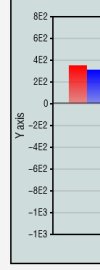
B4J Question xChartLite YValue display issue

feng

Member

Attachments

  • 2026-02-05_173552.jpg
    2026-02-05_173552.jpg
    23.5 KB · Views: 15
  • 2026-02-05_173648.jpg
    2026-02-05_173648.jpg
    9 KB · Views: 11

Chris2

Active Member
Licensed User
Longtime User
I think you need to set the MaxDigits property.
  • MaxDigits As Int
    Gets or sets the MaxDigits property
    Number of digits of the displayed values
    Values between 6 and 10
    Default value = 6
    Examples for 6 digits: 1.23456 / 12.3456 / 1234.56 / 123456 / 1.2E10
    Examples for 8 digits: 1.2345678 / 12.345678 / 1234.5678 / 12345678 / 1.2345E10
 
Upvote 0

teddybear

Well-Known Member
Licensed User
[B4X] [XUI] xChartLite b4xlib
https://www.b4x.com/android/forum/threads/b4x-xui-xchartlite-b4xlib.140197/
I downloaded the example file, and when I ran it, there was an issue with the Y value.
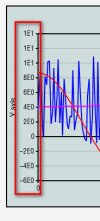
Indeed, there is a bug in the library version 1.8 @klaus , the mMaxDigits is not declared, and the MaxDigits and TextFont of the Values are not initialized.
1. Adding the existing module xChartLite is from the example, its version is 1.4.
2. Or Using the library which I modified, and I have added comments for that.
 

Attachments

  • xChartLite0205.b4xlib
    21.3 KB · Views: 2
Last edited:
Upvote 0
Top