Android Tutorial [Linux] [B4X] Wine Installer

📦 Install B4A+B4J on Linux Mint using Wine with a single silent script​


GitHub: https://github.com/pyhoon/b4x-wine-installer
Screenshot1.png
Screenshot2.png


Files:
  1. install_b4x_wine.sh
  2. uninstall_b4x_wine.sh
  3. configure_b4x_settings.sh
  4. README.md
Archived:
  1. install_b4a_wine.sh
  2. install_b4j_wine.sh
  3. uninstall_b4a_wine.sh
  4. uninstall_b4j_wine.sh
  5. configure_b4a_settings.sh
  6. configure_b4j_settings.sh
  7. repair_b4a_launcher.sh
  8. repair_b4j_launcher.sh
The script is modified from the combination of B4A Wine Installer and B4J Wine Installer script generated by AI (Qwen3.6-Plus chat)
Using a single wine prefix saved you 3GB+ of diskspace.

Disclaimer: I haven't really fully tested it. Use it at your own risk.

🚀 How to use​

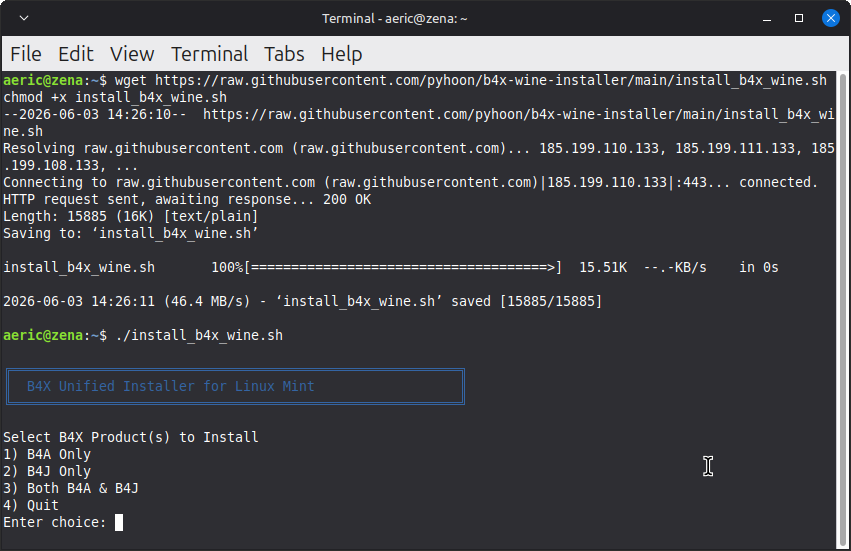
Just 3 lines of commands (You can copy and paste in one go).
Bash:
wget https://raw.githubusercontent.com/pyhoon/b4x-wine-installer/main/install_b4x_wine.sh
chmod +x install_b4x_wine.sh
./install_b4x_wine.sh

⚠️ Note / Reminder​

  1. When you double-click on a launcher (desktop icon), Linux Mint will prompt you to choose "Launch Anyway" or "Mark Executable". Choose the latter so it won't ask you again.
  2. Remember to comment the #CustomBuildAction: folders ready for RoboCopy.exe or Shared Files
  3. Even if you have run "configure_b4a_settings.sh", B4A still pops up asking you to set the Paths, just click "Ok" to save the settings.
  4. Make sure you have deleted old scripts and you are not downloaded the new script which renamed to .sh1 extension. Otherwise you are not executing the new script.

🤝 Contributing​

Found an issue or have an improvement?
  1. Fork the repository
  2. Create a feature branch
  3. Submit a Pull Request

🙏 Credits​

Special thanks to B4X members who have contributed tutorial/guides in the past so that AI could use them as references to assist me to generate this script.
@Mihai Rainer Jr. @walt61 @Raboebie

📄 License​

MIT License - See LICENSE file for details.
 

Attachments

  • Screenshot3.png
    Screenshot3.png
    87.8 KB · Views: 46
Last edited:

aeric

Expert
Licensed User
Longtime User
Fixed some bugs and added Note/Reminder section on first post.
 

walt61

Well-Known Member
Licensed User
Longtime User
WOW, brilliant, very smooth! I ran it again in a Linux Mint 22.3 Cinnamon 64-bit VM in VirtualBox and everything seems to work fine.

One hiccup: files configure_b4a_settings.sh, configure_b4j_settings.sh, and uninstall_b4x_wine.sh weren't downloaded by the script (and it does refer to them at the end - and they're very useful).

A couple of suggestions:
- if the script would ask the user which environment(s) to install (B4A, B4J, or B4X), it would become a 'one size fits all' and you'd only need to maintain one script if changes were needed
- somehow let the user decide which paths to use for java, Android SDK, additional libraries, projects; perhaps just mention that to do this, the relevant variables' values can be changed at the top of the script before running it (in that case, all of these folders must have corresponding variables)
 

aeric

Expert
Licensed User
Longtime User
One hiccup: files configure_b4a_settings.sh, configure_b4j_settings.sh, and uninstall_b4x_wine.sh weren't downloaded by the script (and it does refer to them at the end - and they're very useful).
These are optional scripts. I have tested and all these files were downloaded successfully using the commands in the README.md.

A couple of suggestions:
The repo is open source. I welcome anyone to improve it or modify the script for their personal preferences.
 

aeric

Expert
Licensed User
Longtime User
A couple of suggestions:
- if the script would ask the user which environment(s) to install (B4A, B4J, or B4X), it would become a 'one size fits all' and you'd only need to maintain one script if changes were needed
- somehow let the user decide which paths to use for java, Android SDK, additional libraries, projects; perhaps just mention that to do this, the relevant variables' values can be changed at the top of the script before running it (in that case, all of these folders must have corresponding variables)
I don't fully understand what this paragraph means so I just throw it to Qwen to "read/think" for me.

The script is now refactored and updated with some improvement.
  1. ✅ Interactive/CLI product selection (B4A, B4J, or Both)
  2. ✅ Configurable paths via editable variables at the top (override-friendly)
 
Last edited:

aeric

Expert
Licensed User
Longtime User
A lot of bugs has been fixed and all scripts are now more interactive.
  • 1 script to install B4A, B4J or both.
  • 1 script to configure B4A, B4J or both.
  • 1 script to uninstall B4A, B4J, both or the entire prefix.
screenshot3-png.171747
 
Top