
Share My Creation B4XCopilot - A.I. Assistant

Introducing B4X Copilot: Harness the Power of AI in Your B4X IDE

logo.png


B4X Copilot is an inofficial external tool completely written in B4J, designed to integrate the most common AI (GPT, Claude, Gemini) advanced language model capabilities into your B4X programming environment. Whether you're coding in B4A, B4J, or B4i, B4X Copilot offers smart, AI-driven features to enhance your coding efficiency and quality.


Key Features of B4X Copilot:
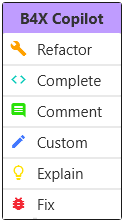
  • Code Refactoring: Enhance your existing code with our intelligent refactoring tools. B4X Copilot reviews your code, suggesting optimizations to improve both performance and readability.
  • Code Completion: Leveraging comments within your code, B4X Copilot predicts and completes your code snippets automatically. Simply begin a comment and B4X Copilot will seamlessly convert your thoughts into precise, functional code.
  • Automated Commenting: Maintain clarity within your codebase with auto-generated comments. B4X Copilot provides insightful explanations for complex code sections, simplifying project navigation and maintenance.
  • Custom Prompt: Directly instruct the AI by describing exactly what you need. Just tell B4X Copilot what to do, and it will execute your commands intelligently.
  • Code Explanation: Revisit your code with confidence. B4X Copilot offers clear, understandable explanations for any part of your code, aiding both you and your team in managing your projects effectively.
  • Fix Code: B4X Copilot not only identifies issues within your code but also corrects them. After making changes, it provides a detailed explanation of what was modified and why, ensuring you understand the adjustments and can learn from them.


Requirements:

Used Models:

Installation Guide:

1. Download B4XCopilot.zip and unzip it and start it with the B4xCopilot.exe.
3. Right-click the tray icon to access settings. Here, you can configure your preferred language, IDE, A.I. Provider, API Key and shortcut.

To change the shortcut use the KeyCodes and seperate them with a &. for example "29&61" for Ctrl+F2. The settings screen will show you the current keycode of the pressed key.
Standard Value is 29&43 for `Ctrl+circumflex (Ctrl+^)`.


Usage:
1. Highlight the code section you need assistance with and press the key combination: `Ctrl+circumflex (Ctrl+^)`.
2. A context menu will appear with all available functions. Select the desired function and wait for the operation to complete.
1720089497164.png


Important Note: While B4X Copilot is designed to enhance your coding experience, it's important to note that due to the relatively lower popularity of the B4X language, it may not be as comprehensively supported in the AI's model. This could lead to occasional inaccuracies in code suggestions and comments. Always review the AI's contributions to ensure they meet your project's requirements.

@Erel may be able to integrate this natively into the IDEs. I am at your disposal for help ;-)

Changelog 1.1
- Adds "Fix" Method (experimental)
- Adds option to change the shortcut

Changelog 1.2
- Nicer contextmenu
- Adds Anthropic Claude and Google Gemini as possible A.I.

Download v1.2
If you want to support my work, please consider a small donation here

 
Last edited:

Blueforcer

Well-Known Member
Licensed User
Longtime User
That means... you can update your tool with cli.. copy code and paste to a jshell prompt cli... also with the new feature coming from Erel ..codesync will change everything!!
oh nice didnt saw the codesync feature announcement..
 

Blueforcer

Well-Known Member
Licensed User
Longtime User
@Blueforcer
can you share what model worked best for you (at free)...
and some tips working with cli
Gemini 3 (flash) is my all day LLM. At heavy work or problems im switching Gemini 3 pro. Just use it like a coworker ;). Im currently writing a gemini cli skill wich handles the work in B4X a bit better. For further discussions we should open a new thread in "chit-chat"
 

Blueforcer

Well-Known Member
Licensed User
Longtime User
coworker - what is - and how ?
I mean, just like your colleague at work, just tell him what to do and he'll figure it out. The more information you give him at the start (e.g., look in XYZ.bas and fix this and that), the better.
 

Magma

Expert
Licensed User
Longtime User
- You mean be more specific - what 2 do...

- found something - using settings.json (At windows) from users/%userfolder%/.gemini/settings.json you can set some more settings (like mcp server, or how to compile fast to check if something works)
B4X:
{
  "mcpServers": {
    "slackCoworker": {
      "command": "python",
      "args": ["slack_mcp.py"]
    }
  }
}
 

cheveguerra

Member
Licensed User
Longtime User
If you are using Gemini or ChatGPT via CLI to analyze your project, I highly recommend creating a file named 00_instructions.txt in your source folder.

Most CLI tools read files in alphabetical order. By naming it 00_, you ensure the AI reads your "Rules of Engagement" before it processes any code. This "Sequential Priming" significantly reduces hallucinations and prevents the AI from suggesting Java-style code that won't work in B4A.

B4X:
''' ======================================================================================
''' CRITICAL INSTRUCTIONS FOR THE AI ASSISTANT (B4A PROTOCOL)
''' 1. CONTEXT: This project is developed in B4A (Basic4android).
''' 2. ANTI-HALLUCINATION: Before suggesting properties, methods, or syntax, you MUST
'''    VERIFY if they exist in the current project's [Global Variables] or [Types] definitions.
''' 3. EXTERNAL DOCUMENTATION:
'''    - IF files with names containing "Library" or "Reference" are provided, PRIORITIZE those definitions over your general knowledge.
'''    - Use these files as the "Source of Truth" for B4A classes and methods.
'''    - IF NO references are provided, rely strictly on the existing code within the project modules.
''' 4. SCOPE & SYNTAX:
'''    - Strictly respect Public/Private visibility.
'''    - B4X is case-insensitive; maintain consistency but do not treat case as a difference.
'''    - Avoid suggesting Java or VB.NET specific syntax unless it is native to B4X.
''' ======================================================================================

For the part of External Documentation:

To make this even more powerful, I also include a second reference file containing the definitions of the internal B4A libraries (Core, SQL, OkHttp, etc.).

Since IAs are heavily trained on native Android (Java), they often try to suggest native Java methods. By providing a "Library Context" file, the AI is forced to follow the instruction: "PRIORITIZE those definitions over your general knowledge."

This ensures that:
  • The AI only suggests methods that actually exist in B4A.
  • It respects Read-Only [Prop:R] properties, preventing it from suggesting code that won't compile.
  • It follows the exact B4X syntax for events and objects instead of generic Java/Android alternatives.
Make sure your reference files have 'Library' or 'Reference' in their filename so the AI can easily link them to Rule #3 of the instructions.

It’s the difference between an AI that just "reads your code" and an AI that actually "knows how to program in B4A".

Since my english is not that good, this message was mostly written by Gemini, so if you see a lot of formality and "I am too good to be true", then it is not my fault!! 🤪
 

Attachments

  • _B4X_Librerias_Internas_para_ayuda_IA.zip
    93.2 KB · Views: 31
Last edited:

Blueforcer

Well-Known Member
Licensed User
Longtime User
Gemini handles B4X extremely well. I've never had real problems with it, and it never uses native Java unless B4A doesn't support a function natively and then it uses perfect inline java. Most of the system prompt is standard procedure, which Gemini already knows.

I work on my 85k lines of B4A code every day with Gemini. I also tried GPT Codex 5.3 and Claude Opus 4.6 for several days and burned millions of tokens in testing. Gemini is currently one of the best LLMs for B4X in my opinion.
For example, I "vibe coded" a complete B4A HTTP Server from scratch with upload and websocket support, with zero intervention, it runs at the first start perfectly.

Anyway, your system prompt is a good starting point. BUT:

The internal library context will burn your tokens like crazy (calculated 584.088 Tokens wich results in $5,58 with the first promt using opus 4.6 and $2,36 with gemini 3 pro as an example )
where most of the informations are not needed. You should spin up an agent or skill for an intelligent search function to minimize input tokens. Also it's better to use markdown files instead of txt. There are lot of characters wich are unnecessary.
 
Last edited:

cheveguerra

Member
Licensed User
Longtime User
Gemini handles B4X extremely well. I've never had real problems with it, and it never uses native Java unless B4A doesn't support a function natively and then it uses perfect inline java. Most of the system prompt is standard procedure, which Gemini already knows.

I work on my 85k lines of B4A code every day with Gemini. I also tried GPT Codex 5.3 and Claude Opus 4.6 for several days and burned millions of tokens in testing. Gemini is currently one of the best LLMs for B4X in my opinion.
For example, I "vibe coded" a complete B4A HTTP Server from scratch with upload and websocket support, with zero intervention, it runs at the first start perfectly.

Anyway, your system prompt is a good starting point. BUT:

The internal library context will burn your tokens like crazy (calculated 584.088 Tokens wich results in $5,58 with the first promt using opus 4.6 as an example )
where most of the informations are not needed. You should spin up an agent or skill for an intelligent search function to minimize input tokens. Also it's better to use markdown files instead of txt. There are lot of characters wich are unnecessary.

So, the part of the prompt is "probably" helpful, but the external library not so good??

When you say "burned millions of tokens" ... how much (in $$) was that?? 😅
 

Blueforcer

Well-Known Member
Licensed User
Longtime User
I really don't recommend using the external library context. If needed, give Gemini a little help with a short example.

For my testing, I started with a standard $20 subscription each, which I pushed pretty fast to the usage limit because I spun up multiple agents in a defined coding orchestra, so I used the API for further processing. All in all, I spent around $160 in 5 days 😅
 

Magma

Expert
Licensed User
Longtime User
well start using gemini cli.. seems works better than claude...

how can i be more specific what will fix,optimize for me... some times saying to it fix one sub and changing a lot...

also how can i go a step back.. is it have history? .. also if go back returns tokens? 😉
 

Blueforcer

Well-Known Member
Licensed User
Longtime User
well start using gemini cli.. seems works better than claude...

how can i be more specific what will fix,optimize for me... some times saying to it fix one sub and changing a lot...

also how can i go a step back.. is it have history? .. also if go back returns tokens? 😉
Just write your promt more specific :) Promt engineering is everything in vibe coding.
You dont have a history, you should review the changes gemini wants to make before accepting.
You can tell gemini to just undo the last changes, of course it uses also tokens.
 

Mashiane

Expert
Licensed User
Longtime User
Greetings...

I have been swapping between Antigravity (renews tokens on average of 30 minutes to 2 days on my subscription when i finish them), OpenCode : Kimi 2.5 Free (come tomorrow after token expiry) and now CodeX (this has not expired as yet). All have their strengths and weaknesses, At least im able to access my working folders and chat with the tools to do 1,2,3. Managed to get Gemini CLI installed yesterday and will check it out today. Thanks for the heads up.

1770980290983.png


1770980171884.png
 

cheveguerra

Member
Licensed User
Longtime User
well start using gemini cli.. seems works better than claude...

how can i be more specific what will fix,optimize for me... some times saying to it fix one sub and changing a lot...

also how can i go a step back.. is it have history? .. also if go back returns tokens? 😉
If you feel the CLI is getting too 'creative' and changing things it shouldn't, just ask Gemini or ChatGPT to write the prompt for you.

You can tell it something like this:

'I need to modify [this specific Sub] in B4X to do [X task]. Write a prompt for Gemini CLI that is extremely specific, strictly forbids it from touching any other part of the code, and ensures it only outputs the modified block.'
It's much easier to let the AI talk to the AI. This way, you get the surgical fix you need without the 'collateral damage' in the rest of your module.

I know it sounds a bit silly, but it's much easier to ask the AI for a prompt first. Once you see how it builds them, you'll start realizing exactly 'what' and 'how' to ask for things yourself.

You can also ask the IA to explain WHY that prompt works!! ;)
 
Last edited:
Top