
Android Question "Clean project", but with exceptions

Filippo

Expert
Licensed User
Longtime User
Hi,

I want to archive my project after it has compiled successfully, keeping only the most important files.

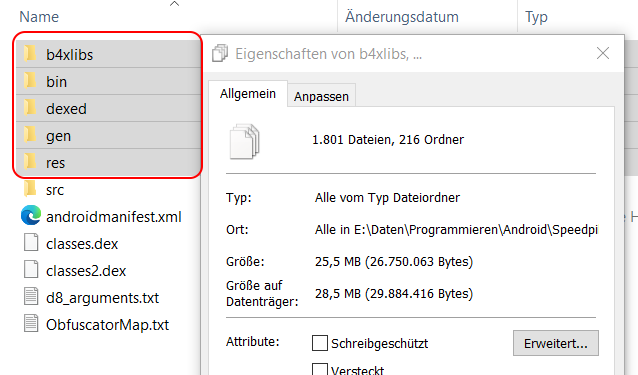
Here's an example:
I want to keep only the files from the “src” directory, as they are necessary for debugging.

1779720958514.png


All the files in these folders marked in red can be deleted. In this example, that alone saves me 25 MB.
The “Clean project” function deletes everything, but I want to keep the data in the “src” folder.
Is there already a ready-made solution I could use, or do I have to create one myself?
1779720973090.png
 
Solution
A simple solution:
B4X:
#Macro: Title, Clean & Copy Src, ide://run?File=%WINDIR%\System32\Robocopy.exe&args=src&args=..\SavedSrc&args=/MIR&CleanProject=True

It will copy Objects\Src to MySrc folder and then clean the project.
You can remove the /MIR flag and it will then only copy files. With the /MIR flag it deletes files that no longer exist. The downside is that if the Src folder is empty it will also delete MySrc files.

Filippo

Expert
Licensed User
Longtime User
Don't delete those folders after each compilation. The compiler reuses them when it can and it saves some compilation time.
I only want to delete the project once the app is ready to be uploaded (to Google Play or the App Store).
That's why I just need a tool like “Clean project”, but one that doesn't delete the contents of the “src” folder.

Right now, here's what I do: after compiling, I move the APK file and the “ObfuscatorMap.txt” file to a separate folder and run the “Clean project” tool. But that also deletes the contents of the “src” folder, which is a problem when it comes to debugging later on.
 
Upvote 0

Erel

B4X founder
Staff member
Licensed User
Longtime User
A simple solution:
B4X:
#Macro: Title, Clean & Copy Src, ide://run?File=%WINDIR%\System32\Robocopy.exe&args=src&args=..\SavedSrc&args=/MIR&CleanProject=True

It will copy Objects\Src to MySrc folder and then clean the project.
You can remove the /MIR flag and it will then only copy files. With the /MIR flag it deletes files that no longer exist. The downside is that if the Src folder is empty it will also delete MySrc files.
 
Upvote 0
Solution

Filippo

Expert
Licensed User
Longtime User
A simple solution:
B4X:
#Macro: Title, Clean & Copy Src, ide://run?File=%WINDIR%\System32\Robocopy.exe&args=src&args=..\SavedSrc&args=/MIR&CleanProject=True

It will copy Objects\Src to MySrc folder and then clean the project.
You can remove the /MIR flag and it will then only copy files. With the /MIR flag it deletes files that no longer exist. The downside is that if the Src folder is empty it will also delete MySrc files.
Thanks a lot, Erel!
Your solution is simple and effective.
 
Upvote 0
Top