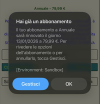
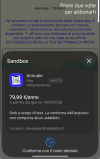
Hi, I'm having trouble testing my app subscription through RevenueCat. I'm not sure which code is the correct one for these two.
If Main.HasPremium Then or If Success Then
If I test with Main.HasPremium it tells me that the subscription is not active, if I test with Success it tells me that it is active
I have a doubt about the code, because in the example
I downloaded, the same code is used to display the existing subscription.
So I'm asking for clarification on the correct code to verify that the subscription is active.
I'm hoping someone can help me, I made another post about RevenueCat a while ago with no response,
I don't think anyone uses RevenueCat or is there another way to do it?
If Main.HasPremium Then or If Success Then
If I test with Main.HasPremium it tells me that the subscription is not active, if I test with Success it tells me that it is active
B4X:
PurchaseHelper.Initialize(Me,"PurchaseHelper",m_API_KEY)
    PurchaseHelper.ProductIndentififer = Array As String("Mesi12") 'The Product identifyer
        Wait For (PurchaseHelper.CheckPurchases) complete (Success As Boolean)
    If Main.HasPremium Then
    If Success Then
I downloaded, the same code is used to display the existing subscription.
B4X:
B4XPages.SetTitle(Me,"RevenueCat Example")

    PurchaseHelper.Initialize(Me,"PurchaseHelper","YourRevenueCatApiKey")
    PurchaseHelper.ProductIndentififer = Array As String("all_access_1_month_lognote","all_access_1_year_lognote") 'The Product identifyer

    Wait For (PurchaseHelper.CheckPurchases) complete (Success As Boolean) 'Must be called at app start, as we check here whether the user has the Premium version
    Log("Do I have a premium version? " & Success)

    Wait For (PurchaseHelper.GetProductsInformation(PurchaseHelper.ProductIndentififer)) complete (lstPurchases As List)

    For Each ProductInfo As ProductInformation In lstPurchases
        'Log(ProductInfo.Tag)
        'Log(ProductInfo.Description)
        CustomListView1.AddTextItem(ProductInfo.Title & " - " & ProductInfo.LocalizedPrice,ProductInfo.ProductIdentifier)
NextI'm hoping someone can help me, I made another post about RevenueCat a while ago with no response,
I don't think anyone uses RevenueCat or is there another way to do it?