Android Question EditText control - set font to Courier New rather than a proportional font.

aedwall

Active Member
Licensed User
Longtime User
I have a moto g 5G (2022) phone that runs my app. On all other devices I have, the font is Courier New. But on this moto phone, the font is proportional, like Arial, and not Courier New (non-proportional. The software is the same, but the display is different. How can I fix this? Thank you.
 

drgottjr

Expert
Licensed User
Longtime User
you should be able to use whatever font you want. download one of your choice or use the various built-in fonts.

B4X:
    typeface1 = Typeface.LoadFromAssets("JMH Typewriter.ttf")
    edittext1.Typeface = typeface1
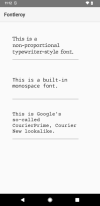
    edittext1.Text = "This is a non-proportional typewriter-style font."
    
    edittext2.Typeface = Typeface.MONOSPACE
    edittext2.Text = "This is a built-in monospace font."
    
    typeface3 = Typeface.LoadFromAssets("CourierPrime-Regular.ttf")
    edittext3.Typeface = typeface3
    edittext3.Text = "This is Google's so-called CourierPrime, Courier New lookalike."
 

Attachments

  • font.png
    font.png
    20.7 KB · Views: 29
Upvote 0

aedwall

Active Member
Licensed User
Longtime User
you should be able to use whatever font you want. download one of your choice or use the various built-in fonts.

B4X:
    typeface1 = Typeface.LoadFromAssets("JMH Typewriter.ttf")
    edittext1.Typeface = typeface1
    edittext1.Text = "This is a non-proportional typewriter-style font."
   
    edittext2.Typeface = Typeface.MONOSPACE
    edittext2.Text = "This is a built-in monospace font."
   
    typeface3 = Typeface.LoadFromAssets("CourierPrime-Regular.ttf")
    edittext3.Typeface = typeface3
    edittext3.Text = "This is Google's so-called CourierPrime, Courier New lookalike."
I think I tried that and b4A did not like ".Typeface". I believe that forced me into using the library called "CustomFonts". Are you saying I don't need that special library? I will try your suggestions and see what happens. Thank you for the ideas presented.
 
Upvote 0

aedwall

Active Member
Licensed User
Longtime User
you should be able to use whatever font you want. download one of your choice or use the various built-in fonts.

B4X:
    typeface1 = Typeface.LoadFromAssets("JMH Typewriter.ttf")
    edittext1.Typeface = typeface1
    edittext1.Text = "This is a non-proportional typewriter-style font."
   
    edittext2.Typeface = Typeface.MONOSPACE
    edittext2.Text = "This is a built-in monospace font."
   
    typeface3 = Typeface.LoadFromAssets("CourierPrime-Regular.ttf")
    edittext3.Typeface = typeface3
    edittext3.Text = "This is Google's so-called CourierPrime, Courier New lookalike."

The above worked, so thank you very much.

Yet this did not work: "CourierPrime-Regular.ttf" - until I changed the font name to all lower case "courierprime.ttf". I don't know why. But I got it to work.
 
Upvote 0
Top