Hi,
I'm having a problem that's driving me crazy!:BangHead:
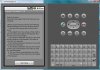
My app is on a 320x480x160 layout, but looks good on a 540x960x240 Motorola Atrix screen.
I have my help file in a text box on a non visible panel. When I click the Help button the panel is made visible and is brought to the front.
When I click End Help the panel disappears (code below).
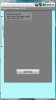
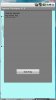
The program runs as designed on a 320x480x160 screen, but on the Motorola screen, emulator and device, the help EditText is resized too small.
Can anyone tell me how to force the textbox to stay as it is sized in the designer?
'---------------------------------------
Sub btnExitHelp_Click
PnlHelp.Visible = False
PnlHelp.SendToBack
End Sub
'---------------------------------------
Sub btnHelp_Click
PnlHelp.Visible = True
PnlHelp.BringToFront
txtHelp.Enabled = False
txtHelp.Text = "Help for Calculations" _
& Chr(10) & "Some stuff." _
& Chr(10) & Chr(10) & "More stuff"
End Sub
I'm having a problem that's driving me crazy!:BangHead:
My app is on a 320x480x160 layout, but looks good on a 540x960x240 Motorola Atrix screen.
I have my help file in a text box on a non visible panel. When I click the Help button the panel is made visible and is brought to the front.
When I click End Help the panel disappears (code below).
The program runs as designed on a 320x480x160 screen, but on the Motorola screen, emulator and device, the help EditText is resized too small.
Can anyone tell me how to force the textbox to stay as it is sized in the designer?
'---------------------------------------
Sub btnExitHelp_Click
PnlHelp.Visible = False
PnlHelp.SendToBack
End Sub
'---------------------------------------
Sub btnHelp_Click
PnlHelp.Visible = True
PnlHelp.BringToFront
txtHelp.Enabled = False
txtHelp.Text = "Help for Calculations" _
& Chr(10) & "Some stuff." _
& Chr(10) & Chr(10) & "More stuff"
End Sub