

Hallo world,
i need to upload a file via FTP to MS Server 2025 with IIS 10.
I am using FTP with explicit SSL.
Logon is working and LIST also but uploading a file gives error 550 Access denied.

The user for sure has all rights, Filezilla and SCP is working fine with same credentials.
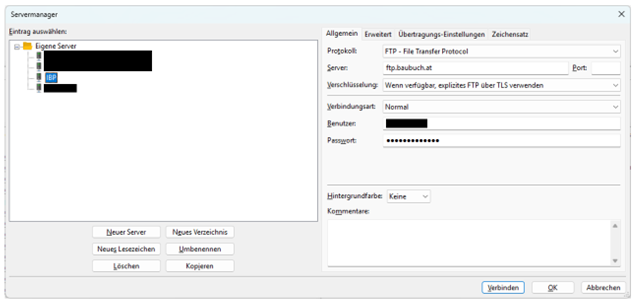
Here are the Filezilla settings:
This is my code using the NET library V1.83 with B4a V13.40
Hope somebody has an idea, maybe i did understand something wrong, or i just do not see my bug after hours.
Thx in advance regards
Georg
i need to upload a file via FTP to MS Server 2025 with IIS 10.
I am using FTP with explicit SSL.
Logon is working and LIST also but uploading a file gives error 550 Access denied.
The user for sure has all rights, Filezilla and SCP is working fine with same credentials.
Here are the Filezilla settings:
This is my code using the NET library V1.83 with B4a V13.40
sendFtp:
public Sub sendFtp
    Try

        If File.Exists( File.DirDefaultExternal, "tempPic.jpg") Then

            Dim ftp As FTP
            ftp.Initialize("ftp", "ftp.baubuch.at", 21, "xxxuserxxx", "xxxpwdxxx")

            ftp.PassiveMode = True
            ftp.UseSSL = False
            ftp.UseSSLExplicit = True
            ftp.TimeoutMs = 6000

            Wait for (ftp.List("/")) FTP_ListCompleted (serverPath As String, Success As Boolean, Folders() As FTPEntry, Files() As FTPEntry)
            If Success = False Then
                Log(LastException)
            Else
                For i = 0 To Folders.Length - 1
                    Log(Folders(i).Name)
                Next
                For i = 0 To Files.Length - 1
                    Log(Files(i).Name & ", " & Files(i).Size & ", " & DateTime.Date(Files(i).Timestamp))
                Next
                Log("FTP Success")
            End If

            Wait For(ftp.UploadFile(File.DirDefaultExternal, "tempPic.jpg", False, "/")) FTP_UploadCompleted(serverPath As String, Success As Boolean)
            If Success Then
                ftp.Close
                Log("Ftp file upload successfully!")
            Else
                ftp.Close
                Log(LastException)
                Return
            End If

        End If

    Catch
        Log("sendFTP: " & LastException)
    End Try
End Sub
Hope somebody has an idea, maybe i did understand something wrong, or i just do not see my bug after hours.
Thx in advance regards
Georg


 !
!

