Hallo und Hilfe 
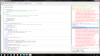
Ich bin sehr neu und habe ein Problem zwar habe ich es geschaft das Programm zu schreiben wie es im Tutorial beschrieben ist, und kann es sogar aufs Tablet übertragen, jedoch gibt es mir eine Fehlermeldung, die ich nicht einortnen kann und keine Ahnung habe was mir der PC damit sagen will. Fals mir jemand helfen könnte währe ich euch sehr verbunden um einen Ratschlag zur Problemlösung.

Das Rote ist denke ich das was nicht Gut ist
Danke viel Mals und noch eine schöne Woche
Ich bin sehr neu und habe ein Problem zwar habe ich es geschaft das Programm zu schreiben wie es im Tutorial beschrieben ist, und kann es sogar aufs Tablet übertragen, jedoch gibt es mir eine Fehlermeldung, die ich nicht einortnen kann und keine Ahnung habe was mir der PC damit sagen will. Fals mir jemand helfen könnte währe ich euch sehr verbunden um einen Ratschlag zur Problemlösung.
Das Rote ist denke ich das was nicht Gut ist
B4X:
#Region  Project Attributes
    #ApplicationLabel: B4A Example
    #VersionCode: 1
    #VersionName:
    'SupportedOrientations possible values: unspecified, landscape or portrait.
    #SupportedOrientations: unspecified
    #CanInstallToExternalStorage: False
#End Region

#Region  Activity Attributes
    #FullScreen: False
    #IncludeTitle: True
#End Region

Sub Process_Globals
    'These global variables will be declared once when the application starts.
    'These variables can be accessed from all modules.
    Dim GPS1 As GPS
End Sub

Sub Globals
    'These global variables will be redeclared each time the activity is created.
    'These variables can only be accessed from this module.

    Dim latitude As Label
    Dim longitude As Label
    Dim speed As Label
    Dim labsate As Label
End Sub

Sub Activity_Create(FirstTime As Boolean)
    'Do not forget to load the layout file created with the visual designer. For example:
    If FirstTime Then
    GPS1.Initialize ("GPS")
    End If
    Activity.LoadLayout ("1")
End Sub
Sub Activity_Resume
If GPS1.GPSEnabled = False Then
        ToastMessageShow ("Please enable the GPS device.", True)
        StartActivity(GPS1.LocationSettingsIntent)
    Else
        GPS1.Start(0,0)
    End If
End Sub

Sub Activity_Pause (UserClosed As Boolean)
GPS1.Stop
End Sub
Sub GPS_LocationChanged (Location1 As Location)
latitude.Text = "Lat = " & Location1.ConvertToMinutes (Location1.Latitude )
longitude.Text = "Lon = " & Location1.ConvertToMinutes (Location1.Longitude )
speed.Text = "Speed = " & Location1.Speed
End Sub
Sub GPS_UserEnebeld (Enabled As Boolean )
ToastMessageShow ("GPS device enabled = " & Enabled, True)
End Sub
Sub GPS_GpsStatus (Satellites As List)
labsate.Text = "Satellites:" & CRLF
For i = 0 To Satellites.size -1
    Dim Satellite As GPSSatellite
    Satellite = Satellites.Get (i)
    labsate.Text = labsate.Text & CRLF & Satellite.Prn & _
        " " & Satellite.Snr & " " & Satellite.UsedInFix  & " " & Satellite.Azimuth _
        & " " & Satellite.Elevation
    Next
End Sub
Danke viel Mals und noch eine schöne Woche