
TECHNIQUE
- Builds a grid from CustomListView rows using nested panels (outer loop = rows, inner loop = cells)
- itemHeight scales automatically from itemWidth via aspect ratio
- Elements centered programmatically (photoLeft, lblHeight)
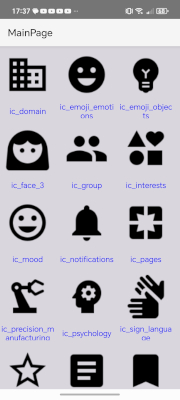
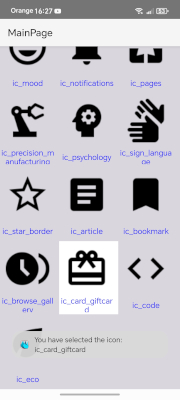
ARCHITECTURE
- MainPage layout contains the CLV; lyItemGrid is the layout for each cell
- Fixed view hierarchy:
pnlCell (dynamic, CreatePanel)
└─[0] pnlBase ← lyItemGrid root
├─[0] ivPhoto
└─[1] lblName
Dim iv As ImageView = pCell.GetView(0).GetView(0)
- pnlCell is the dynamic container that receives the click event
and the visual selection effect (SetColorAnimated)
DATA & LOADING
- Monochrome vector icons loaded from AddResources folder via AndroidResources
- pnlCell.Tag (Map) is the data source: holds the icon name and "loaded" flag
- Lazy loading via CLV1_VisibleRangeChanged
- Memory is not released between views: few images, lightweight vectors
- For larger images, see post 2
NOTES
- Built for B4A (icon selector use case)
- Developed with AI assistance
- Builds a grid from CustomListView rows using nested panels (outer loop = rows, inner loop = cells)
- itemHeight scales automatically from itemWidth via aspect ratio
- Elements centered programmatically (photoLeft, lblHeight)
ARCHITECTURE
- MainPage layout contains the CLV; lyItemGrid is the layout for each cell
- Fixed view hierarchy:
pnlCell (dynamic, CreatePanel)
└─[0] pnlBase ← lyItemGrid root
├─[0] ivPhoto
└─[1] lblName
Dim iv As ImageView = pCell.GetView(0).GetView(0)
- pnlCell is the dynamic container that receives the click event
and the visual selection effect (SetColorAnimated)
DATA & LOADING
- Monochrome vector icons loaded from AddResources folder via AndroidResources
- pnlCell.Tag (Map) is the data source: holds the icon name and "loaded" flag
- Lazy loading via CLV1_VisibleRangeChanged
- Memory is not released between views: few images, lightweight vectors
- For larger images, see post 2
NOTES
- Built for B4A (icon selector use case)
- Developed with AI assistance
Attachments
Last edited:


