iOS Question How to show dialog in a stabil screen width?

Cadenzo

Active Member
Licensed User
Longtime User
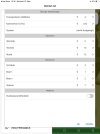
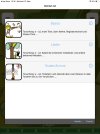
I can't really solve the problem, that dialogs (Custom, PreferencesDialog, ...) in iOS, that should have 95% of screen size are sometimes only a view dips small (see pics 3 and 4). (In B4A there is never this problem.)
This is a B4Xpage project, only portrait mode. So the size should not change, right? I know, that in iOS the width and height is only in B4XPage_Resize correct, so I use this event in many pages, to set the size in a global integer variable (Main.cG.i_Width, Main.cG.i_Heigh). To be save, I do this not only in the Main page and with "Max" I always use the larger one! But anyhow, sometimes I get this small dialogs.

B4X:
Private Sub B4XPage_Resize (Width As Int, Height As Int)
    modH.SetDisplaySize(Width, Height)
End Sub

Sub SetDisplaySize(Width As Int, Height As Int)
    Dim iWidth As Int = Max(Main.cG.i_Width, Width)
    Dim iHeight As Int = Max(Main.cG.i_Height, Height)
    iWidth = Max(iWidth, 100%x)
    iHeight = Max(iHeight, 100%y)
    Main.cG.i_Width = iWidth
    Main.cG.i_Height = iHeight
End Sub

    Dim dlg As B4XDialog : dlg.Initialize(Root) : Dialog = dlg 'global
    Dim p As B4XView = xui.CreatePanel("")
    p.SetLayoutAnimated(0, 0, 0, Main.cG.i_Width * 0.95, Main.cG.i_Width * 0.95)
    p.LoadLayout("viewDlgPackages")
    wait for (dlg.ShowCustom(p, "", "Content...", "Cancel")) Complete (dlgresult As Int)
 

Attachments

  • dlgprob0.jpg
    dlgprob0.jpg
    34.7 KB · Views: 284
  • dlgprob1.jpg
    dlgprob1.jpg
    47.6 KB · Views: 265
  • dlgprob2.jpg
    dlgprob2.jpg
    35.7 KB · Views: 283
  • dlgprob3.jpg
    dlgprob3.jpg
    28.2 KB · Views: 271

ilan

Expert
Licensed User
Longtime User
Sub SetDisplaySize(Width As Int, Height As Int) Dim iWidth As Int = Max(Main.cG.i_Width, Width) Dim iHeight As Int = Max(Main.cG.i_Height, Height) iWidth = Max(iWidth, 100%x) iHeight = Max(iHeight, 100%y) Main.cG.i_Width = iWidth Main.cG.i_Height = iHeight End Sub
you are already referencing the Width and Height from the Resize Event but you dont use them instead you use x% and Y%, why?

B4X:
Sub SetDisplaySize(Width As Int, Height As Int)
    Dim iWidth As Int = Max(Main.cG.i_Width, Width)
    Dim iHeight As Int = Max(Main.cG.i_Height, Height)
    iWidth = Max(iWidth, Width)
    iHeight = Max(iHeight, Height)
    Main.cG.i_Width = iWidth
    Main.cG.i_Height = iHeight
End Sub

try it like this
 
Upvote 0

Cadenzo

Active Member
Licensed User
Longtime User
you are already referencing the Width and Height from the Resize Event but you dont use them
The first line (6) uses the Width, if it is larger than from a previous call. Dim iWidth As Int = Max(Main.cG.i_Width, Width)
Than I only increase iWidth, if "100%x" is larger. I know, that this code looks not very good. Version after version I added something to get rid of this strange behavior in dialogs. But still it is.
instead you use x% and Y%, why?
I did not know, where 100%xy takes its values from in B4i. So it was just another try, after the result, that sometimes (not always) the dialogs are in wrong size. Not instead, but as a "second chance". And with the "Max" it will not change the value of Main.cG.i_Width, if 100% is a smaller value. It is never too large, but still sometimes too small.
Second reason is, that the same Sub should also work in B4A.
 
Last edited:
Upvote 0

Cadenzo

Active Member
Licensed User
Longtime User
B4X:
Sub B4XPage_Appear
    If xui.IsB4A Then Main.cG.i_Height = 100%Y : Main.cG.i_Width = 100%x 'vor allem für Android, weil B4XPage_Resize nicht aufgerufen wird
End Sub
This was the reason! In B4X: "If condition = True Then a = 1 : b = 1" sets b also, if condition is false!! In VB.NET the whole line is executed only if condition is true, which for me is more logical.
 
Upvote 0
Top