
B4J Question IDE Log extra line break with B4J Bridge

aaronk

Well-Known Member
Licensed User
Longtime User
Hi,

I am using the B4J Bridge.

If I run the project it sends the data to my remote server. The project runs fine.

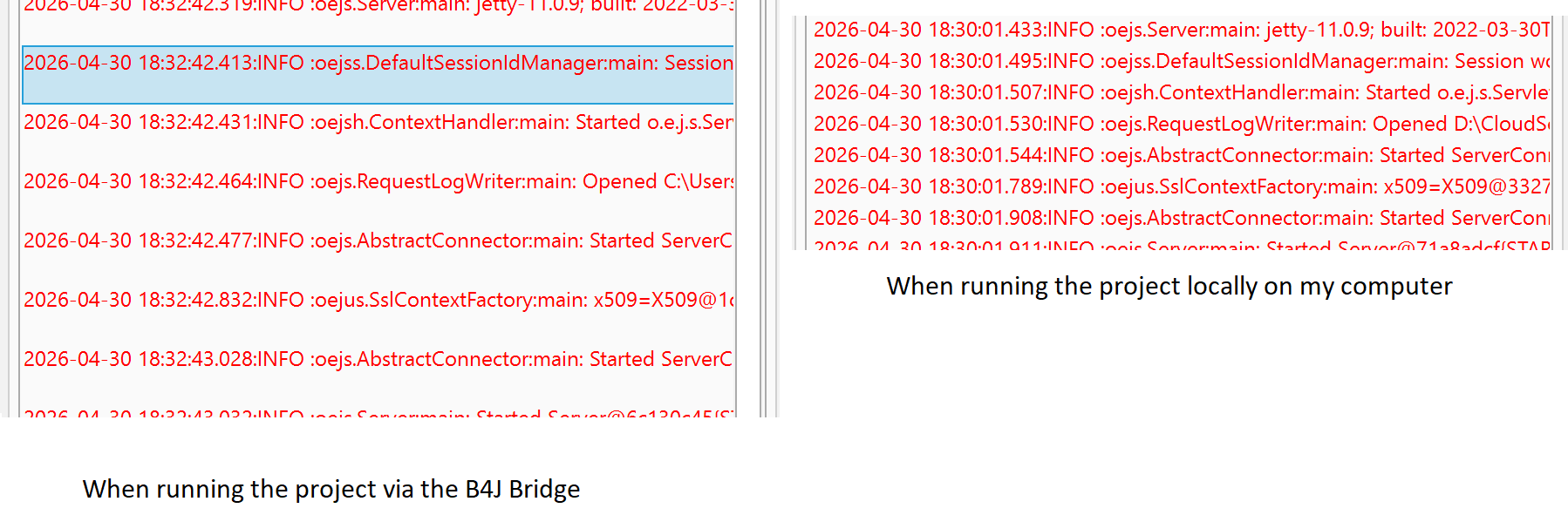
However, in my B4J IDE logs it looks like it's adding a CRLF to the event in the IDE log.

When I run it locally on my computer the IDE logs look fine.

Any ideas on how to make it show like when running it locally without the text line ?

B4J-Bridge v1.61
1777538123811.png
 

aaronk

Well-Known Member
Licensed User
Longtime User
The B4J bridge is running on a remote Windows 10 Enterprise machine. (not a VM).
(B4J-Bridge v1.61)

My B4J IDE is running on my Mac in a VM (Win!0).
B4J IDE Version 10.50 (64 bit)

I just tried on my desktop PC which is Win10 Pro (not a VM) connected to the bridge on the Win10 Enterprise machine and it also has the same issue, so I know it's not related to the B4J running on my VM.

I managed to find the issue in the B4J-Bridge code.
I updated the shl_StdOut & shl_StdErr code in the B4J-Bridge code and it fixed the issue:

B4X:
Sub shl_StdOut (Buffer() As Byte, Length As Int)
    Dim s As String = BytesToString(Buffer, 0, Length, "UTF8")
    s = s.Replace(Chr(13), "")   'remove CR
    Dim b() As Byte = s.GetBytes("UTF8")
    Streams.Write(AddCommandToBytes(STDOUT, b, b.Length))
End Sub

Sub shl_StdErr (Buffer() As Byte, Length As Int)
    Dim s As String = BytesToString(Buffer, 0, Length, "UTF8")
    s = s.Replace(Chr(13), "")
    Dim b() As Byte = s.GetBytes("UTF8")
    Streams.Write(AddCommandToBytes(STDERR, b, b.Length))
End Sub
 
Upvote 0

Erel

B4X founder
Staff member
Licensed User
Longtime User
I've implemented it like this:
B4X:
Sub shl_StdOut (Buffer() As Byte, Length As Int)
    CleanCR(Buffer, Length)
    Streams.Write(AddCommandToBytes(STDOUT, Buffer, Length))
End Sub

Sub shl_StdErr (Buffer() As Byte, Length As Int)
    CleanCR(Buffer, Length)
    Streams.Write(AddCommandToBytes(STDERR, Buffer, Length))
End Sub

Private Sub CleanCR(Buffer() As Byte, Length As Int)
    If Windows Then
        For i = 1 To Length - 1
            If Buffer(i) = 10 And Buffer(i - 1) = 13 Then
                Buffer(i - 1) = 32
            End If
        Next
    End If
End Sub
It replaces the CR character with space. It is a bit more efficient as it avoids converting the bytes to string and back, and it reuses the buffer.
 
Upvote 0
Top