
Here is a global color picker for B4J, capable of capturing the color of any pixel on the screen, even outside the application, thanks to jnativehook-2.2.2.jar.

It includes:
Main features:
Keyboard shortcuts Key Action
The zoom is perfectly centered thanks to:
This small offset corrects the natural JavaFX/Robot offset and ensures that the red cross points exactly to the captured pixel.
The complete code is provided below.
It's self-contained, requires no layout, and can be integrated into any B4J project.
Why share this component?
Because B4J doesn't have a built-in global color picker, and many developers are looking for a solution that is:
This color picker is:
Have fun
It includes:
- an ultra-smooth zoom magnifier
- a pixel grid
- a perfectly aligned central crosshair
- a floating popup that always appears on top
- automatic color copying on click
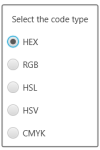
- multiple formats: HEX, RGB, HSL, HSV, CMYK
- activation/deactivation via F8
- closing via ESC
Main features:
- Global mouse capture - Thanks to jnativehook, the picker works even outside the application.
- Zoomed magnifier (150×150 px)
- Clean zoom
- Pixel grid
- Red crosshair in the center
- Perfect alignment of the captured pixel
- Updates every 50 ms
- Borderless
- Always visible
- Displays color + code
- Automatic copy on click
- HEX
- RGB
- HSL
- HSV
- CMYK
Keyboard shortcuts Key Action
- F8 Toggle color picker on/off
- ESC Close color picker
The zoom is perfectly centered thanks to:
B4X:
Dim rx As Int = x - (captureSize / 2) + OffsetX
Dim ry As Int = y - (captureSize / 2) + OffsetY
This small offset corrects the natural JavaFX/Robot offset and ensures that the red cross points exactly to the captured pixel.
The complete code is provided below.
It's self-contained, requires no layout, and can be integrated into any B4J project.
Why share this component?
Because B4J doesn't have a built-in global color picker, and many developers are looking for a solution that is:
- simple
- reliable
- Windows compatible
- with professional zoom
- This component perfectly meets that need.
This color picker is:
- accurate
- fast
- easy to integrate
- pleasant to use
- and above all, 100% B4J + standard Java
Have fun
Attachments
Last edited:


