Share My Creation Powertoys Color Picker clone.

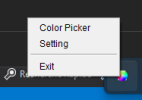
Here is a global color picker for B4J, capable of capturing the color of any pixel on the screen, even outside the application, thanks to jnativehook-2.2.2.jar.

ScreenShot.gif


It includes:
  • an ultra-smooth zoom magnifier
  • a pixel grid
  • a perfectly aligned central crosshair
  • a floating popup that always appears on top
  • automatic color copying on click
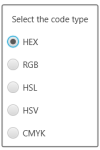
  • multiple formats: HEX, RGB, HSL, HSV, CMYK
  • activation/deactivation via F8
  • closing via ESC
This component functions like professional color pickers (Photoshop, Figma, etc.).

Main features:
  • Global mouse capture - Thanks to jnativehook, the picker works even outside the application.
  • Zoomed magnifier (150×150 px)
  • Clean zoom
  • Pixel grid
  • Red crosshair in the center
  • Perfect alignment of the captured pixel
  • Updates every 50 ms
Floating popup
  • Borderless
  • Always visible
  • Displays color + code
  • Automatic copy on click
Available formats:
  • HEX
  • RGB
  • HSL
  • HSV
  • CMYK
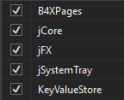
The selected format is saved via KeyValueStore.

Keyboard shortcuts Key Action
  • F8 Toggle color picker on/off
  • ESC Close color picker
Zoom accuracy

The zoom is perfectly centered thanks to:
B4X:
Dim rx As Int = x - (captureSize / 2) + OffsetX
Dim ry As Int = y - (captureSize / 2) + OffsetY

This small offset corrects the natural JavaFX/Robot offset and ensures that the red cross points exactly to the captured pixel.

The complete code is provided below.
It's self-contained, requires no layout, and can be integrated into any B4J project.

Why share this component?

Because B4J doesn't have a built-in global color picker, and many developers are looking for a solution that is:
  • simple
  • reliable
  • Windows compatible
  • with professional zoom
  • This component perfectly meets that need.
Conclusion
This color picker is:
  • accurate
  • fast
  • easy to integrate
  • pleasant to use
  • and above all, 100% B4J + standard Java
Feel free to improve it, adapt it, or suggest variations (circular magnifier, adjustable zoom, etc.).

Have fun
 

Attachments

  • 1.png
    1.png
    1.7 KB · Views: 19
  • 2.png
    2.png
    4.8 KB · Views: 18
  • 3.png
    3.png
    3.5 KB · Views: 20
  • B4JColorPicker.zip
    501.7 KB · Views: 24
Last edited:

Erel

B4X founder
Staff member
Licensed User
Longtime User
Looks great. Worth adding a macro:

Something like:
B4X:
#Macro: Title, Color Picker, ide://run?File=%ADDITIONAL%\ColorPicker.jar
Assuming that the compiled jar is in the additional libraries folder. Or better in the B4X additional folder:
B4X:
#Macro: Title, Color Picker, ide://run?File=%ADDITIONAL%\..\B4X\ColorPicker.jar
 

LucaMs

Expert
Licensed User
Longtime User
Great, thanks for sharing.

Since F8 is used by B4X (in step-by-step Debug mode), I prefer the CTRL+F8 combination.
B4X:
Sub GlobalKey_Event(MethodName As String, Args() As Object)

    Select MethodName

        Case "nativeKeyPressed"
        Dim keyEvent As JavaObject = Args(0)

        Dim keyCode As Int = keyEvent.RunMethod("getKeyCode", Null)
        Dim modifiers As Int = keyEvent.RunMethod("getModifiers", Null)

        Dim NativeInputEvent As JavaObject
        NativeInputEvent.InitializeStatic("com.github.kwhat.jnativehook.NativeInputEvent")
        Dim CTRL_MASK As Int = NativeInputEvent.GetField("CTRL_MASK")

        ' CTRL + F8
        If keyCode = 66 And Bit.And(modifiers, CTRL_MASK) <> 0 Then
            pickerEnabled = Not(pickerEnabled)
            If pickerEnabled Then
                ShowPopup
            Else
                HidePopup
            End If
        End If

        ' esc key
        If keyCode = 1 Then
            pickerEnabled = False
            HidePopup
        End If

    End Select
End Sub
 
  • Like
Reactions: zed

Toley

Active Member
Licensed User
Longtime User
Thank you very much @zed this is a very useful tool.
Feel free to improve it, adapt it, or suggest variations (circular magnifier, adjustable zoom, etc.).
I have modified your t_Tick sub to move the magnifier when we get at the bottom or the right side of the screen.
I used AWTRobot to get the screen size https://www.b4x.com/android/forum/t...-keyboard-and-mouse-events-etc.55832/#content
This is probably not the most efficient way but it's ok for my needs.
B4X:
Private Sub t_Tick
    If pickerEnabled = False Then Return
    Dim p As TPoint = GetMousePosition
    Dim c As AWTRobot
    Dim a() As Int = c.ScreenGetDimensions
    
    DrawMagnifier(p.X, p.Y)
    
    Dim hexColor As String = GetPixelHexColor(p.X, p.Y)

    lbl.Text = hexColor
    colorPreview.Color = xui.Color_RGB(lastR, lastG, lastB)
    
    Select currentFormat
        Case "HEX"
            lbl.Text = $"#${ByteToHex(lastR)}${ByteToHex(lastG)}${ByteToHex(lastB)}"$

        Case "RGB"
            lbl.Text = $"RGB(${lastR}, ${lastG}, ${lastB})"$

        Case "HSL"
            lbl.Text = RGBtoHSL(lastR, lastG, lastB)

        Case "HSV"
            lbl.Text = RGBtoHSV(lastR, lastG, lastB)

        Case "CMYK"
            lbl.Text = RGBtoCMYK(lastR, lastG, lastB)
    End Select

    ' Global click detection (Windows compatible)
    If mousePressed And lastClickState = False Then
        fx.Clipboard.SetString(lbl.Text)
        Log("Color copied : " & lbl.Text)
    End If

    lastClickState = mousePressed

    If p.X > a(0) - magnifierSize Then
        popup.WindowLeft = p.X - magnifierSize
    Else
        popup.WindowLeft = p.X + 15
    End If
    
    If p.Y > a(1) - magnifierSize Then
        popup.WindowTop = p.Y - magnifierSize
    Else
        popup.WindowTop = p.Y + 15
    End If
End Sub
 
  • 100%
Reactions: zed

TILogistic

Expert
Licensed User
Longtime User
And this will be the true Powertoys clone?

Rectangular or circular magnifying glass, and more than 20 conversion colors to choose from.

1.gif
3.gif


4.gif
 
Top