Share My Creation Powertoys Color Picker clone.

Here is a global color picker for B4J, capable of capturing the color of any pixel on the screen, even outside the application, thanks to jnativehook-2.2.2.jar.

ScreenShot.gif


It includes:
  • an ultra-smooth zoom magnifier
  • a pixel grid
  • a perfectly aligned central crosshair
  • a floating popup that always appears on top
  • automatic color copying on click
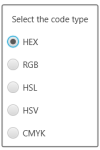
  • multiple formats: HEX, RGB, HSL, HSV, CMYK
  • activation/deactivation via F8
  • closing via ESC
This component functions like professional color pickers (Photoshop, Figma, etc.).

Main features:
  • Global mouse capture - Thanks to jnativehook, the picker works even outside the application.
  • Zoomed magnifier (150×150 px)
  • Clean zoom
  • Pixel grid
  • Red crosshair in the center
  • Perfect alignment of the captured pixel
  • Updates every 50 ms
Floating popup
  • Borderless
  • Always visible
  • Displays color + code
  • Automatic copy on click
Available formats:
  • HEX
  • RGB
  • HSL
  • HSV
  • CMYK
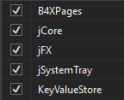
The selected format is saved via KeyValueStore.

Keyboard shortcuts Key Action
  • F8 Toggle color picker on/off
  • ESC Close color picker
Zoom accuracy

The zoom is perfectly centered thanks to:
B4X:
Dim rx As Int = x - (captureSize / 2) + OffsetX
Dim ry As Int = y - (captureSize / 2) + OffsetY

This small offset corrects the natural JavaFX/Robot offset and ensures that the red cross points exactly to the captured pixel.

The complete code is provided below.
It's self-contained, requires no layout, and can be integrated into any B4J project.

Why share this component?

Because B4J doesn't have a built-in global color picker, and many developers are looking for a solution that is:
  • simple
  • reliable
  • Windows compatible
  • with professional zoom
  • This component perfectly meets that need.
Conclusion
This color picker is:
  • accurate
  • fast
  • easy to integrate
  • pleasant to use
  • and above all, 100% B4J + standard Java
Feel free to improve it, adapt it, or suggest variations (circular magnifier, adjustable zoom, etc.).

Have fun
 

Attachments

  • 1.png
    1.png
    1.7 KB · Views: 6
  • 2.png
    2.png
    4.8 KB · Views: 5
  • 3.png
    3.png
    3.5 KB · Views: 6
  • B4JColorPicker.zip
    501.7 KB · Views: 6
Last edited:

Erel

B4X founder
Staff member
Licensed User
Longtime User
Looks great. Worth adding a macro:

Something like:
B4X:
#Macro: Title, Color Picker, ide://run?File=%ADDITIONAL%\ColorPicker.jar
Assuming that the compiled jar is in the additional libraries folder. Or better in the B4X additional folder:
B4X:
#Macro: Title, Color Picker, ide://run?File=%ADDITIONAL%\..\B4X\ColorPicker.jar
 

LucaMs

Expert
Licensed User
Longtime User
Great, thanks for sharing.

Since F8 is used by B4X (in step-by-step Debug mode), I prefer the CTRL+F8 combination.
B4X:
Sub GlobalKey_Event(MethodName As String, Args() As Object)

    Select MethodName

        Case "nativeKeyPressed"
        Dim keyEvent As JavaObject = Args(0)

        Dim keyCode As Int = keyEvent.RunMethod("getKeyCode", Null)
        Dim modifiers As Int = keyEvent.RunMethod("getModifiers", Null)

        Dim NativeInputEvent As JavaObject
        NativeInputEvent.InitializeStatic("com.github.kwhat.jnativehook.NativeInputEvent")
        Dim CTRL_MASK As Int = NativeInputEvent.GetField("CTRL_MASK")

        ' CTRL + F8
        If keyCode = 66 And Bit.And(modifiers, CTRL_MASK) <> 0 Then
            pickerEnabled = Not(pickerEnabled)
            If pickerEnabled Then
                ShowPopup
            Else
                HidePopup
            End If
        End If

        ' esc key
        If keyCode = 1 Then
            pickerEnabled = False
            HidePopup
        End If

    End Select
End Sub
 

Toley

Active Member
Licensed User
Longtime User
Thank you very much @zed this is a very useful tool.
Feel free to improve it, adapt it, or suggest variations (circular magnifier, adjustable zoom, etc.).
I have modified your t_Tick sub to move the magnifier when we get at the bottom or the right side of the screen.
I used AWTRobot to get the screen size https://www.b4x.com/android/forum/t...-keyboard-and-mouse-events-etc.55832/#content
This is probably not the most efficient way but it's ok for my needs.
B4X:
Private Sub t_Tick
    If pickerEnabled = False Then Return
    Dim p As TPoint = GetMousePosition
    Dim c As AWTRobot
    Dim a() As Int = c.ScreenGetDimensions
    
    DrawMagnifier(p.X, p.Y)
    
    Dim hexColor As String = GetPixelHexColor(p.X, p.Y)

    lbl.Text = hexColor
    colorPreview.Color = xui.Color_RGB(lastR, lastG, lastB)
    
    Select currentFormat
        Case "HEX"
            lbl.Text = $"#${ByteToHex(lastR)}${ByteToHex(lastG)}${ByteToHex(lastB)}"$

        Case "RGB"
            lbl.Text = $"RGB(${lastR}, ${lastG}, ${lastB})"$

        Case "HSL"
            lbl.Text = RGBtoHSL(lastR, lastG, lastB)

        Case "HSV"
            lbl.Text = RGBtoHSV(lastR, lastG, lastB)

        Case "CMYK"
            lbl.Text = RGBtoCMYK(lastR, lastG, lastB)
    End Select

    ' Global click detection (Windows compatible)
    If mousePressed And lastClickState = False Then
        fx.Clipboard.SetString(lbl.Text)
        Log("Color copied : " & lbl.Text)
    End If

    lastClickState = mousePressed

    If p.X > a(0) - magnifierSize Then
        popup.WindowLeft = p.X - magnifierSize
    Else
        popup.WindowLeft = p.X + 15
    End If
    
    If p.Y > a(1) - magnifierSize Then
        popup.WindowTop = p.Y - magnifierSize
    Else
        popup.WindowTop = p.Y + 15
    End If
End Sub
 
Top