B4J Question Send whole row from a database

aaronk

Well-Known Member
Licensed User
Longtime User
Hi,

I have a database in my B4J app. In this database I have a table which contains approx. 1200 columns.

Each row will be a users account.

For Example:
item1 item 2 item 3 .... item1200
Row1 name1 name2 name3 Name1200
Row2 nameA nameB nameC NameXYZ

My B4i/B4A app will need to get the users row sent to it.

For example, The B4i/B4A app will send a command using WebSockets and ask to return the whole row for that user (Row1).

I was going to poll each column for that user and send one at a time, but this would take some time.

I then was going to create a JSON message containing each column for that user, (not sure if this is going to be big for a JSON message?)

I then thought of maybe saving the data as a XML file then getting the B4A/B4i to request that XML file.

Anyone else got an idea on how to send this one column to the user ?

I don't want to copy the whole database since it contains other users data, and only want to send 1 row only.
 

udg

Expert
Licensed User
Longtime User
You could use the B4XSerializator to pack a Map or List on the server end containing all the fields from a successfull SELECT statement.
On the client (i.e. mobile device) you read that same object and make the appropriate use of its info.

Note: you could even trasmit an error condition using the same mechanism, so the client knows what went wrong and can decide whether to retry or abort.

udg
 
Upvote 0

Daestrum

Expert
Licensed User
Longtime User
Not a criticism, just an observation, but if you have 1200 columns in a table, you should maybe look at how you are storing the data in the database.
 
Upvote 0

Erel

B4X founder
Staff member
Licensed User
Longtime User
I agree with @Daestrum. You shouldn't create a single column for each item.

One table for example

User Item
---- -----
User1 Item1
User1 Item2
User5 Item300

The table primary key should be (User, Item) columns.

You can have another table such as:

ItemId ItemName ItemPrice
------ ---------- ---------
Item1 Nice Item 23.23

And another table for the users if you need.
 
Upvote 0

aaronk

Well-Known Member
Licensed User
Longtime User
You shouldn't create a single column for each item.
(maybe I read your answer wrong, or maybe I explained what I am doing wrong)

The columns I have is:
AccountID (being used as a unique ID for each device)
Name1
Name2
Name3
..
Name1200

Then I am storing each device in a separate row.

upload_2017-1-22_18-5-54.png


Is this what you mean? (If so, this is what I am currently doing)
 
Upvote 0

udg

Expert
Licensed User
Longtime User
Hi aaronk,
I think that comments about your data structure derive from the consideration that it's difficult to imagine a case where for each AccountID you have 1200 data items.
Maybe they are from distinct logical groups like personal data, medical data on so on.
Anyway I believe you are the best judge about your project so you know best how to organize your data.
 
Upvote 0

aaronk

Well-Known Member
Licensed User
Longtime User
What is the meaning of each of the name columns?
I named them (as per my posts) as example names. Of cause I have named them more mean full names in my B4J app.

A device in the field needs to send data back to my B4J app and needs to store it. These are names of items connected to this accountID.

As an example to help understand on what I am storing and do..
A device out in the field might have 1200 items connected to it. Lets lower the number to say 200 items to help explain what I a doing.
Imagine a WiFi network with 200 devices connected to it.
This Access Point will send it's Account ID (MAC addeess) and the names of devices connected to it, to my B4J app. The AccountID will help know which device in the field it is. The names are names of those devices connected to it.

In my B4J app I need to store this in a database.

Now when the B4A/B4i app connects to my B4J app I need to send the names to it. I am sending a message to my B4J app which says 'send AccountID names to me'

So, since the names are stored in the B4J database I need to send these names to the B4i/B4A apps when the user requests it.

However, there isn't 200 names I need to send/store there is approx. 1200 names.

The above is an example of what I am trying to do, as an example only, to help understand on what I am trying to do. (hope I make sense)
 
Upvote 0

udg

Expert
Licensed User
Longtime User
Well, if 1200 is kind of worst case you should reconsider Erel suggestion to record those data as rows of a two columns table (AccessPointID and StationName) then query the table for all the records sporting the requested AccessPointID. This will lead a variable number of data itemsvto trasmit back to your mobile app.
 
Last edited:
Upvote 0

aaronk

Well-Known Member
Licensed User
Longtime User
I would have designed it this way:


AccountId DeviceName
---------- ------------
Account1 Device1
Account1 Device4
Account9 Device10

This makes it simple to add new devices and also to build queries.
I would of thought this would be harder to work with, and why I didn't go down that path and did it the way I did it.

By having it in one row I could use something like:

B4X:
Dim Account As String = "12345678"
Dim RS As ResultSet = db_names.ExecQuery("SELECT * FROM `Names` WHERE `AccountID` LIKE '" & Account & "'")
   
    Do While RS.NextRow
        Log(RS.GetString("Name1"))
        Log(RS.GetString("Name2"))
        Log(RS.GetString("Name3"))
    Loop
    RS.Close


Then update the name like:

B4X:
db_names.ExecNonQuery("UPDATE `Names` SET " & "Name1" & "='" & "NewNameHere" & "' WHERE `AccountID` LIKE '" & Account & "'")

When you say:
This makes it simple to add new devices and also to build queries.

Is that the only benefit? I am guessing my way will work as well (since this how I have done it so far and seems to work) ?
 
Upvote 0

billzhan

Active Member
Licensed User
Longtime User
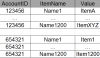
Advantages of the 'long' format structure :
1. You can add more items (name1201 ... ) without changing table (add extra columns)
2. Aggregation ( sum, count ,max ,min ) based on AccountId and/or ItemName
3. Indexing
4. Missing data will not be stored in database
5. Multiple data
-------
123456 Name1 value1
123456 Name1 value2
123456 Name1 value3
 

Attachments

  • db.PNG
    db.PNG
    16.1 KB · Views: 351
Upvote 0

billzhan

Active Member
Licensed User
Longtime User
Parameterized queries should be used (SQL.ExecQuery2, ExecNonQuery2) Your sql statements are not safe (from SQL injection)

And the column name(s) can't be treated as parameters in parameterized queries.
 
Upvote 0

aaronk

Well-Known Member
Licensed User
Longtime User
Advantages of the 'long' format structure :
1. You can add more items (name1201 ... ) without changing table (add extra columns)
2. Aggregation ( sum, count ,max ,min ) based on AccountId and/or ItemName
3. Indexing
4. Missing data will not be stored in database
5. Multiple data

I see there is some benefits of using it the way suggested.


Parameterized queries should be used (SQL.ExecQuery2, ExecNonQuery2) Your sql statements are not safe (from SQL injection)
I am using SQLite in B4J and not a SQL server. Only my B4J app can access the database on the server since the database is not accessible from the outside. (a hacker would need to go through my B4J app in order to see the database)

And the column name(s) can't be treated as parameters in parameterized queries.
Based on my examples in this thread, I don't see why I can't use parameters. This is how I am currently doing it and seems to be working fine. Maybe I got confused on what you are saying. Are you able to explain what you mean ?
 
Upvote 0

billzhan

Active Member
Licensed User
Longtime User
Well parameterized queries are used to prevent SQL injection. https://en.wikipedia.org/wiki/SQL_injection
As long as you take inputs of clients to build SQL statements, you should be aware of it.

B4X:
'username is the input by client
query= "SELECT * FROM table1 WHERE name = '" & username & "'"

'simple SQL injection 
username = "OR '1'='1"
query= "SELECT * FROM table1 WHERE name = '' OR '1'='1'

'parameterized queries can be used to filter inputs
SQL1.ExecQuery2("SELECT * FROM table1 WHERE name = ?", Array As String(username))

In parameterized queries, you can only parameterize the values.

B4X:
'will not work .Column/ table names can't be parameterized 
SQL1.ExecQuery2("SELECT * FROM ? WHERE name = ?", Array As String(tablename,username))

SQL1.ExecQuery2("SELECT id,? FROM table1 ", Array As String(columnname))
 
Upvote 0
Top