
SendInput Library v0.2
* v0.2 31/03/2014
Added: SwipeParams - Now allowing the delay between each swipe pulse to be increased or decreased.
Moved: 'Step' parameter from SendSwipe to SwipeParams
This library allows you to emulate user input within the application. You can send key codes, a string of keys, a single touch tap, and swipe actions.
To begin using the library you simply define a variable:
That's all. The following commands can now be used to send/emulate user input:
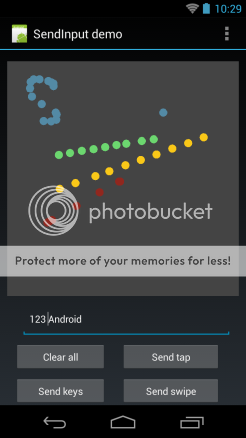
The download link (below) includes a demo to test out the library.
Download the library from here - DOWNLOAD
* v0.2 31/03/2014
Added: SwipeParams - Now allowing the delay between each swipe pulse to be increased or decreased.
Moved: 'Step' parameter from SendSwipe to SwipeParams
This library allows you to emulate user input within the application. You can send key codes, a string of keys, a single touch tap, and swipe actions.
To begin using the library you simply define a variable:
B4X:
Sub Globals
    ' define a variable for the SendInput library
    Dim si As SendInput
End Sub
That's all. The following commands can now be used to send/emulate user input:
B4X:
' Send a single keycode
si.SendKeyCode(KeyCodes.KEYCODE_TAB)

' Send a string of keys
si.SendKeys("Hello")

' Send a touch tap to absolute coordinate 300,200
si.SendTap(300,200)

' Send a swipe action from absolute coordinates 60,70 to 200,300
si.SendSwipe(60,70 , 200,300)

' Change the swipe parameters.
' Here, the steps between each swipe point are set to 50 and the
' delay between each swipe point to 25ms.
' NOTE: It may be necessary to increase the delay for older devices in order
' to allow time for the system to pick up each swipe point.
si.SwipeParams(50,25)
The download link (below) includes a demo to test out the library.
Download the library from here - DOWNLOAD
Last edited:


