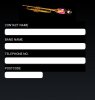
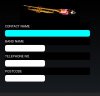
When i run a simple 'contact' view, it loads ok but when i press the first text box the rest shrink as picture 2 shows. When i press the shrunk text boxes they go back to normal.
I did have all my code in the designer but it did it there as well??
Am i missing something??
I did have all my code in the designer but it did it there as well??
Am i missing something??
B4X:
Sub AddViews
   Dim cd As ColorDrawable
   Dim LabelTextSize As Int
   LabelTextSize = 20

   cd.Initialize(Colors.White,15)

   imgBrapp.Initialize("imgBrapp")
   imgBrapp.Bitmap = (LoadBitmap(File.DirAssets, "splash.jpg"))
   imgBrapp.Gravity = Gravity.FILL
   Activity.AddView(imgBrapp, 20%x, 0%y, 60%x, 15%y)

   lblContactName.Initialize("lblContactName")
   lblContactName.Color = Colors.Black
   lblContactName.TextSize = LabelTextSize
   lblContactName.TextColor = Colors.White
   lblContactName.Gravity = Gravity.LEFT + Gravity.CENTER_VERTICAL
   lblContactName.Text = "CONTACT NAME"
   Activity.AddView(lblContactName, 5%x, 15%y, 85%x, 5%y) 'Left, Top, Width, Height

   txtContactName.Initialize("txtContactName")
   txtContactName.TextSize = 20
   txtContactName.TextColor = Colors.Black
   txtContactName.Gravity = Gravity.LEFT + Gravity.CENTER_VERTICAL
   txtContactName.Text = ""
   txtContactName.Background=cd
   Activity.AddView(txtContactName, 5%x, 20%y, 85%x, 40dip) 'Left, Top, Width, Height

   lblBandName.Initialize("lblBandName")
   lblBandName.Color = Colors.Black
   lblBandName.TextSize = LabelTextSize
   lblBandName.TextColor = Colors.White
   lblBandName.Gravity = Gravity.LEFT + Gravity.CENTER_VERTICAL
   lblBandName.Text = "BAND NAME"
   Activity.AddView(lblBandName, 5%x, 25%y, 85%x, 5%y) 'Left, Top, Width, Height

   txtbandName.Initialize("txtBandName")
   txtbandName.TextSize = 20
   txtbandName.TextColor = Colors.Black
   txtbandName.Gravity = Gravity.LEFT + Gravity.CENTER_VERTICAL
   txtbandName.Text = ""
   txtbandName.Background=cd
   Activity.AddView(txtbandName, 5%x, 30%y, 85%x, 40dip) 'Left, Top, Width, Height

   lblTelephone.Initialize("lblTelephone")
   lblTelephone.Color = Colors.Black
   lblTelephone.TextSize = LabelTextSize
   lblTelephone.TextColor = Colors.White
   lblTelephone.Gravity = Gravity.LEFT + Gravity.CENTER_VERTICAL
   lblTelephone.Text = "TELEPHONE NO."
   Activity.AddView(lblTelephone, 5%x, 35%y, 85%x, 5%y) 'Left, Top, Width, Height

   txtTelephone.Initialize("txtTelephone")
   txtTelephone.TextSize = 20
   txtTelephone.TextColor = Colors.Black
   txtTelephone.Gravity = Gravity.LEFT + Gravity.CENTER_VERTICAL
   txtTelephone.Text = ""
   txtTelephone.Background=cd
   Activity.AddView(txtTelephone, 5%x, 40%y, 85%x, 40dip) 'Left, Top, Width, Height

   lblPostcode.Initialize("lblPostcode")
   lblPostcode.Color = Colors.Black
   lblPostcode.TextSize = LabelTextSize
   lblPostcode.TextColor = Colors.White
   lblPostcode.Gravity = Gravity.LEFT + Gravity.CENTER_VERTICAL
   lblPostcode.Text = "POSTCODE"
   Activity.AddView(lblPostcode, 5%x, 45%y, 85%x, 5%y)

   txtPostcode.Initialize("txtPostcode")
   txtPostcode.TextSize = 20
   txtPostcode.TextColor = Colors.White
   txtPostcode.Gravity = Gravity.LEFT + Gravity.CENTER_VERTICAL
   txtPostcode.Text = ""
   txtPostcode.Background=cd
   Activity.AddView(txtPostcode, 5%x, 50%y, 40%x, 40dip)
End Sub