Hello,
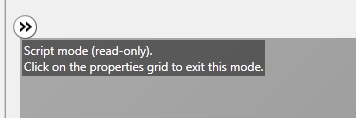
Sometimes when I'm using the visual designer, I find that I can't drag & drop de views to change its order, and if I right click on some view it doesn't show the context menu:

It seems it happens when I run the project with the visual designer open, and It still happens after stopping the execution. I have to close the visual designer and open it again in order to have context menu and drag ability again.
Thank you very much!
Sometimes when I'm using the visual designer, I find that I can't drag & drop de views to change its order, and if I right click on some view it doesn't show the context menu:
It seems it happens when I run the project with the visual designer open, and It still happens after stopping the execution. I have to close the visual designer and open it again in order to have context menu and drag ability again.
Thank you very much!