
Other B4J v10.5 with integrated Code Bundle tool has been released

Erel

B4X founder
Staff member
Licensed User
Longtime User
I'm happy to release B4J v10.5!

Code Bundle is a tool that packs your project together with additional relevant information into a single json file, that can be provided to AI assistants for debugging, learning, refactoring and other tasks.
B4J_gi6VqO4yty.gif


The bundle is created with a click of a button (Ctrl + R). The bundle includes:
  • Project code + list of public APIs. Keys are sanitized based on heuristic templates.
  • (optional) Logs + compilation output + warnings and errors list. Compilation output is included when the dialog is visible.
  • (optional) Layouts + designer script.
  • (optional) Paths configuration.
  • List of files. Files content is not added.
  • List of libraries with additional information for each library.
  • Current caret location with the code around it - the AI knows where you are focused on right now.
  • Additional information about the IDE and useful links for the AI to find more information.
How to use:
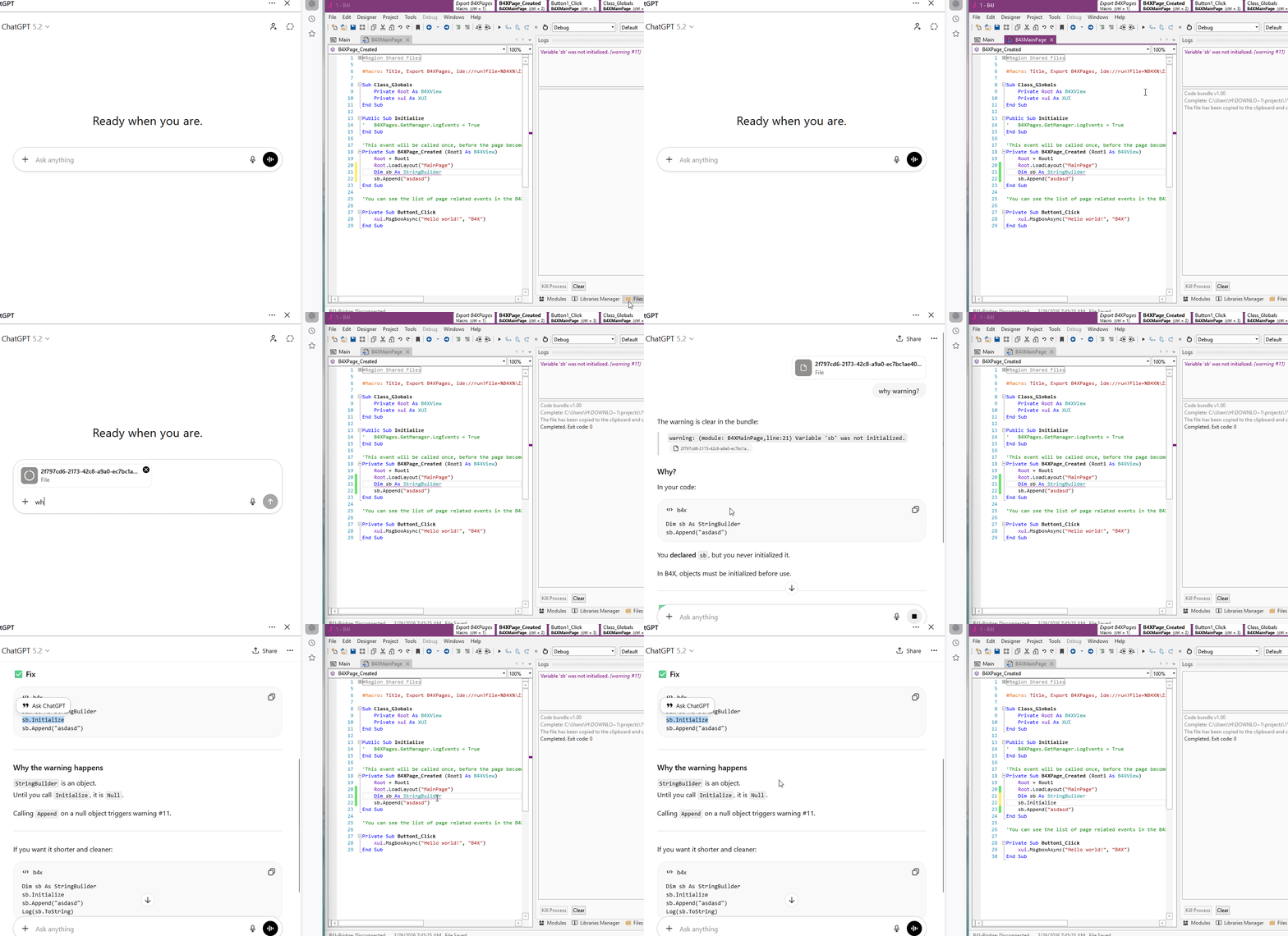
- Click on Ctrl + R. A json file will be created and copied to the clipboard. Paste into the AI assistant and ask questions.

I tested it with several AI platforms and the results are quite good. The answers are mostly to the point.
Other improvements:
  • Autocomplete in #If lines:
    View attachment 170251
  • List.Sublist - Very fast method that returns a read-only sub-list.
  • Fix for String.ToLower not explicitly setting the locale. Mainly fixes the Turkish I: https://www.b4x.com/android/forum/t...ctly-for-the-turkish-language.163961/#content
  • PyBridge template updated.
  • New #Macro / comment link options:
    • librariesrefresh - set to True to automatically refresh the libraries after the task runs.
    • codesync - set to True to force the IDE to synchronize the code modules with the files.
    • autosave - set to True to automatically save the project BEFORE running the task. Note that Tools - IDE Options - Auto Save should be enabled for this to have effect.
    • filessync (not new) - set to True to synchronize the Files tab after the task.
    • cleanproject (not new) - set to True to "clean project" after the task
    • %STATE1% - new variable that causes the IDE to create a temporary file with the IDE state based on the new options under Tools - IDE Options. The file path will be passed to the process. This is used by Code Bundle and can be used by other similar tools. Note that the format is not final and can be modified.
  • Objects\Temp folder is deleted when cleaning project.
  • Json library updated and maps now preserve order when writing or reading.
  • Other bug fixes and minor improvements.

Download: https://www.b4x.com/b4j.html
 

ranul

Member
Licensed User
Longtime User
Hi @Erel,

What will help a lot to AI is if the layout file (the bjl) will be a text file and not a binary file.
I use Claude Code to help me with B4X programming and once we get to UI designing and UI implementation, Claude is telling me that I must use the Virtual Designer because he (Claude) doesn't know how to create/edit the bjl file.

Thanks.
 
Upvote 0

mcqueccu

Expert
Licensed User
Longtime User
Hi @Erel,

What will help a lot to AI is if the layout file (the bjl) will be a text file and not a binary file.
I use Claude Code to help me with B4X programming and once we get to UI designing and UI implementation, Claude is telling me that I must use the Virtual Designer because he (Claude) doesn't know how to create/edit the bjl file.

Thanks.
This is how I work around it, I let it create the UI as html, then define the controls for me (the names I should use to declare in B4X) and having the idea how the layout will look using the preview from the html, I recreate same layout in B4X.
 
Upvote 0

Erel

B4X founder
Staff member
Licensed User
Longtime User
Upvote 0

virpalacios

Active Member
Licensed User
Longtime User
I'm happy to release B4J v10.5!

Code Bundle is a tool that packs your project together with additional relevant information into a single json file, that can be provided to AI assistants for debugging, learning, refactoring and other tasks.

B4J_gi6VqO4yty.gif


The bundle is created with a click of a button (Ctrl + R). The bundle includes:
  • Project code + list of public APIs. Keys are sanitized based on heuristic templates.
  • (optional) Logs + compilation output + warnings and errors list. Compilation output is included when the dialog is visible.
  • (optional) Layouts + designer script.
  • (optional) Paths configuration.
  • List of files. Files content is not added.
  • List of libraries with additional information for each library.
  • Current caret location with the code around it - the AI knows where you are focused on right now.
  • Additional information about the IDE and useful links for the AI to find more information.
How to use:
- Click on Ctrl + R. A json file will be created and copied to the clipboard. Paste into the AI assistant and ask questions.

I tested it with several AI platforms and the results are quite good. The answers are mostly to the point.
Other improvements:
  • Autocomplete in #If lines:
    View attachment 170251
  • List.Sublist - Very fast method that returns a read-only sub-list.
  • Fix for String.ToLower not explicitly setting the locale. Mainly fixes the Turkish I: https://www.b4x.com/android/forum/t...ctly-for-the-turkish-language.163961/#content
  • PyBridge template updated.
  • New #Macro / comment link options:
    • librariesrefresh - set to True to automatically refresh the libraries after the task runs.
    • codesync - set to True to force the IDE to synchronize the code modules with the files.
    • autosave - set to True to automatically save the project BEFORE running the task. Note that Tools - IDE Options - Auto Save should be enabled for this to have effect.
    • filessync (not new) - set to True to synchronize the Files tab after the task.
    • cleanproject (not new) - set to True to "clean project" after the task
    • %STATE1% - new variable that causes the IDE to create a temporary file with the IDE state based on the new options under Tools - IDE Options. The file path will be passed to the process. This is used by Code Bundle and can be used by other similar tools. Note that the format is not final and can be modified.
  • Objects\Temp folder is deleted when cleaning project.
  • Json library updated and maps now preserve order when writing or reading.
  • Other bug fixes and minor improvements.

Download: https://www.b4x.com/b4j.html
Great Erel B4X is Super
 
Upvote 0

Peter Simpson

Expert
Licensed User
Longtime User
Hello Erel,
I can use the generated JSON file, but nothing is being copied to the clipboard on either my Windows 10 or Windows 11 development machines.

1. I click on Export State:
1773417929702.png


2. I get this message:
1773418069079.png


3. Clipboard is empty in every package (this is Notepad++), and all browsers too:
1773418188819.png


I’m sure that it was working fine in the beta version.

It’s most probably my machines, I do find it strange though. Anyway, I’ll look more closely at it tomorrow.
I'm sure that others will reply saying that it works on their machines which is excellent news. I just thought that I would let you know, but it's most probably my machines.

It doesn’t really bother me, as I can and do use the generated JSON file.

Thank you...
 
Upvote 0

aeric

Expert
Licensed User
Longtime User
Hello Erel,
I can use the generated JSON file, but nothing is being copied to the clipboard on either my Windows 10 or Windows 11 development machines.

1. I click on Export State:
View attachment 170582

2. I get this message:
View attachment 170583

3. Clipboard is empty in every package (this is Notepad++), and all browsers too:
View attachment 170584

I’m sure that it was working fine in the beta version.

It’s most probably my machines, I do find it strange though. Anyway, I’ll look more closely at it tomorrow.
I'm sure that others will reply saying that it works on their machines which is excellent news. I just thought that I would let you know, but it's most probably my machines.

It doesn’t really bother me, as I can and do use the generated JSON file.

Thank you...
It is a "file", not String.
When you paste the clipboard on ChatGPT, it is adding the file for uploading.
 
Upvote 0

Peter Simpson

Expert
Licensed User
Longtime User
Meaning I think you could open an explorer window and simply paste the file there.
Nope, previously I've done that to many times to count. I'm getting absolutely nothing.

True. Or paste it directly into ChatGPT / Gemini / ...
Same reply as above.

Two development machines, windows 10 and 11, not pasting into anything. The Notepad++ screenshot was just because it was open at the time. Paste is never highlighted in any browsers on my machines, in any editors or IDE's, but it does create the JSON file, and that is what I use anyway...
 
Upvote 0

aeric

Expert
Licensed User
Longtime User
A little out of topic, maybe just me. I found the paste icon too small to be noticed in Windows 10 or 11 right click menu. I don't know why MS made such an unintuitive design decision.
 
Upvote 0

Erel

B4X founder
Staff member
Licensed User
Longtime User
@Peter Simpson can you try a modified version of CodeBundle: www.b4x.com/b4j/files/CodeBundle.jar ?
Copy it to the installation folder. It should show v1.01 when you run it.

The process will be kept for one minute before it exits. Paste the file before it exits. Maybe it will fix the issue. Maybe not.
 
Upvote 0

LucaMs

Expert
Licensed User
Longtime User
Works here...

If you are downloading it with chrome, then it might block it because of a "dangerous" file. You should have an option to download it anyway.
(I had to copy the address and open it in a new page; I couldn't find the setting in Chrome that worked)

I tried that version of CodeBundle.jar, and my clipboard still appears empty (but I've "worked hard" on this and it's a Windows 7 bug).
This version does NOT save the json file, while the preinstalled version does.
 
Upvote 0

derez

Expert
Licensed User
Longtime User
After CTRL+R I paste into some directory and get the file with [name of app].json , open it in notepad , copy the text and paste it to the AI window.
 
Upvote 0

Peter Simpson

Expert
Licensed User
Longtime User
@Peter Simpson can you try a modified version of CodeBundle: www.b4x.com/b4j/files/CodeBundle.jar ?
Copy it to the installation folder. It should show v1.01 when you run it.

The process will be kept for one minute before it exits. Paste the file before it exits. Maybe it will fix the issue. Maybe not.


Hello Erel,
You've done it 💪, that fixed the issue.
Both Right Click then Paste and also Ctrl + V are now working and pasting the JSON code directly into 4 generative AI chatbots (LLMs) that I just tested it on. I've not changed a thing, logs now says 'Code bundle v1.01', I click on
1773597308124.png
and can now paste directly into the generative AI chatbots (LLMs) with no issues whatsoever.

First test
1773596083931.png


Second test
1773596265033.png


Third test
1773596554134.png


Forth test
1773596777728.png


At least I was not going crazy 🤕

Perfect Erel, thank you 👌
 
Upvote 0
Top