
Share My Creation B4XCopilot - A.I. Assistant

Introducing B4X Copilot: Harness the Power of AI in Your B4X IDE

logo.png


B4X Copilot is an inofficial external tool completely written in B4J, designed to integrate the most common AI (GPT, Claude, Gemini) advanced language model capabilities into your B4X programming environment. Whether you're coding in B4A, B4J, or B4i, B4X Copilot offers smart, AI-driven features to enhance your coding efficiency and quality.


Key Features of B4X Copilot:
  • Code Refactoring: Enhance your existing code with our intelligent refactoring tools. B4X Copilot reviews your code, suggesting optimizations to improve both performance and readability.
  • Code Completion: Leveraging comments within your code, B4X Copilot predicts and completes your code snippets automatically. Simply begin a comment and B4X Copilot will seamlessly convert your thoughts into precise, functional code.
  • Automated Commenting: Maintain clarity within your codebase with auto-generated comments. B4X Copilot provides insightful explanations for complex code sections, simplifying project navigation and maintenance.
  • Custom Prompt: Directly instruct the AI by describing exactly what you need. Just tell B4X Copilot what to do, and it will execute your commands intelligently.
  • Code Explanation: Revisit your code with confidence. B4X Copilot offers clear, understandable explanations for any part of your code, aiding both you and your team in managing your projects effectively.
  • Fix Code: B4X Copilot not only identifies issues within your code but also corrects them. After making changes, it provides a detailed explanation of what was modified and why, ensuring you understand the adjustments and can learn from them.


Requirements:

Used Models:

Installation Guide:

1. Download B4XCopilot.zip and unzip it and start it with the B4xCopilot.exe.
3. Right-click the tray icon to access settings. Here, you can configure your preferred language, IDE, A.I. Provider, API Key and shortcut.

To change the shortcut use the KeyCodes and seperate them with a &. for example "29&61" for Ctrl+F2. The settings screen will show you the current keycode of the pressed key.
Standard Value is 29&43 for `Ctrl+circumflex (Ctrl+^)`.


Usage:
1. Highlight the code section you need assistance with and press the key combination: `Ctrl+circumflex (Ctrl+^)`.
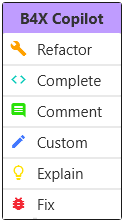
2. A context menu will appear with all available functions. Select the desired function and wait for the operation to complete.
1720089497164.png


Important Note: While B4X Copilot is designed to enhance your coding experience, it's important to note that due to the relatively lower popularity of the B4X language, it may not be as comprehensively supported in the AI's model. This could lead to occasional inaccuracies in code suggestions and comments. Always review the AI's contributions to ensure they meet your project's requirements.

@Erel may be able to integrate this natively into the IDEs. I am at your disposal for help ;-)

Changelog 1.1
- Adds "Fix" Method (experimental)
- Adds option to change the shortcut

Changelog 1.2
- Nicer contextmenu
- Adds Anthropic Claude and Google Gemini as possible A.I.

Download v1.2
If you want to support my work, please consider a small donation here

 
Last edited:

Theera

Expert
Licensed User
Longtime User
Do you mind custom editing the A context menu? Because I'm not good at English.(some "Refactor" cann't translate directly in Thai,there isn't the meaning in Thai)
 

Blueforcer

Well-Known Member
Licensed User
Longtime User
Do you mind custom editing the A context menu? Because I'm not good at English.(some "Refactor" cann't translate directly in Thai,there isn't the meaning in Thai)
Not sure if a translation system worth for 8 words. But you can find a explanation in the first post.
 

Blueforcer

Well-Known Member
Licensed User
Longtime User
Unfortnually GPT-3.5 doesnt support the functionalities i need for B4XCopilot.
But you should get access to the latest models:

"After you have made a successful payment of $5 or more (usage tier 1), you'll be able to access the GPT-4, GPT-4 Turbo, and GPT-4o models via the OpenAI API. "
 
Last edited:

Magma

Expert
Licensed User
Longtime User
Introducing B4X Copilot: Harness the Power of AI in Your B4X IDE

View attachment 154887

B4X Copilot is an inofficial external tool completely written in B4J, designed to integrate the most common AI (GPT, Claude, Gemini) advanced language model capabilities into your B4X programming environment. Whether you're coding in B4A, B4J, or B4i, B4X Copilot offers smart, AI-driven features to enhance your coding efficiency and quality.


Key Features of B4X Copilot:
  • Code Refactoring: Enhance your existing code with our intelligent refactoring tools. B4X Copilot reviews your code, suggesting optimizations to improve both performance and readability.
  • Code Completion: Leveraging comments within your code, B4X Copilot predicts and completes your code snippets automatically. Simply begin a comment and B4X Copilot will seamlessly convert your thoughts into precise, functional code.
  • Automated Commenting: Maintain clarity within your codebase with auto-generated comments. B4X Copilot provides insightful explanations for complex code sections, simplifying project navigation and maintenance.
  • Custom Prompt: Directly instruct the AI by describing exactly what you need. Just tell B4X Copilot what to do, and it will execute your commands intelligently.
  • Code Explanation: Revisit your code with confidence. B4X Copilot offers clear, understandable explanations for any part of your code, aiding both you and your team in managing your projects effectively.
  • Fix Code: B4X Copilot not only identifies issues within your code but also corrects them. After making changes, it provides a detailed explanation of what was modified and why, ensuring you understand the adjustments and can learn from them.


Requirements:

Used Models:

Installation Guide:

1. Download B4XCopilot.zip and unzip it and start it with the B4xCopilot.exe.
3. Right-click the tray icon to access settings. Here, you can configure your preferred language, IDE, A.I. Provider, API Key and shortcut.

To change the shortcut use the KeyCodes and seperate them with a &. for example "29&61" for Ctrl+F2. The settings screen will show you the current keycode of the pressed key.
Standard Value is 29&43 for `Ctrl+circumflex (Ctrl+^)`.


Usage:
1. Highlight the code section you need assistance with and press the key combination: `Ctrl+circumflex (Ctrl+^)`.
2. A context menu will appear with all available functions. Select the desired function and wait for the operation to complete.

View attachment 155179


Important Note: While B4X Copilot is designed to enhance your coding experience, it's important to note that due to the relatively lower popularity of the B4X language, it may not be as comprehensively supported in the AI's model. This could lead to occasional inaccuracies in code suggestions and comments. Always review the AI's contributions to ensure they meet your project's requirements.

@Erel may be able to integrate this natively into the IDEs. I am at your disposal for help ;-)

Changelog 1.1
- Adds "Fix" Method (experimental)
- Adds option to change the shortcut

Changelog 1.2
- Nicer contextmenu
- Adds Anthropic Claude and Google Gemini as possible A.I.

Download v1.2
If you want to support my work, please consider a small donation here
Very nice!
 

Jhonn

Member
main._process_globals (java line: -1)
java.awt.AWTError: Assistive Technology not found: com.sun.java.accessibility.AccessBridge
 

tchart

Well-Known Member
Licensed User
Longtime User
main._process_globals (java line: -1)
java.awt.AWTError: Assistive Technology not found: com.sun.java.accessibility.AccessBridge
Might be a Java version issue. What JDK are you using?
 

touchsquid

Active Member
Licensed User
Longtime User
The EXE runs then crashes (disappears without error message). I have a Claude API key but never got to the point of entering it.

Running the debug bat gives this:

C:\Users\desig\OneDrive\Documents\B4a\Copilot\B4XCopilot>cd bin

C:\Users\desig\OneDrive\Documents\B4a\Copilot\B4XCopilot\bin>java.exe @release_java_modules.txt -m b4j/de.blueforcer.copilot.main
Detected B4A as IDE
B4X Copilot 1.2 started
B4X Copilot: Please complete your Settings

The tray icon disappears before I can right click it.

Any hints to debug it?
 
Last edited:

Jmu5667

Well-Known Member
Licensed User
Longtime User
Hello, this happened in debug mode after I was putting some settings in the settings dualogue. I dont have an API key so I entered BlahBlah

B4X:
C:\B4X\B4XCopilot\bin>java.exe @release_java_modules.txt  -m b4j/de.blueforcer.copilot.main
Detected B4A as IDE
B4X Copilot 1.2 started


keycombolistener._initialize (java line: -1)
java.lang.NumberFormatException: empty String
        at java.base/jdk.internal.math.FloatingDecimal.readJavaFormatString(Unknown Source)
        at java.base/jdk.internal.math.FloatingDecimal.parseDouble(Unknown Source)
        at java.base/java.lang.Double.parseDouble(Unknown Source)
        at b4j/anywheresoftware.b4a.BA.ObjectToNumber(Unknown Source)
        at b4j/de.blueforcer.copilot.keycombolistener._initialize(Unknown Source)
        at b4j/de.blueforcer.copilot.main._settingsform_closed(Unknown Source)
        at java.base/jdk.internal.reflect.NativeMethodAccessorImpl.invoke0(Native Method)
        at java.base/jdk.internal.reflect.NativeMethodAccessorImpl.invoke(Unknown Source)
        at java.base/jdk.internal.reflect.DelegatingMethodAccessorImpl.invoke(Unknown Source)
        at java.base/java.lang.reflect.Method.invoke(Unknown Source)
        at b4j/anywheresoftware.b4a.BA.raiseEvent2(Unknown Source)
        at b4j/anywheresoftware.b4a.BA$1.run(Unknown Source)
        at javafx.graphics/com.sun.javafx.application.PlatformImpl.lambda$runLater$10(Unknown Source)
        at java.base/java.security.AccessController.doPrivileged(Unknown Source)
        at javafx.graphics/com.sun.javafx.application.PlatformImpl.lambda$runLater$11(Unknown Source)
        at javafx.graphics/com.sun.glass.ui.InvokeLaterDispatcher$Future.run(Unknown Source)
        at javafx.graphics/com.sun.glass.ui.win.WinApplication._runLoop(Native Method)
        at javafx.graphics/com.sun.glass.ui.win.WinApplication.lambda$runLoop$3(Unknown Source)
        at java.base/java.lang.Thread.run(Unknown Source)


C:\B4X\B4XCopilot\bin>pause
Press any key to continue . . .
 

Blueforcer

Well-Known Member
Licensed User
Longtime User
This tool is quite old. I highly recommend to use CLI agent tools, like claude code or gemini cli. these are much stronger as it has access to your codebase and can work in every class. If my tool is still needed (please tell me why :)) then I will update it again as soon as I have a little more time.
 

Magma

Expert
Licensed User
Longtime User
This tool is quite old. I highly recommend to use CLI agent tools, like claude code or gemini cli. these are much stronger as it has access to your codebase and can work in every class. If my tool is still needed (please tell me why :)) then I will update it again as soon as I have a little more time.
hmm interesting... but how to use b4x with gemini cli? what exactly do u mean ? which way in windows and b4j ?

thx in advance
 

Blueforcer

Well-Known Member
Licensed User
Longtime User
hmm interesting... but how to use b4x with gemini cli? what exactly do u mean ? which way in windows and b4j ?

thx in advance
Install gemini cli (https://github.com/google-gemini/gemini-cli) in your windows terminal (i recommend WSL (windows-Subsystem for Linux, but also works in standard cmd or powershell) . Then open a commandpromt in your project folder, start the agent with "gemini" and start promting :) Its my all day tool, and very strong in B4X.
 

Blueforcer

Well-Known Member
Licensed User
Longtime User
hmmn it reads the code from folder? .. no need rename to .txt?
nope, it can understand your whole project and can modify your code directly. you just need to wait few seconds until B4X IDE recognize the file modification and display the changes. Will be faster with the codesync feature in the next update
 
Last edited:

Mashiane

Expert
Licensed User
Longtime User
This tool is quite old. I highly recommend to use CLI agent tools, like claude code or gemini cli. these are much stronger as it has access to your codebase and can work in every class. If my tool is still needed (please tell me why :)) then I will update it again as soon as I have a little more time.
Thank you so much, am checking these right away.
 
Top