iOS Question [Solved] Problems reading CSV files

D

Deleted member 103

Guest
Hi,

The CSV file (see attachment) can be imported in B4a, but not in B4i.
But if you convert the CSV file to UTF8, then it can be read in B4i.

B4X:
Dim lstCSV As List = File.ReadList(File.DirDocuments, "test.csv")

Is it possible to automatically convert a CSV file to UTF8 format so that the user does not have to do anything when creating the file?
 

Attachments

  • Test.zip
    307 bytes · Views: 253
D

Deleted member 103

Guest
B4X:
Dim s As String = File.ReadString2(File.DirAssets, "Test.csv", "iso-8859-1")
Hi Erel,

of course I have also tried with this format, unfortunately also without success.

B4X:
Dim s As String = File.ReadString2(File.DirAssets, "Test.csv", "iso-8859-1")
log("s=" & s)

Log output:

Meanwhile I think the error is in the routine "ReadString2", because I can't imagine that it doesn't give an error message if it can't read the file.
As already written, the file is read in Android without problems.

Question: did you try to read the file with B4i?
 
Upvote 0
D

Deleted member 103

Guest
Of course. Works fine here.
Hi Erel,
you are right as always. ?
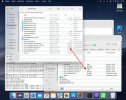
I just noticed that the CSV file "Test_Timekeeper_komma.csv" was empty (see screenshot).
It can only happen when copying, because in Finder has a size of 191 bytes and in iPhone 0 bytes.
 

Attachments

  • Bildschirmfoto 2021-12-28 um 09.42.14.jpg
    Bildschirmfoto 2021-12-28 um 09.42.14.jpg
    156.5 KB · Views: 259
Upvote 0
Top